Social engineering training for employees works when it's continuous, not annual. A large 2026 benchmark found susceptibility fell from 33.2% before training to 4.2% after one year of ongoing training, a 79% reduction.
Annual awareness courses still dominate because they're easy to schedule and easy to prove to auditors, but they leave a dangerous gap between attendance and actual resistance. People forget fast, attackers change faster, and the job is to build habits that hold up under pressure.
Why Traditional Security Training Keeps Failing
A training program can look successful and still leave the business exposed. Completion rates rise, quiz scores look clean, and the next convincing lure still gets a click or a call back.
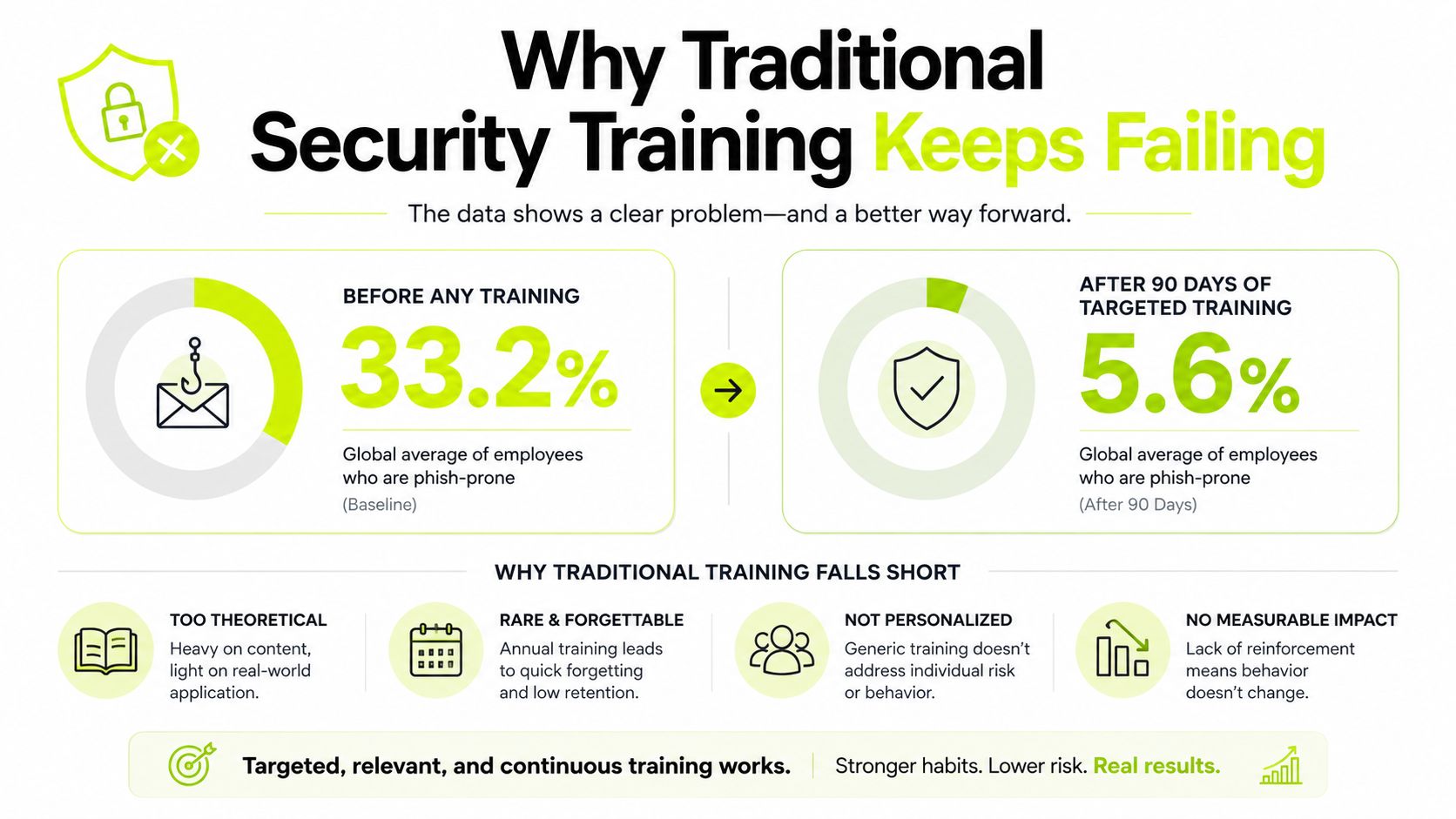
The benchmark numbers make that gap hard to ignore. Before any training, the global average phish-prone percentage was 33.2%, dropping to 4.2% after one year of ongoing training, according to KnowBe4's 2026 phishing susceptibility benchmark. The 2025 benchmark showed the same pattern in slightly different numbers, from 33.1% to 4.1% after 12 months, with the largest gains arriving after the first quarter (Hoxhunt's 2025 phishing training benchmark).
Annual completion creates false confidence
One annual course teaches vocabulary. It does not train judgment. People can recognize the term phishing and still respond to a well-timed request from a familiar-looking sender, a phone call that sounds urgent, or a QR code that feels routine.
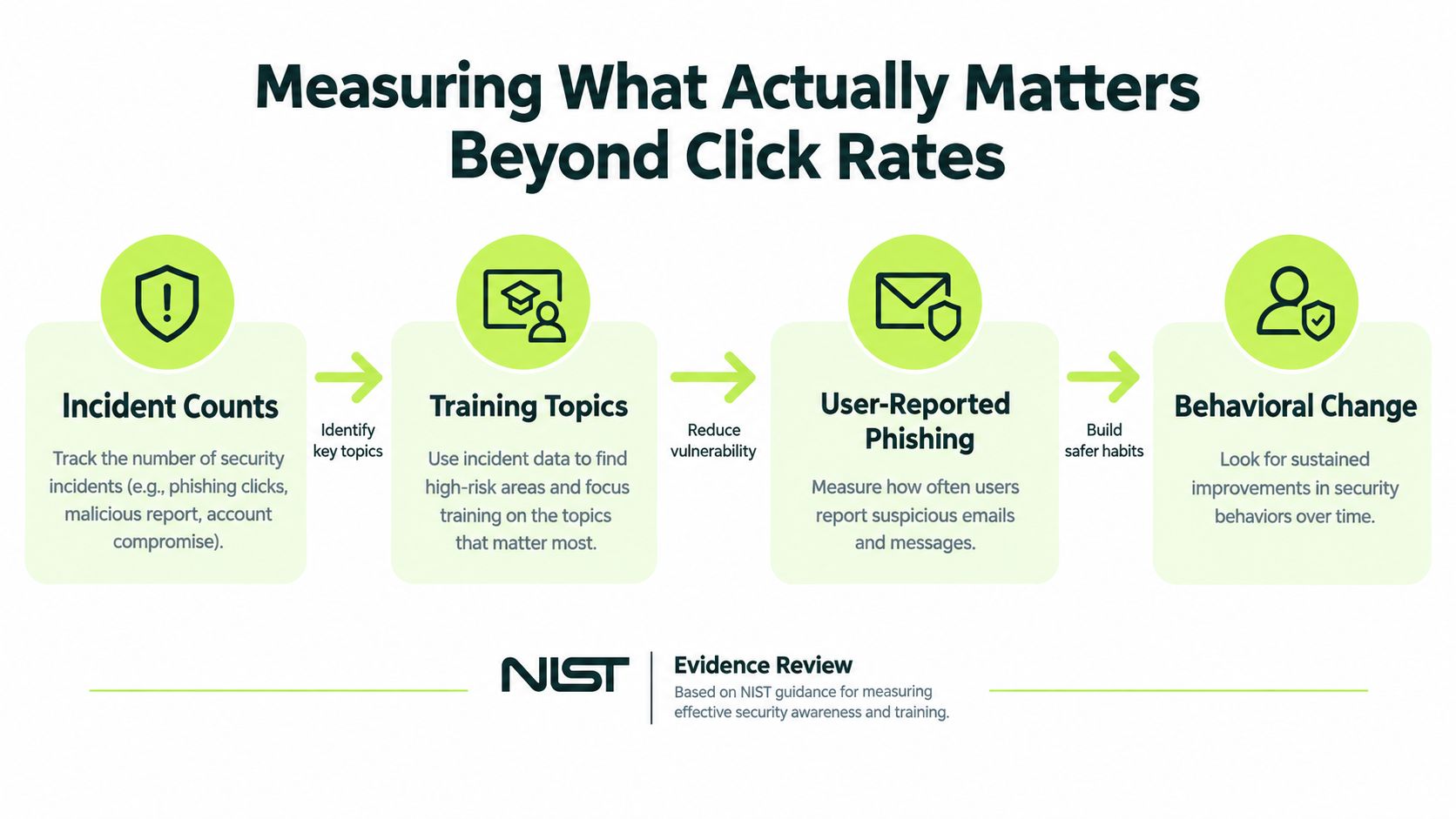
NIST treats awareness as a continuous control loop, not a box to check once a year (NIST review). That review points to a broader measurement set, including incident counts tied to training topics, user-reported incidents, simulation click rates, engagement with awareness material, and stakeholder feedback. Completion alone only shows that someone sat through the module.
Practical rule: if the program ends when the slide deck ends, the behavior change probably did too.
Retention decays, so training has to repeat
Security habits fade when the reminder arrives once a year. The 90-day and one-year benchmark results matter because they reflect repeated exposure, coaching, and retesting, not a single lecture.
The better model starts with a short baseline simulation, then follows with recurring campaigns, immediate coaching, and another test later. That moves a program away from compliance theater and toward actual defense. It also makes audit evidence more honest, because the records show behavior over time rather than one attendance log.
Email-only training also misses the way employees are approached under pressure across channels. For a useful primer on the broader attack pattern, see social engineering attack patterns.
Building a Curriculum That Fits Real Workflows
A workable curriculum fits into the workday instead of competing with it. Short lessons, realistic examples, and a structure that matches how people get tricked matter more than a neat slide deck.
The core paths are straightforward: security foundations, threat defense, privacy and compliance, remote and physical security, role-based topics, and modern work challenges. Each path should answer a question employees can use right away, such as how to verify a request, when to escalate, or what to do when a message arrives by text instead of email.
Design for the workflow, not the classroom
Four-minute microlessons work because they reduce context switching. People can finish them inside the flow of work, then use the lesson before the next suspicious message arrives.
Use interactive prompts, not passive reading. A short lesson should ask the learner to spot the red flag, choose the right response, and see immediate feedback. That turns the lesson into a memory cue instead of content that gets ignored.
Cover the channels attackers use most
Email-only training is outdated. Employees also need practice with SMS phishing, voice cloning, deepfakes, and QR-code attacks, because attackers do not stay inside a mail client. Identity checks should move to a separate channel when something feels off, since the original channel may be under attack.
Role segmentation makes the curriculum sharper. Finance teams need invoice fraud and payment verification. IT admins need credential-reset scams and help-desk impersonation. Executives need deepfake and authority-bypass scenarios, because the request often looks normal while the pressure they face daily is different.
Good training doesn't try to make everyone expert at everything. It trains each group against the pressure they face daily.
For a role-aware model that fits this approach, role-based training guidance is the right place to start. In practice, that means assigning different modules and simulations by department, not sending the same generic package to the whole company.
Designing Phishing Simulations That Change Behavior
Simulations work when they teach. They fail when they embarrass people, repeat stale lures, or punish the wrong behavior. The goal is to build reflexes, not anxiety.
A good simulation starts with a realistic scenario and ends with immediate feedback. If someone clicks, the follow-up should explain what was missed, why it mattered, and what the safer response should have been. Waiting days or weeks to send a generic warning email wastes the moment when the lesson is strongest.
Make the scenario fit the audience
Finance should not get the same lure as engineering. HR should not see the same pretext as IT. Attackers tailor their stories, so your simulations need to do the same.
That also means rotating the formats. An employee who only sees email tests will not build resistance to a text message requesting a quick callback, a voicemail asking for a code, or a QR code in a shared space. The channel matters because the social pressure changes by channel.
Avoid stale repetition
Static repetition can backfire. A 2025 study reported in 2026 coverage linked repeated static training to an 18.5% increase in failure rates (Adaptive Security coverage). That's a strong warning against sending the same template over and over until employees start pattern-matching the test instead of learning the behavior.
Use variation instead. Change the pretext, the sender identity, the timing, and the channel. Keep the tone realistic, but don't rely on shame. People learn faster when the simulation feels close to real work and the follow-up feels like coaching.
Immediate coaching is the turning point. The click is not the failure, the absence of reflection is.
If you want the program to stay relevant, build scenarios that can change as the threat environment changes. AI-generated lures and role-specific deception don't belong in a generic annual deck. They belong in the simulation cadence itself.
Measuring What Matters Beyond Click Rates
Completion rates and click rates are easy to report, which is why teams overuse them. They are also incomplete. A serious social engineering training for employees program needs a broader measurement set that shows whether people detect, report, and escalate threats.
The most useful signals are the ones closest to real defense. Track incident counts tied to training topics, user-reported incidents, phishing simulation click rates, engagement with awareness materials, and stakeholder feedback. Completion rates and click rates still help, but they do not show whether behavior changed.
Track behavior, not just attendance
Reporting speed matters because faster escalation limits damage. Reporting volume matters because it shows whether employees are willing to speak up. Credential submission matters because clicking and then typing credentials is a much deeper failure than a mistaken tap.
A practical measurement framework starts with a pre-training baseline. Segment by role or department. Run recurring simulations across channels. Add immediate coaching after failures. Re-test on a schedule. Correlate the results with real incident reporting and audit evidence.
That sequence gives you trend data instead of vanity data. It also shows leadership which teams improve and which teams need more targeted intervention.
Look for resilience, not perfection
No workforce becomes flawless. The key question is whether people improve the behaviors that matter. A lower click rate helps, but it is only one slice of the picture.
The stronger question is whether employees report sooner, hesitate less, and escalate suspicious requests through the right channel. Those habits predict real-world defense. They also make board reporting more credible, because you are showing operational change instead of only training activity.
Choosing Between Traditional Portals and Native Platform Training
Traditional portals can satisfy a compliance checklist, but they often create friction that lowers engagement. Employees forget passwords, tab away from lessons, and treat the whole process as a separate task instead of part of the workday.
Native delivery removes a lot of that drag. When training lives where people already work, it's easier to complete, easier to reinforce, and easier to document. That matters most for distributed teams, where every extra login is another chance to postpone the lesson.
A practical comparison
| Factor | Traditional external portal | Native platform delivery |
|---|---|---|
| Setup effort | Separate logins and onboarding | Fits existing workspace habits |
| Ongoing overhead | Manual reminders and evidence gathering | Automated assignment and reporting |
| Learner friction | Context switching, password resets | Short lessons inside the daily workflow |
| Engagement profile | Better for long, scheduled modules | Better for recurring microlearning |
| Compliance readiness | Can require manual export and mapping | Can sync evidence into audit workflows |
Native delivery isn't magic, and it won't fix a weak curriculum. But it does reduce the operational friction that makes programs stall after launch. That's especially useful when security, HR, and compliance teams all need the same evidence without three different admin processes.
Where Slack-native training fits
Slack-native microlearning works well for cloud-first organizations because it keeps the lesson where the conversation already lives. Short refreshers, instant phishing coaching, and workflow-based reminders are easier to sustain than quarterly portal logins that people avoid.
Vigil Security is one option in this category. It delivers interactive lessons inside Slack, includes recurring microlearning, phishing simulations, and evidence synchronization for audit-ready records, which fits teams that want training embedded in the workflow rather than added on top of it.
The right choice depends on your operating model. If you have a distributed team, a heavy compliance burden, and a need for continuous behavior change, the delivery layer matters as much as the content.
Your 90-Day Deployment Roadmap
CIRA's benchmark is useful because it shows what short, workflow-friendly delivery can accomplish. In that report, 79% of users completed training the same day it was assigned (CIRA's phishing and cyber-training benchmark). That doesn't mean every team will hit the same number, but it does prove that rapid assignment-to-completion is realistic when the format is light enough to fit into the day.
A 90-day rollout should feel controlled, not heroic. The point is to establish a baseline, launch targeted content, and build enough repetition to see behavior shift before the quarter ends.
Days 1 to 14, baseline and setup
Start with the baseline. Run an initial simulation, note the click, report, and credential-submission patterns, and segment the results by role. That gives you the map before you change the terrain.
This is also the time to define the admin model. Who assigns content, who reviews results, and who owns follow-up coaching? If that isn't clear, the program will slow down before the first refresh hits inboxes.
Days 15 to 42, curriculum launch
Launch the first wave of microlearning. Keep the lessons short and close to daily work, especially for roles that handle money, data, or privileged access. Use the curriculum paths that match the actual threat profile, not the most convenient content library.
A useful mistake to avoid here is overbuilding. Teams often spend too long perfecting the content and too little time getting the first behavior change. A simple, repeatable lesson stream is better than a polished pilot that never scales.
Days 43 to 70, simulations and coaching
Now the simulations need to start varying. Include different channels, different pretexts, and different departments. Pair each miss with immediate coaching, and watch for repeat offenders or teams that need more support.
For programs that handle PII or sensitive records, the training should also reinforce verification habits around data handling and request validation. PII training guidance is a useful companion if your employees are likely to make identity or disclosure mistakes under pressure.
Days 71 to 90, reporting and refinement
Use the last stretch to compare the new data with the baseline. Look for changes in reporting speed, reporting volume, and repeat failures. Then turn those findings into a report that a security leader, a compliance lead, and an executive can all understand.
Don't measure only completion. That's the trap. Measure whether people are getting faster at recognizing suspicious requests, more willing to report them, and less likely to make the same mistake twice.
If the first quarter ends with better reporting and fewer repeat failures, the program is working even before the year-end audit arrives.
Vigil Security helps teams run social engineering training for employees inside Slack, with short lessons, phishing simulations, and audit-ready evidence built into the workflow. If you want to replace annual checkbox training with a continuous program that fits distributed teams, visit Vigil Security and see how it supports behavior change without adding portal friction.