A 62% share of breaches involving human action changes the conversation fast, because social engineering isn't just an email problem, it's a people-and-process problem that attackers keep replaying across every channel they can reach, from inboxes to phone calls and collaboration apps (Verizon DBIR analysis summarized here). If the first defense is still “don't click,” the first failure is already built in. Real protection means making suspicious requests harder to act on, easier to verify, and quick to report before a rushed reply turns into access, fraud, or data loss.
Why Social Engineering Still Works and What Protection Really Means
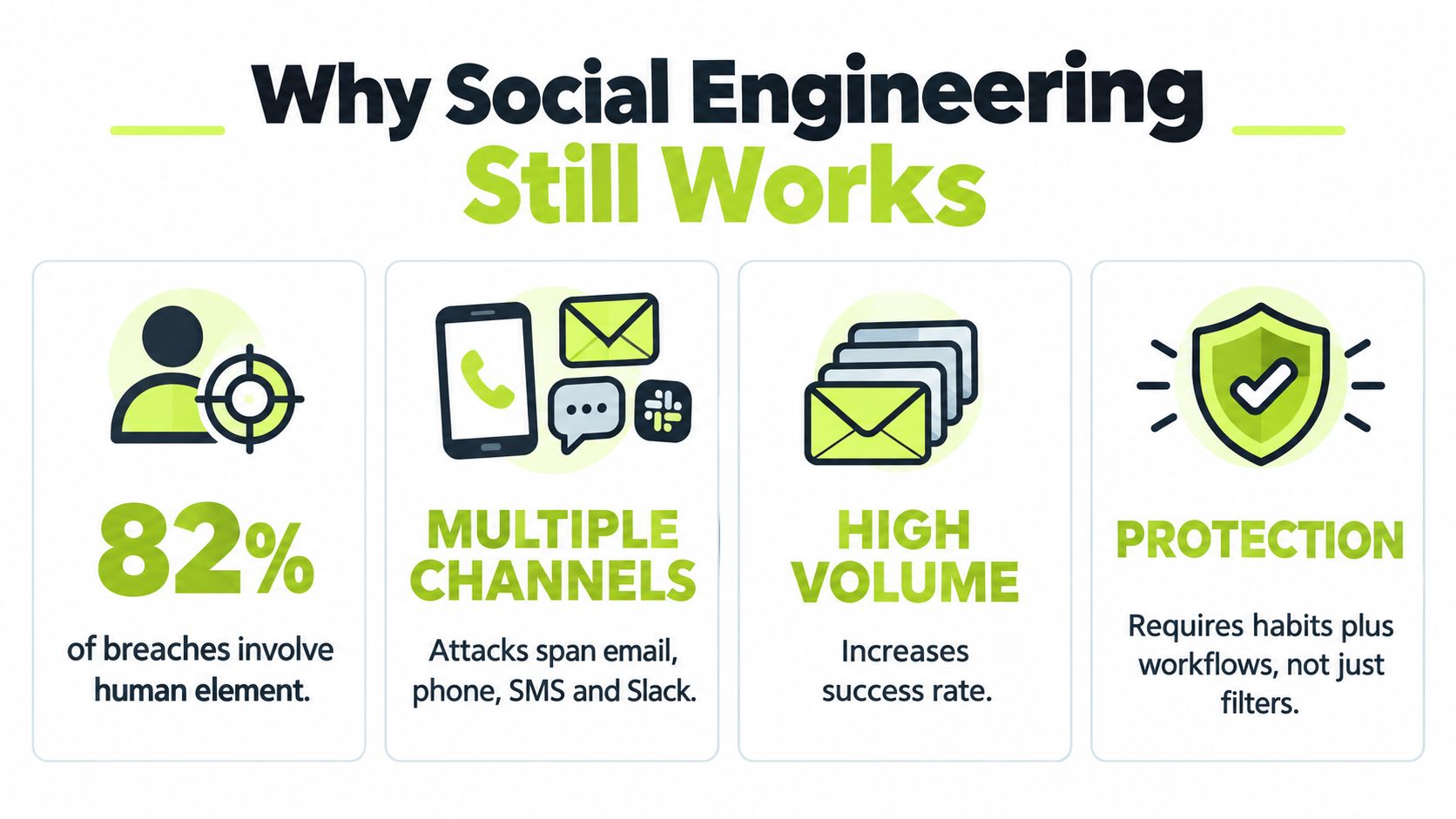
Social engineering keeps working because it targets human behavior under pressure. Attackers do not need perfect malware when they can get someone to confirm a login, approve a transfer, or forward a document from a trusted account. Recent breach analysis shows that human action still sits at the center of many incidents, and social engineering remains a repeatable way to turn that pressure into access, fraud, or data loss (analysis summary).
Email is only one path. Analysts at Verizon noted that a large share of social-engineering cases use non-email vectors such as phone calls and social media (analysis summary). That matters because a lot of “how to protect against social engineering attacks” guidance still stops at checking links and sender names. Those habits help, but they do not solve the harder problem, verifying an urgent request when it arrives in Slack, by text, or on a voice call.
Protection means friction, verification, and backup controls.
The right model has three layers. First, train people to slow down and verify. Second, build workflows that force risky requests through a second channel or approval path. Third, use technical controls like phishing-resistant MFA, least privilege, and account recovery steps so one mistake does not become a breach. That mix matters because awareness alone does not stop attacks, especially in distributed teams where requests move quickly and context switches are constant.
One practical rule holds up across channels. If a request is urgent, financial, identity-related, or access-related, treat it as untrusted until you verify it through a separate channel.
The point is not a poster or a yearly module. Continuous microlearning, phishing-resistant MFA, and multi-channel verification workflows change behavior in ways annual training rarely does. They make the safe action the easy one, and they reduce the chance that a single rushed reply turns into an incident.
Building Prevention Controls That Slow Down Risky Actions
The best prevention controls don't try to spot every lie. They slow down the actions that matter most, so a rushed message can't instantly become a payment, credential reset, or privileged change. That's why the strongest programs focus on workflow design before they focus on awareness slogans. If people can approve sensitive requests in the same channel where the request arrived, attackers only need one convincing message.
Start with verification workflows, not just reminders
Any request that changes money, access, or identity should move through a second channel verification step. If finance gets a Slack DM asking to change bank details, the responder should confirm the request over a known phone number or an established ticketing path, not by replying in the same thread. If someone claims to be an executive on a voice call, the team should use a pre-approved callback routine or another trusted contact path before acting.
Build friction where the risk is highest
Keep the process short, but make it deliberate. The point is not to bury people in approvals, it's to stop irreversible actions from happening at conversational speed.
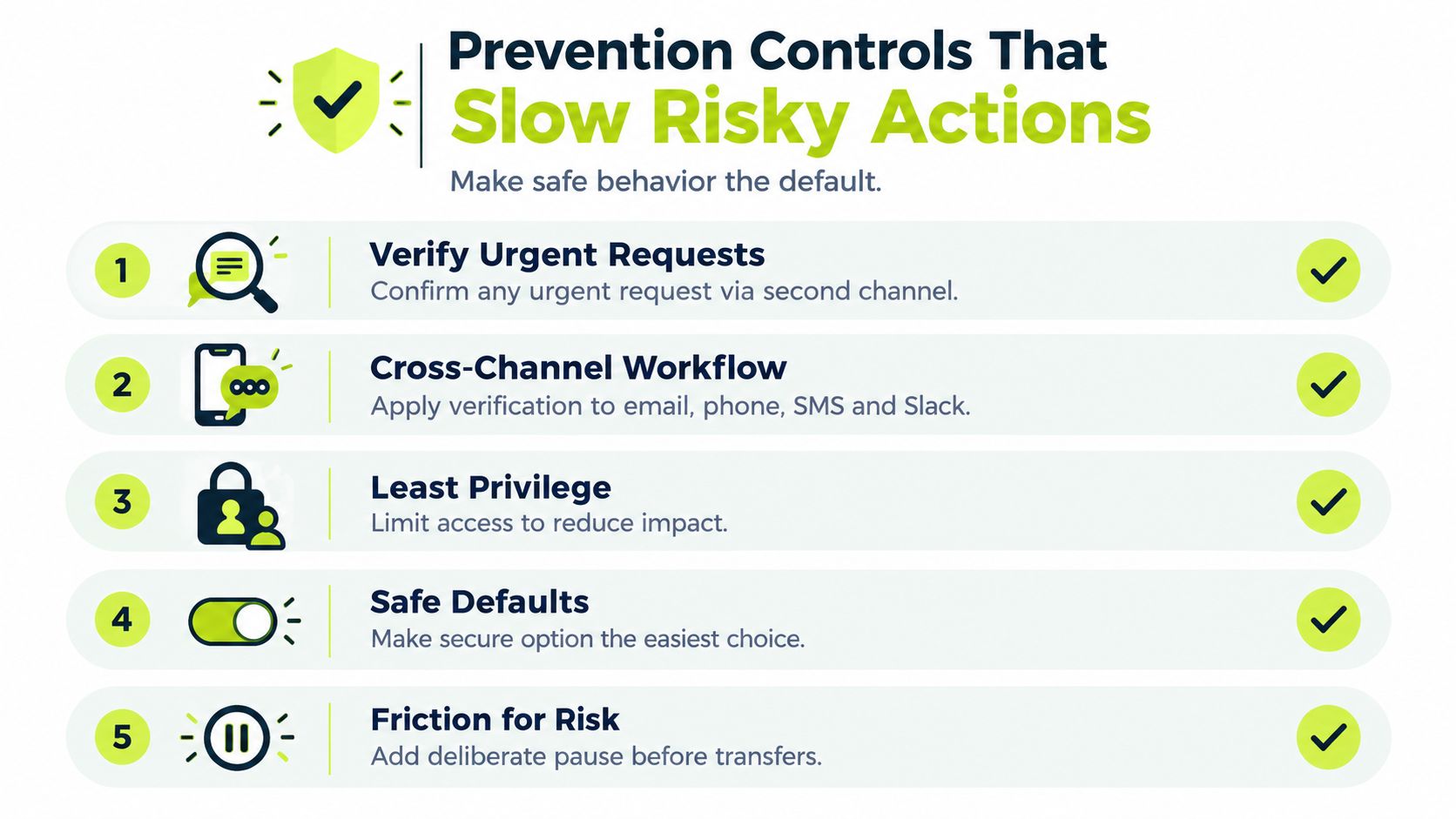
- Verify urgent requests: Confirm any sudden request for payment, credentials, file sharing, or admin changes through a second channel.
- Apply cross-channel rules: Use the same verification standard for email, phone, SMS, and Slack, because attackers don't stay in one lane.
- Limit blast radius: Use least privilege so a stolen account can't reach everything.
- Set safe defaults: Make secure options the easiest ones to choose.
- Pause before transfer: Add a deliberate stop before wires, gift cards, password resets, or role changes.
A simple policy document won't do that on its own. You need service desk scripts, finance approval steps, and role-based access rules that all point people toward the same behavior. When the workflow is consistent, people don't have to improvise under pressure.
Useful shortcut: If a request would be embarrassing to reverse later, give it a verification step now.
Running Training and Phishing Simulations That Change Behavior
Annual awareness modules are convenient for audits and weak for behavior. A randomized controlled study of more than 19,000 employees found no significant relationship between recent completion of general awareness training and phishing-simulation failure, while embedded training produced only about a 2 percentage-point reduction in average failure rate. The same dataset showed 56% of users failed at least one simulation and 25.9% failed at least two (study). That's why completion rates can look good while actual risk stays stubbornly high.
Replace annual modules with microlearning
Short, repeated lessons work better than one long annual event because the attack environment is repetitive. The APWG's Q1 2026 report recorded 971,181 phishing attacks, up 13.8% from 853,244 in Q4 2025 (report). If attackers keep the pressure on, training has to keep pace. The practical answer is frequent refreshers, brief scenario drills, and coaching that lands in the same place work already happens.
For teams that live in Slack, that can mean a Slack-native delivery model. Vigil Security is one example of a tool that runs short lessons, simulations, and reminders inside Slack instead of pushing everyone to a separate portal. The format matters more than the brand name, because the learner should see the prompt in the same workflow where risky requests show up.
Make simulations realistic and feedback immediate
Use multiple lures, not just one email template. Test email, SMS-style messages, and collaboration app scenarios. The goal is to see whether people can spot urgency, impersonation, and odd requests before they react. After a failure, don't send a generic scolding email. Trigger instant coaching in the workflow, then move repeat clickers and high-risk roles into tighter remediation.
A good operating rhythm looks like this:
- Baseline the behavior: Measure click rate, report rate, and repeat-failure patterns before changing the program.
- Run short simulations regularly: Keep them realistic and varied.
- Coach immediately after failure: Correct the behavior while the scenario is fresh.
- Segment the audience: Give privileged users, finance, and admins more targeted practice.
- Track comprehension, not just completion: Passing a module doesn't prove behavior changed.
Phishing simulation training guidance is most useful when it reinforces what people do in live workflows, not when it becomes a box-checking exercise.
Strengthening Technical Mitigations Behind the Human Layer
Technical controls do not replace judgment. They reduce the blast radius when someone misses a fake request or approves the wrong login. Phishing-resistant MFA does the most work here, because stolen passwords become far less useful and attackers cannot easily replay captured credentials through a malicious login flow. CISA recommends FIDO or PKI-based MFA, making MFA opt-out instead of opt-in, and prompting enrollment until it is enabled (CISA guidance). Microsoft also reported a 146% rise in adversary-in-the-middle phishing attacks, which shows that attackers are targeting the MFA step itself, not just the password.
Choose controls by what they stop
| Control | What It Stops | Best For | Implementation Note |
|---|---|---|---|
| Phishing-resistant MFA | Credential replay and MFA interception | Admins, finance, executives, internet-facing apps | Start with privileged accounts, then move outward |
| Email filtering | Common spam and known malicious messages | Broad user base | Useful, but not enough by itself |
| Browser isolation | Drive-by web abuse and risky link handling | High-risk browsing workflows | Good for teams that open lots of untrusted links |
| Device controls | Stolen sessions and unmanaged endpoints | Mixed-device environments | Pair with access policies, not as a standalone fix |
| Reporting workflows | Slow attacker dwell time | All users | Make reporting faster than forwarding or ignoring |
The rollout should follow risk, not convenience. Start with inventory, then find every internet-facing account and move privileged and admin accounts first. Replace SMS or push-based MFA where possible, because those methods are easier to abuse than phishing-resistant factors. Then extend the rollout to systems where a compromised login would cause the most damage.
Browser isolation and device controls help in a different way. They reduce exposure when people open untrusted links, work from personal devices, or handle requests across Slack, email, and mobile devices in the same day. That matters for distributed teams, where a clean separation between channels rarely exists.
The trade-off is straightforward. Phishing-resistant MFA takes more work to deploy than an SMS prompt, but it gives much stronger resistance to social engineering. Filtering tools still matter, but they are backstops, not the strategy. Continuous microlearning and phishing-resistant MFA do more to change behavior than annual training that people click through once and forget.
Handling Suspected Attacks With a Clear Response Playbook
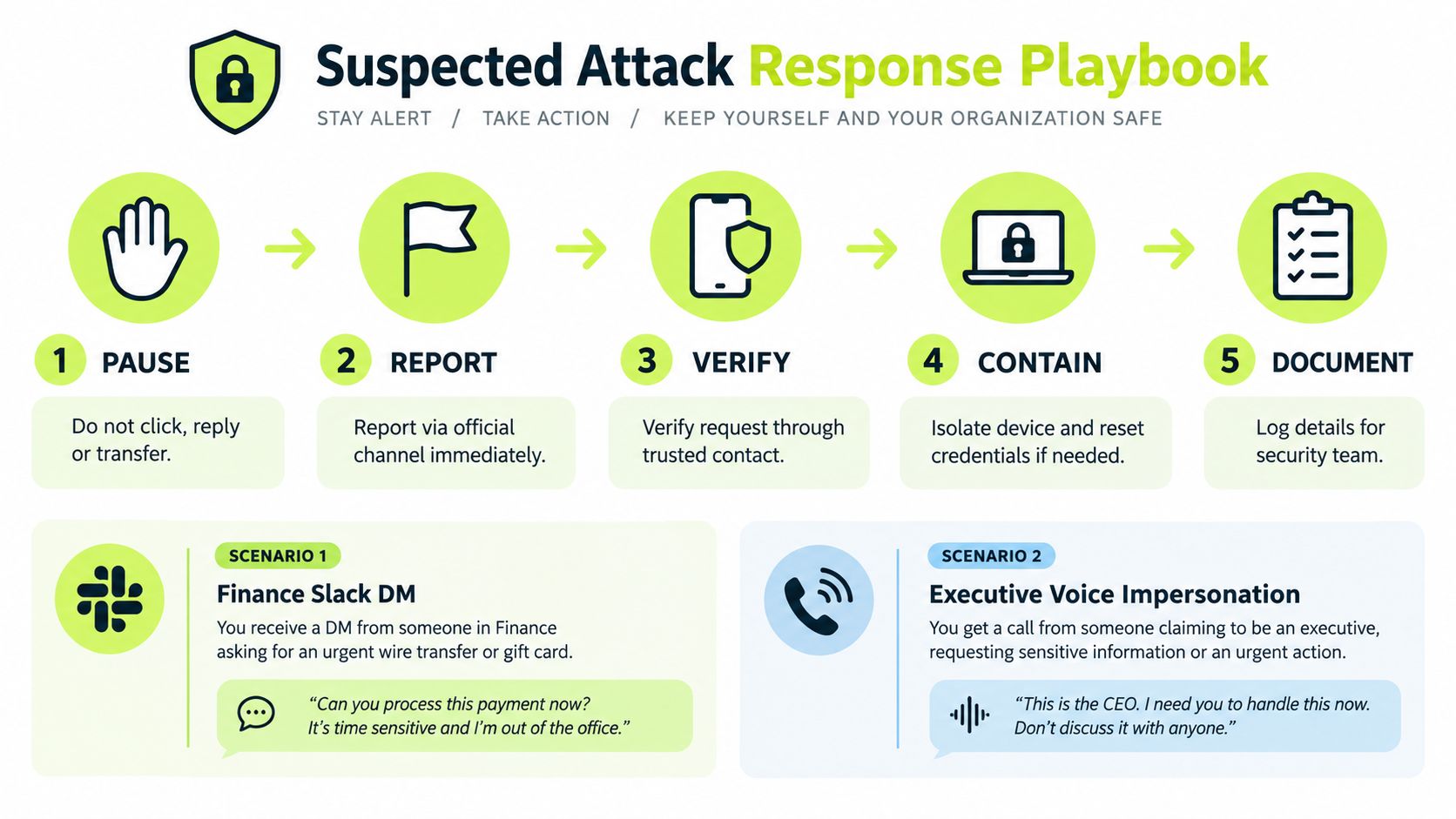
The first minutes matter more than the perfect detection. If someone receives a suspicious Slack DM from finance, the right move is not to debate it in the thread. It's to pause, report, and verify through a trusted path. The same rule applies when an executive voice clone asks for a rushed exception, because attackers count on people acting before they check.
Use the same playbook across channels
A suspicious email, text, phone call, or collaboration app message should trigger the same response:
- Pause: Don't click, reply, transfer, or share credentials.
- Report: Use the official reporting channel immediately.
- Verify: Confirm the request through a trusted contact path.
- Contain: If anything was clicked or entered, isolate the device and reset credentials as needed.
- Document: Capture the message details for the security team.
That sequence keeps the response simple enough for pressure situations. If people need to remember five different paths, they'll hesitate. If they remember one rule, they act faster.
The best response templates avoid blame. People report sooner when the process treats suspicion as normal instead of embarrassing.
For responders, the lightweight runbook is straightforward. Preserve the evidence, check whether the request reached anyone else, look for similar messages, and confirm whether the target account, device, or workflow needs extra containment. If you're building this into a company-wide process, the internal guidance in insider threat awareness can help frame why rapid reporting matters even when the sender looks familiar.
The outcome you want is boring in the best way. The employee reports fast, the security team validates quickly, and the business keeps moving without turning every suspicious message into a crisis.
Keeping Your Program Effective Over Time
A social engineering program decays when it's managed like a project instead of an operating rhythm. The metrics that matter are the ones tied to behavior, not vanity. Track report rate, time to report, repeat clicker rate, and MFA coverage, then review them on a schedule that security, IT, and People Ops all understand.
Keep ownership distributed
Security should own the scenarios and the response playbook. IT should own the access controls and MFA rollout. People Ops should help with policy reinforcement and onboarding habits. When those responsibilities stay separated, programs drift. When they're coordinated, people hear the same message from the tools, the policy, and their managers.
Refresh content as the threat shifts
Attackers keep changing channels, so the content has to stay current. Use simulation results to update scenarios, especially when new lures start showing up in messaging apps, phone calls, or file-sharing workflows. For teams handling sensitive data, the internal guidance in personally identifiable information training can help keep the privacy side of the program aligned with the social engineering side.
Operational truth: If people only see security content during annual review season, they'll treat it like paperwork. If they see it inside work, they'll treat it like part of the job.
The goal isn't perfection. It's a program that catches up with attackers fast enough to matter, proves coverage when auditors ask, and keeps employees ready to verify instead of react.
If you want a Slack-native way to keep phishing simulations, microlearning, and audit-ready records moving together, visit Vigil Security and see how short, recurring lessons can fit into the same workflows where social engineering risk shows up. It's a practical fit for distributed teams that need continuous behavior change, not just annual completion.