Least privilege access means every user, app, and service gets only the minimum access needed for its task and nothing more, for the shortest time needed. In practice, that matters because 75% of security failures were projected to stem from inadequate identity, access, and privilege management by 2023, and real-world permission sprawl is common, with 90% of granted permissions not used and more than 98% of permissions for non-human identities unused for at least 90 days in one industry report. The Zero Trust vs least privilege analysis captures why this keeps showing up in modern security conversations.
A new contractor joins your Slack, gets added to a shared drive, and receives admin access “just for this project.” Three months later, the project is over, but the access is still there because no one owns the cleanup. That's the everyday shape of the problem, and it's exactly why teams keep asking what is least privilege access when the issue is usually not the definition, but the drift.
Introduction to Least Privilege in Modern Work
A marketing lead asks for a temporary export permission, an engineer needs a production fix, and a vendor wants access to one tool. Each request sounds reasonable on its own, so teams say yes and move on. The trouble starts when those one-time approvals stay active long after the task ends.
Cloud-first companies feel this faster than older perimeter-based shops. Work now spans SaaS apps, short-lived contractors, remote endpoints, service accounts, and automation that runs in the background. That creates a simple but uncomfortable truth: access expands unless someone keeps narrowing it.
The principle of least privilege has been around for a long time. It was formally articulated in 1975 by Jerry Saltzer and Michael Schroeder, and it still matters because the idea is blunt, practical, and hard to fake. If a person or system can do its job with less access, giving it more only raises the chance of misuse, mistake, or abuse.
Practical rule: if you can't explain why someone needs a permission today, it probably shouldn't still be there tomorrow.
That's why least privilege is more than a security slogan. It's a way to manage access in a distributed company where Slack messages, cloud consoles, and automation scripts all create new edges of trust. Security, IT, compliance, and engineering all touch the same problem, even if they describe it differently.
Understanding the Core Concept of Least Privilege
A hotel key card opens one room, maybe the gym, and the lobby path your stay requires. At checkout, it stops working. Least privilege should behave the same way, with access tied to a real task and removed when that task ends.
That simple rule applies to people and to machines. A payroll analyst needs payroll systems, not the CRM. A backup service needs backup rights, not editor access across every app. A deployment token should be able to ship code and then lose that power as soon as the pipeline finishes.
Every program and every privileged user of the system should operate using the least amount of privilege necessary to complete the job.
The key point is that least privilege is not a one-time permission choice. It is a continuous identity-governance model. Access should stay narrow, current, and auditable as jobs change, contractors leave, service accounts rotate, and automation moves from one workflow to another. NIST SP 800-207 describes Zero Trust as continuous, context-aware enforcement rather than a single trust decision, which fits this same logic.
That is why least privilege is more than role assignment. It also covers privilege creep, where old access stays behind after a promotion, a project switch, or a temporary exception. A user may need a permission for a short window, then need it again later under tighter terms. A service account may need a token for one automated job, then that token should expire when the job ends.
The clearest way to state it is simple. Give the smallest workable permission set, for the shortest workable time, and keep checking that the access still matches the work.
Why Excess Access Creates Real Risk
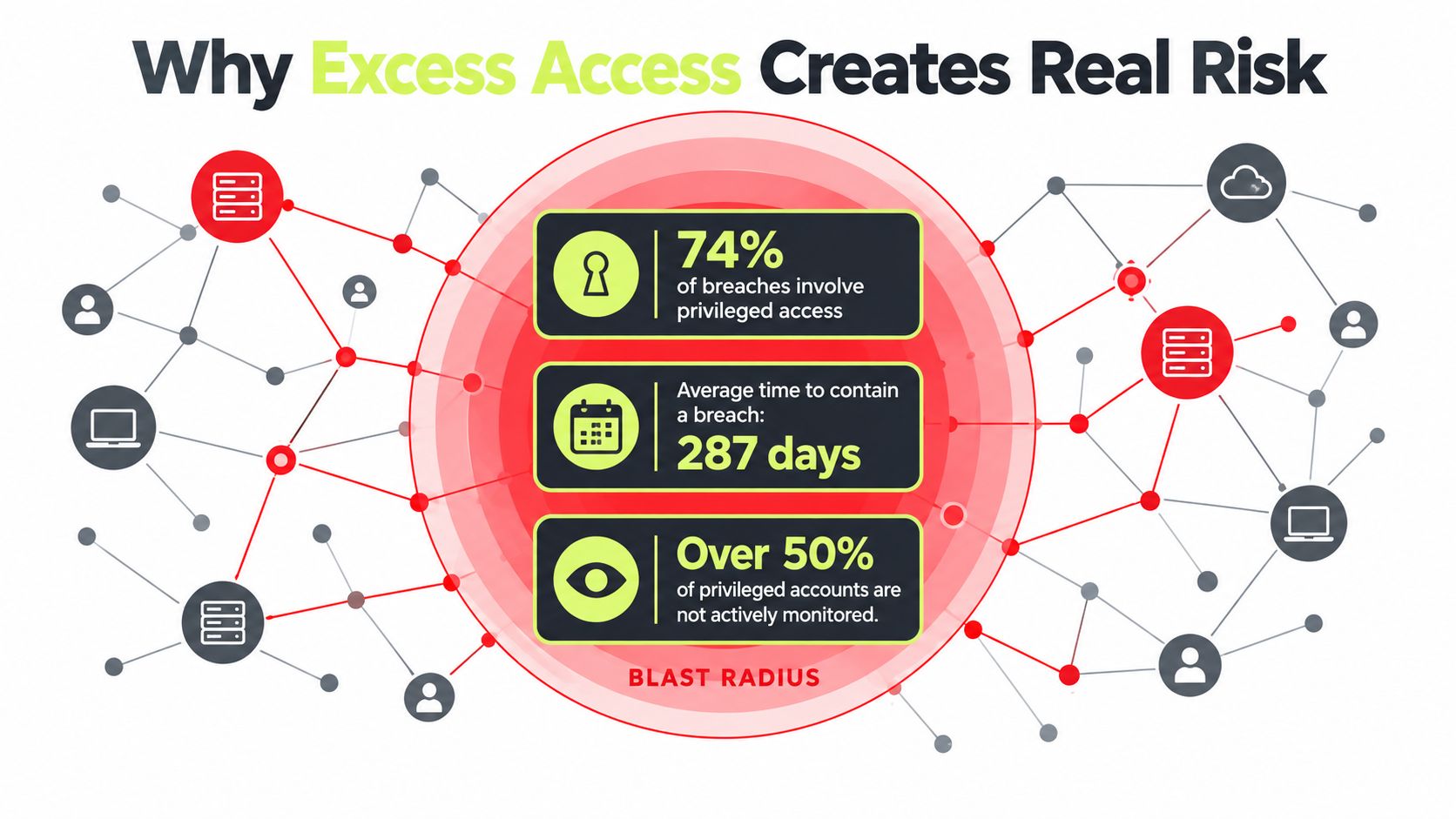
Excess access widens the blast radius when something goes wrong. If one account is compromised, the attacker can only move as far as that account can reach. Unused permissions are not harmless clutter, they are extra doors left open inside the environment.
The risk often hides in ordinary work. A person changes jobs, keeps old permissions “just in case,” and nobody revisits the old grants. That pattern feeds directly into insider threat awareness, because lingering access can be abused without anyone noticing right away.
Over-provisioning usually builds slowly through promotions, project transfers, temporary exceptions, and offboarding that never fully closes the loop. Cloud and hybrid environments make the problem broader because the identity surface includes people and non-human identities, such as service accounts, API keys, tokens, certificates, and third-party paths. This analysis of hybrid identity management is useful because it frames least privilege as ongoing governance, not a one-time cleanup.
That is also why audits become harder. If access grows faster than review, teams struggle to answer simple questions like who has access, why they have it, and when it should end. The result is more administrative work, weaker evidence, and more places for privilege creep to hide.
Video walkthrough for the risk side of the issue:
Standing privilege is convenient for a busy team and attractive to an attacker.
The business case is straightforward. Less excess access means less opportunity for lateral movement, less cleanup after incidents, and less time spent proving to auditors that old permissions no longer matter.
Key Components That Make Least Privilege Work
Least privilege is strongest when it's treated like a control stack, not a single checkbox. Identity authentication proves who is asking. Device security posture helps answer whether the request comes from a trustworthy endpoint. User-to-application segmentation limits what that identity can reach.
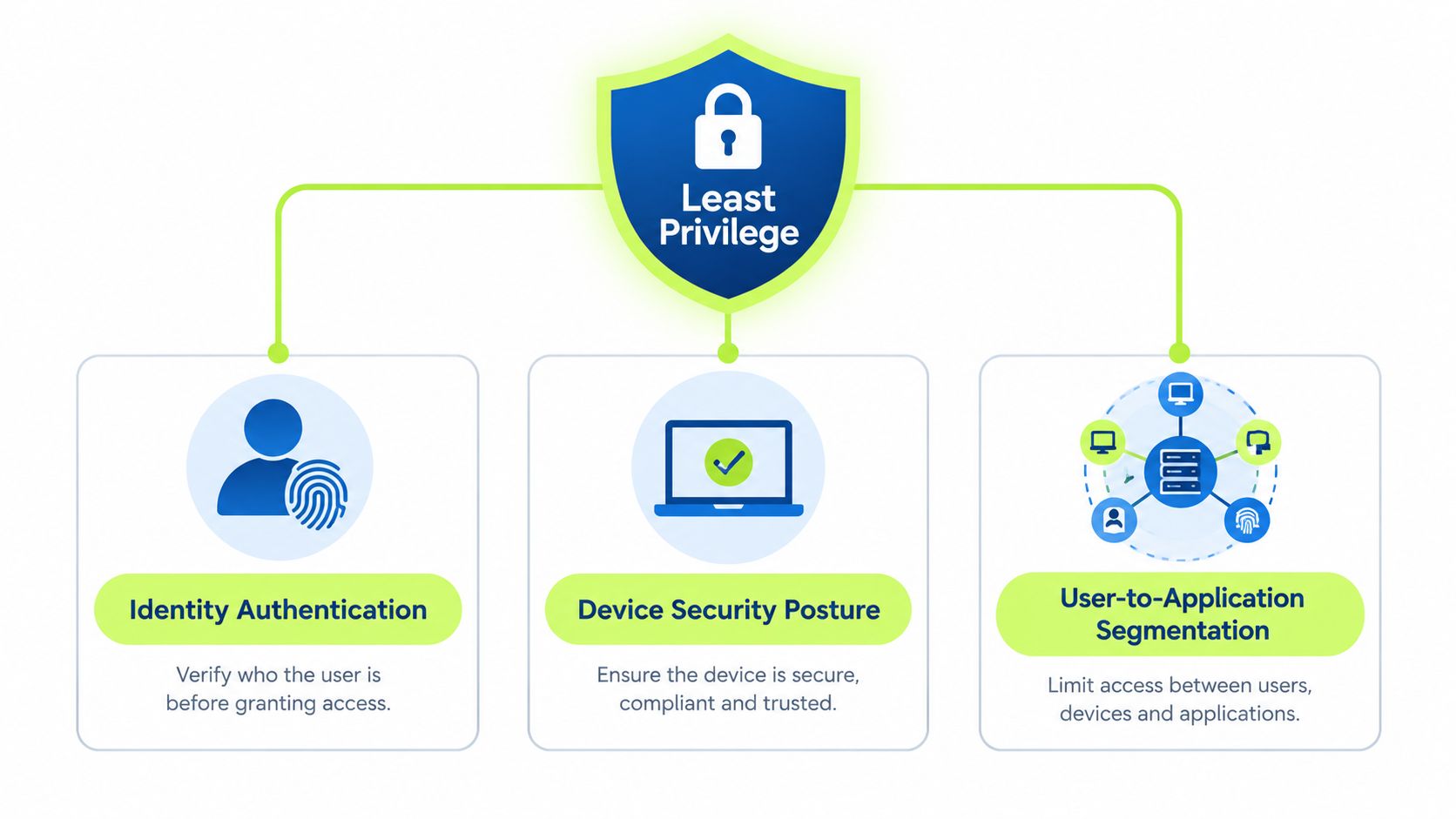
When these layers work together, access becomes narrower and more understandable. A user isn't just “allowed in” or “blocked out.” They are allowed into the smallest workable boundary across the endpoint, application, service, or cloud identity that matches the task.
The access boundary should stay small
The smallest workable boundary is the right way to think about permissions in modern environments. That means being careful with end users, endpoints, applications, services, and cloud identities, then removing temporary access as soon as the task ends. The point is not to make work painful, it's to keep each path as short and specific as possible.
Privileged access needs even tighter handling. Inventorying privileged accounts should include local admin credentials, application and database accounts, cloud admin access, SSH access, and vendor credentials. Short-lived access, often called privilege bracketing, keeps the privileged window narrow so the extra rights exist only long enough to finish the job. SailPoint's principle of least privilege guidance describes this inventory-and-bracketing model well.
Segmentation matters because access is not one thing
A developer might need a production read-only path, but not a database write path. A support technician might need a helpdesk tool, but not the billing console. These aren't abstract distinctions, they are the difference between controlled access and unnecessary exposure.
The same logic applies to vendor and service identities. If those accounts are treated like permanent staff accounts, the environment usually accumulates permissions that no one actively owns. Least privilege works when each identity gets a clearly bounded role and a clear expiration point.
How to Implement Least Privilege Without Breaking Workflows
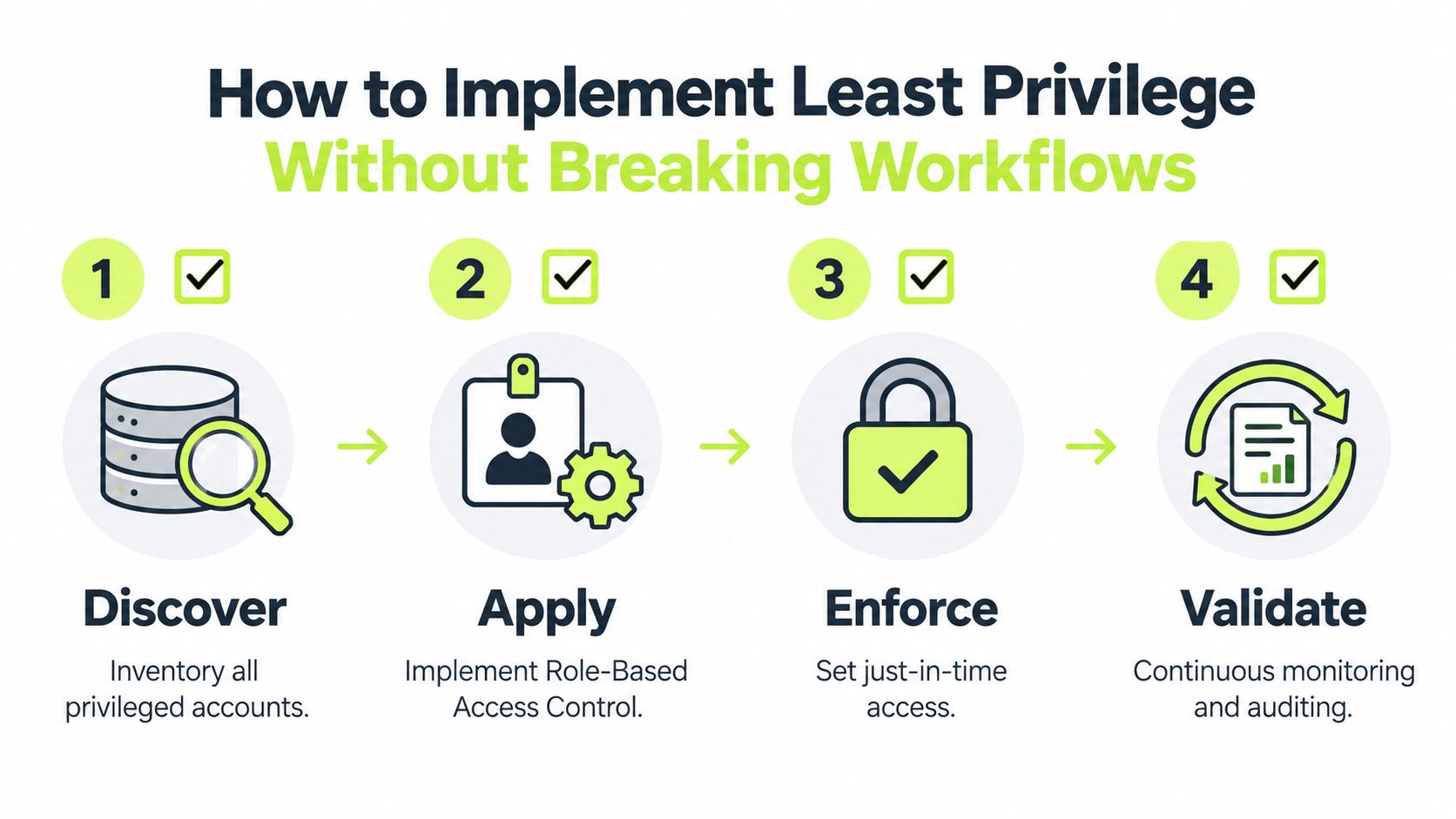
Start with discovery, not restriction. Teams often try to lock things down before they know what's in use, and that creates friction no one asked for. The first job is to inventory all privileged accounts, including the ones people forget about because they aren't human.
Then separate day-to-day access from admin access. Government guidance on administrative privileges emphasizes separate admin accounts, role-based access control, and continuously reviewing deployed applications for unused or reducible permissions. The Canadian Centre for Cyber Security guidance points in that direction, and Microsoft's review-and-revoke advice follows the same operational logic.
A practical order of operations
- Discover what exists. List privileged users, service accounts, cloud identities, vendor access, and application permissions.
- Assign the smallest workable role. Give people and systems the access they need for assigned tasks, not the broadest role that happens to work.
- Use separate admin accounts. Keep higher-rights accounts isolated so normal work and privileged work do not share the same identity.
- Replace standing privilege with just-in-time access. Grant higher access only when the task requires it, then revoke it again.
- Review and remove leftovers. Recurring permission reviews should catch unused rights before they become part of the environment.
The biggest mistake is treating this as a one-time cleanup. Access changes after promotions, project shifts, offboarding, and new integrations, so the model needs recurring enforcement. That's why automation matters, it reduces the chance that entitlements drift back into the environment after a manual review.
You can also make this easier by training the people who approve access. Lightweight, role-aware reminders help managers, IT, and security teams make better decisions without turning every request into a long committee process.
Role Aware Examples for People and Non Human Identities
A marketing contractor may need a campaign folder, a design workspace, and a reporting dashboard. They do not need billing access, production tools, or the ability to invite new users. If the project ends and the account stays active, the access no longer matches the work.
A finance analyst is different. They may need systems for approvals, reporting, and exports, but not permission to change role structures or administer the full finance stack. Good access control follows the work being done, not the job title alone.
An engineer who needs temporary production access is where teams often feel pressure. The safer pattern is a narrow, time-bound window, full visibility while it is active, and automatic removal when the fix is done.
Temporary access should feel temporary to the system, not just to the person requesting it.
Non-human identities create their own version of the problem. Service accounts, API keys, tokens, and third-party integrations can collect permissions because no manager reviews them the way a staff account is reviewed, so inventorying them has to be automated rather than remembered. In hybrid and cloud environments, that gap widens unless teams track these identities and review their permissions on a recurring basis.
If you want a simple habit, ask three questions for every identity, human or not. What does it need, when does it need it, and who checks that the need still exists? That is easier to sustain than a long list of exceptions.
For teams building role-based awareness into everyday training, Vigil Security's role-based training guidance shows how access decisions can be taught in context.
Putting Least Privilege Into Practice and Measuring Success
You know least privilege is working when access is explainable, current, and reviewable. If someone asks who has access to a sensitive system, the answer should be quick. If they ask why that access exists, there should be a clear business reason. If they ask when it should end, there should be a defined answer, not a shrug.
Annual or quarterly reviews are too slow for environments where roles and integrations change constantly. Continuous validation is a better fit because it catches drift after promotions, project changes, and offboarding before the leftover access becomes normal again. That means moving toward real-time monitoring, automated removal of unused access, and just-in-time elevation instead of standing privilege.
A useful internal checkpoint is to look at evidence, not assumptions. Can your team show that permissions were reviewed, that unnecessary access was removed, and that high-level rights were time-bound? If the evidence is hard to produce, the policy is probably weaker than it looks on paper.
The operational side matters just as much as the policy side. This risk and compliance guidance fits well with that mindset, because compliance teams need repeatable proof, not just a written standard. Lightweight training, recurring reminders, and role-aware workflows help keep least privilege from slipping into another stale policy document.
Security leaders do not need a perfect rollout to start. They need a repeatable way to discover access, narrow it, validate it, and prove it stays narrow.
Vigil Security helps distributed teams teach access discipline in Slack with short, role-aware lessons and audit-ready evidence. If you're tightening permissions, reviewing privileged access, or trying to make least privilege stick in everyday work, visit Vigil Security to see how Slack-native training can support that process.