You're probably reading this in the middle of a normal workday. Slack is open. Email is open. Your phone is nearby. A message comes in that looks routine: “Need this approved today.” Or “IT needs you to verify your login.” Or “Can you quickly send that file before the meeting?”
Nothing about that moment feels like a cyberattack.
That's why a social engineering attack is so effective. It doesn't begin by breaking a firewall. It begins by stepping into a human workflow and trying to redirect it. The attacker wants you to click, approve, reply, forward, reset, transfer, or trust.
For a lot of people, social engineering still means phishing emails. That's part of it, but it's too narrow. A modern attacker might call the help desk, text an employee, impersonate a manager in chat, or use voice to pressure someone into bypassing a normal approval step. The tactic works because business runs on speed and trust. Employees are trained to be helpful, responsive, and efficient. Attackers know that.
AI is making this problem harder in a very specific way. It isn't just helping criminals send more messages. It's helping them make a smaller number of high-value impersonation attempts feel more believable across email, SMS, voice, and social channels.
The useful way to understand social engineering is simple: it's human hacking. This guide breaks down how it works, the common attack types, what warning signs to watch for, and what teams can do to build verification habits that hold up under pressure.
Introduction to Social Engineering Attacks
A finance employee gets an email that appears to come from a senior executive. The note is short, polite, and urgent. A payment needs to go out before the end of the day. The employee replies with a question. A follow-up arrives quickly. The tone matches the executive's usual style. A little later, the employee receives a call that seems to confirm the request.
That sequence feels ordinary because it fits how work already happens.
A social engineering attack works by blending into familiar business motions. The attacker doesn't need to “hack” a system in the way we imagine. They just need to nudge a person through a workflow that already exists: approve this invoice, reset this password, share this document, trust this caller, accept this MFA prompt.
Why people get fooled
Most victims aren't careless. They're busy.
Attackers rely on a few predictable conditions:
- Speed beats reflection: People move quickly when requests seem routine.
- Authority lowers resistance: A request from a manager, executive, vendor, or IT team gets less scrutiny.
- Context creates trust: If the message references a real project, person, or process, it feels safer.
- Helpfulness becomes a tool: Employees often want to solve problems, not slow them down.
Social engineering succeeds when normal workplace behavior is turned against the worker.
A good social engineering lure doesn't feel strange. It feels slightly urgent and completely familiar.
Why this matters beyond email
It's tempting to treat this as an inbox problem. It isn't. The attack surface includes chat apps, phone calls, SMS, internal ticketing systems, file sharing, MFA approvals, and help-desk processes. Anywhere a person can authorize something, move information, or grant access, an attacker can try to intervene.
That's why security teams increasingly talk about protecting workflows, not just messages. If a process can be redirected by a convincing person, that process needs verification built into it.
How Social Engineering Attacks Work
A social engineering attack works like a shortcut through a company process. Instead of breaking a lock, the attacker looks for a moment when a person can be persuaded to open the door for them.
That is why these attacks are better understood as workflow exploits, not just message tricks. The attacker studies how a request normally moves from one person to another, then inserts a believable nudge at the point where someone can approve, reset, share, or bypass. According to Stingrai's summary of Verizon and incident-response data, roughly 62% of breaches involved a human action such as a malicious click, a socially engineered call, or misdelivery of a file, and 36% of cases began with social engineering.
The attack chain in plain language
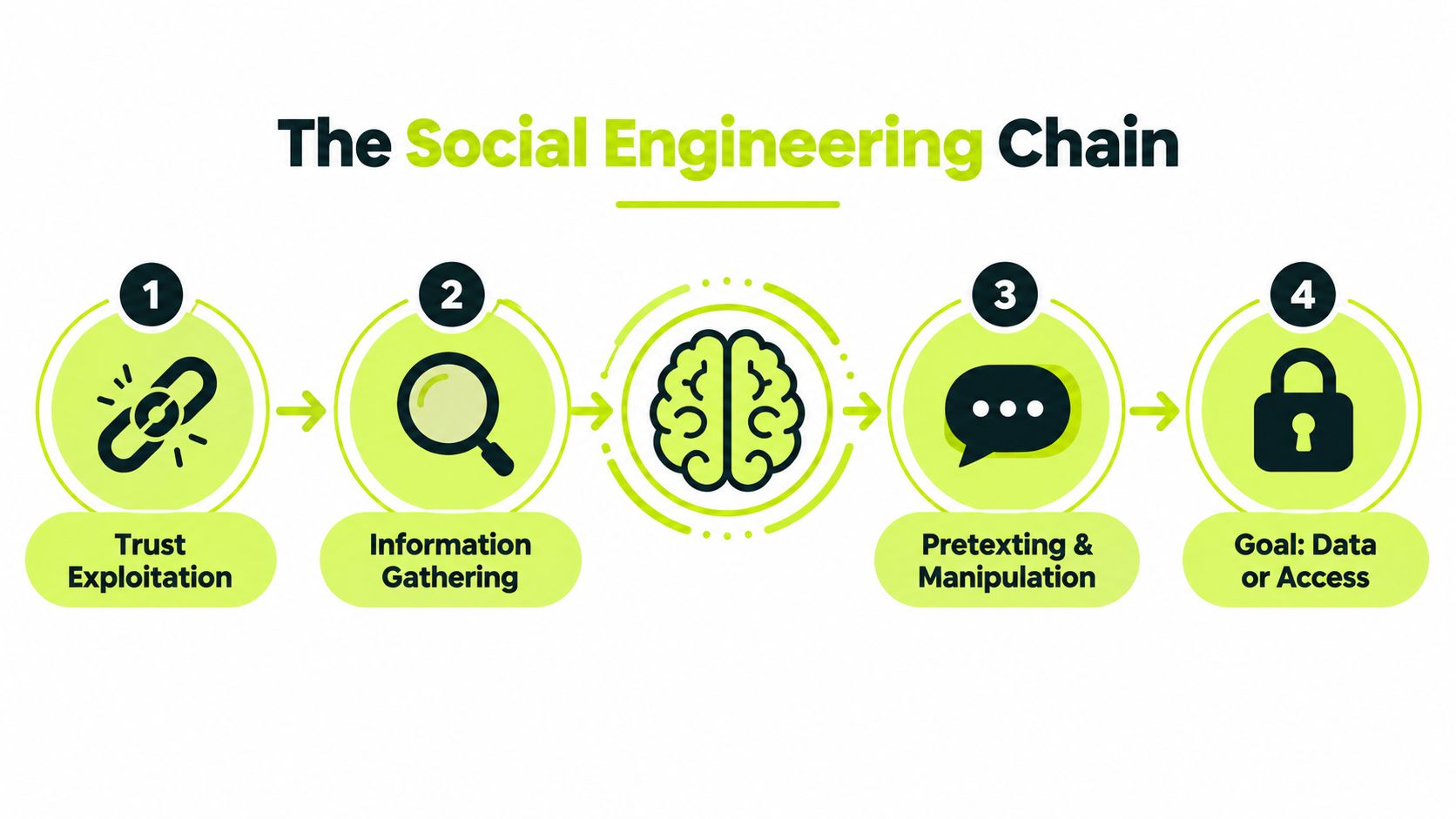
The sequence is usually simple, even when the pretext looks polished.
Map the workflow
The attacker figures out how a task gets done. Who approves invoices? Who can reset an account? Who sends MFA prompts? Which vendor names or project labels will sound familiar?Choose the insertion point
They pick the step where a small push can change the outcome. That could be a help-desk call, a payment update request, a shared document notice, or a login approval prompt.Arrive as someone who belongs there
The false identity fits the process. IT support, a manager, a supplier, a recruiter, or a coworker from another team all make sense because those roles already move requests through the company every day.Create just enough pressure
The request feels ordinary, but slightly rushed. Fix this now. approve this before a deadline. send this file so the project does not stall.Get the action that shifts control
The target clicks, replies, shares a code, updates payment details, approves access, or skips a check that would have stopped the request.
The important point is easy to miss. The attacker often does not need your password first. They need your place in the process.
The psychology behind the exploit
Security tools inspect files, links, and logins. Social engineering goes after judgment inside a routine task.
That is why smart people still get caught. The attacker is not running an intelligence test. They are staging a situation where normal work habits, like being helpful, fast, and responsive, produce the wrong result.
A few pressure points show up again and again:
- Urgency: “I need this handled in the next 10 minutes.”
- Authority: “I'm calling from the executive team.”
- Familiar context: “This is about the vendor change from yesterday's meeting.”
- Fear: “Your account will be locked if you do not verify now.”
- Reciprocity: “Can you do me a quick favor while I'm in transit?”
AI is changing the shape of this pressure. Instead of sending sloppy messages to thousands of people, attackers can now build one highly believable impersonation for one employee with access to something valuable. A well-timed voice clone, a polished writing style, or a message that matches current projects can make a single request feel routine enough to pass.
Why controls still get bypassed
Strong technical controls still matter. They just do not cover every step where a human can approve a risky action.
A spam filter may stop many bad emails, but it cannot inspect every phone conversation. MFA can block stolen passwords, but it cannot help if someone approves a prompt they did not initiate. Access controls can limit damage, but they do not stop a finance employee from changing banking details after a convincing impersonation.
One sentence helps clear up a common misunderstanding.
Practical rule: If a request tries to rush, reroute, or skip a normal verification step, the verification step is the actual target.
That is what makes social engineering so effective. The attacker is not only asking for data or access. They are trying to break the part of the workflow that would have forced a second look.
Common Types of Social Engineering Attacks
The term social engineering attack covers several tactics that look different on the surface but share the same core idea: use trust to move a person toward a risky action.
Unit 42 found that social engineering remained the top initial access vector, accounting for 36% of incidents in its incident-response caseload between May 2024 and May 2025. In those cases, 66% targeted privileged accounts, 23% used callback or voice-based techniques, and 45% relied on impersonation of internal personnel according to the Unit 42 social engineering incident-response report.
Social engineering attack types compared
| Attack Type | Primary Channel | Core Tactic |
|---|---|---|
| Phishing | Sends deceptive messages that push the target to click, open, or reply | |
| Spear phishing | Personalizes the lure to a specific person, role, or project | |
| Business email compromise | Impersonates an executive, vendor, or partner to trigger payment or data disclosure | |
| Vishing | Phone or voicemail | Uses voice pressure, authority, or live persuasion to get access or approvals |
| Callback phishing | Email plus phone | Tells the target to call a number where the attacker controls the conversation |
| Smishing | SMS | Uses text messages to create urgency around links, codes, or account actions |
| Pretexting | Any channel | Builds a believable story to justify a request for information or access |
| Baiting | File, link, device, or offer | Uses curiosity or reward to get the target to engage |
What makes each type distinct
Phishing is the broad category that is well-known. It usually depends on scale. The message is good enough to fool some portion of recipients, and the attacker doesn't need a perfect hit rate.
Spear phishing is narrower. The attacker tailors the message to one person or one team. If they know your title, your current project, and who you report to, the message can feel almost routine.
Business email compromise is more surgical. Instead of trying to compromise many users, the attacker impersonates someone whose authority matters. The request is often operational, not obviously malicious. It may ask for a transfer, payroll change, tax document, contract, or private file.
Voice and callback attacks are rising in importance
Many people still underestimate phone-based attacks because they feel old-fashioned. They're not. Voice creates pressure in real time. It's harder to pause, inspect, and compare details when someone is speaking directly to you.
Callback phishing is especially effective because the victim feels they initiated the call. That creates false confidence. In reality, the attacker wrote the script, supplied the number, and controls the entire interaction.
How AI changes the economics
AI doesn't just help attackers write cleaner emails. It helps them build more believable impersonation across channels. A message can sound like the right person. A text can reference real context. A voice interaction can feel more natural and adaptive.
That matters because defenders often focus on volume. But the more dangerous shift may be this: a small number of well-prepared impersonation attempts can produce outsized damage if they hit payment workflows, privileged access, or help-desk processes.
Real World Examples That Show the Impact
The easiest way to understand a social engineering attack is to look at the decision point the attacker targets. The technology varies. The human moment doesn't.
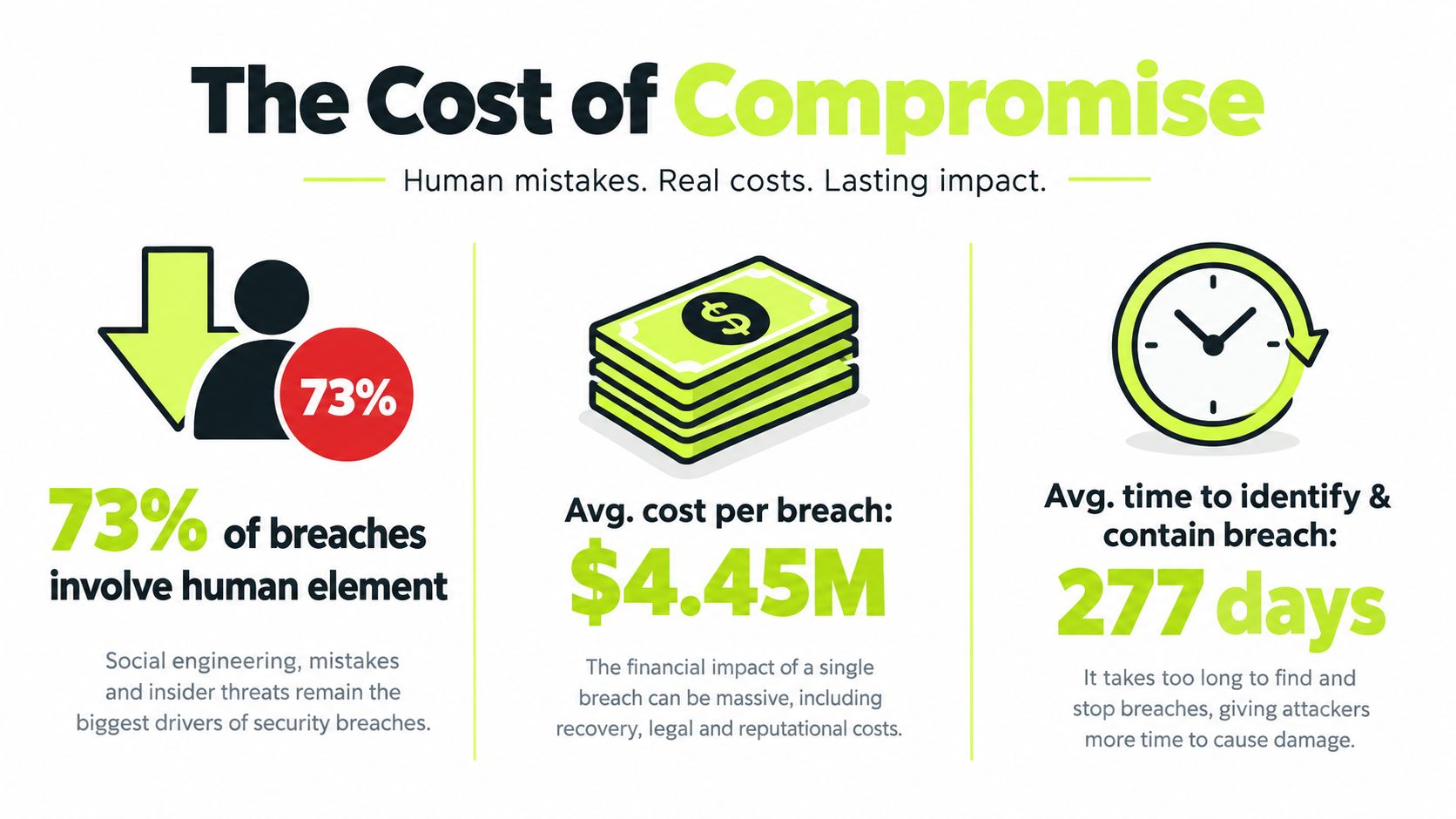
The broad trend shows how serious that impact has become. The Verizon 2024 DBIR summary discussed by dmarcian shows social engineering incidents rising from 1,700 incidents with 928 confirmed disclosures in Verizon's 2023 DBIR to 3,661 incidents with 3,032 confirmed disclosures in 2024. It also notes that external actors were responsible for 100% of breaches in that pattern and that financial motives accounted for 95%.
Example one: the fake executive request
A finance worker receives an email that appears to come from leadership. The request is framed as confidential and urgent. Nothing in the message screams “attack.” The manipulation happens when the employee feels they must act quickly.
The attacker isn't counting on malware. They're counting on compliance with authority.
Example two: the help-desk reset
An attacker calls support pretending to be an employee who has lost access before an important meeting. They know the employee's department, manager name, and enough background detail to sound legitimate. The support agent wants to help. If identity checks are weak or rushed, the attacker can get a reset, a temporary code, or a foothold into an account.
This kind of attack is powerful because it turns an internal assistance process into an access channel.
Example three: the callback trap
An employee gets a message warning about a problem with their account and instructing them to call a number immediately. Calling feels safer than clicking. But the attacker controls the number, the script, and the pressure. Once on the line, they can request credentials, MFA approvals, remote access, or payment actions.
The dangerous moment isn't always the first message. It's the conversation that follows when the target starts cooperating.
Example four: the project-specific impersonation
A team member gets a note in chat or email about a file, contract, or launch task they already expect to handle. The request includes just enough real context to suppress doubt. The manipulated action might be as small as opening a document or as serious as sharing internal data.
These attacks cause damage because they align with normal work. The victim doesn't feel tricked in the moment. They feel productive.
That's why strong technical controls alone can still fail. A single trusted conversation, especially one tied to executive authority or a support workflow, can bypass stronger systems if the human checkpoint is weak.
Warning Signs and How to Spot Manipulation
The best defense against a social engineering attack often starts with noticing that a message or call is trying to control your pace.
Scale makes that harder. Secureframe's social engineering summary cites 1,003,924 phishing attacks in Q1 2025 and 1,130,393 in Q2 2025, a 13% quarter-over-quarter increase. At that volume, teams can't treat impersonation as an occasional oddity. They have to treat it as a constant input stream.
Behavioral signs that matter most
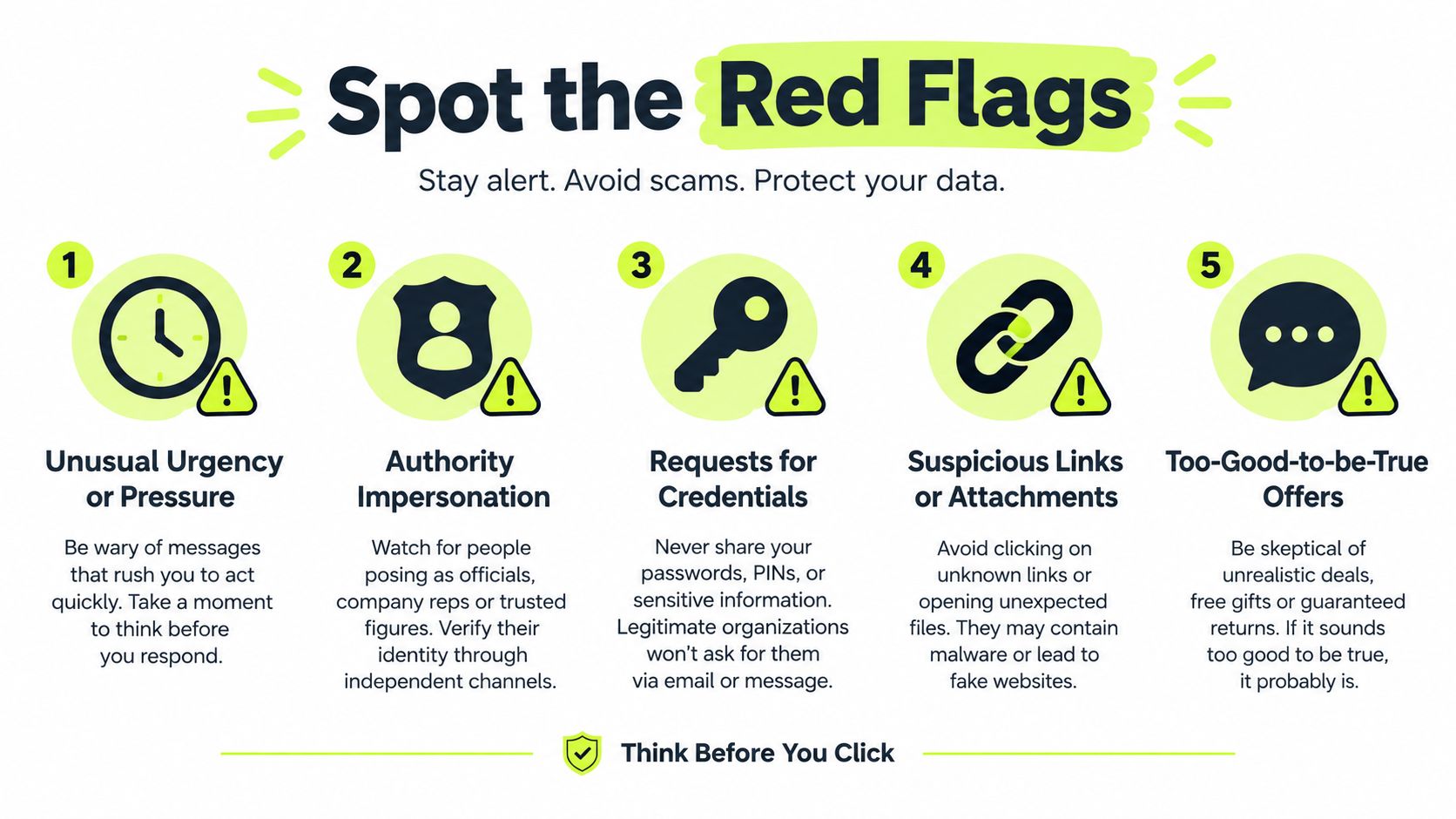
Some warning signs show up before any technical clue does.
- Unnatural urgency: The sender wants action before thought. “Right now,” “before anyone else sees this,” or “within the hour” are common pressure patterns.
- Status pressure: The request leans on title or hierarchy. You're being pushed to obey rather than verify.
- Isolation: The attacker discourages checking with others. Secrecy is part of the manipulation.
- Process avoidance: The request asks you to skip a normal approval, ticket, or verification step.
Technical signs people miss
The details still matter, especially when a message looks polished.
Look for:
- Mismatched identity cues: The display name seems right, but the address, number, or profile details don't.
- Unexpected MFA prompts: If you didn't initiate a login, an approval request is a warning, not an inconvenience.
- Callback numbers inside the message: If the message supplies the verification path, that path may be attacker-controlled.
- Attachments or links tied to routine work: Familiar topic, unfamiliar destination.
A related risk comes from people who already have legitimate access. If you want a broader view of how trusted users, accidents, and misuse overlap with these threats, this guide to insider threat awareness is a useful companion.
A simple pause checklist
When a request feels urgent, don't ask “Does this look real?” Ask these instead:
- Did I expect this?
- Is the request normal for this person and this channel?
- Am I being pushed to act before I verify?
- Can I confirm it through a separate channel I already trust?
If the message tells you how to verify it, that isn't independent verification.
That one habit catches a surprising amount of manipulation. The goal isn't paranoia. It's creating enough friction to break the attacker's momentum.
Proven Strategies to Prevent and Mitigate Attacks
The most effective defense against a social engineering attack is layered. Awareness matters, but awareness alone is too fragile when someone is busy, tired, or under pressure. Good programs combine human habits, workflow controls, and technical safeguards.
SecurityWeek's 2025 outlook noted that attackers increasingly use generative AI across SMS, deepfake voice calls, and social-media personas to make campaigns more dynamic and adaptive. It also highlighted that voice-based phishing rose to 11% of incidents, that business email compromise remains low in volume but extremely high in impact, and that social engineering caused business disruption in 86% of those incidents in the reporting discussed by SecurityWeek's social engineering outlook.

Start with verification habits
A few habits reduce risk fast.
- Use out-of-band confirmation: If a request involves money, credentials, MFA, payroll, or sensitive files, confirm it in a separate channel you choose yourself.
- Slow down privileged actions: Admin changes, access resets, and payment updates should never depend on a single rushed interaction.
- Refuse sender-provided validation paths: Don't call the number in the email to verify the email.
- Normalize escalation: Employees should feel safe saying, “I'm going to verify this first.”
Strengthen the workflow, not just the person
Training works better when it connects to the actual places where people make decisions.
Some teams use recurring microlearning, role-based scenarios, and phishing drills inside the tools employees already use. For example, phishing simulation training in Slack can put realistic lures and immediate coaching into the daily workflow instead of relying on a separate annual module. Vigil Security is one platform that supports that model with short lessons, phishing simulations, and automated evidence collection for compliance workflows.
Add process controls where one conversation can do damage
High-risk actions need structure.
Consider safeguards such as:
Dual approval for payments and vendor changes
One person should never be the only checkpoint for a sensitive transfer.Hard verification for help-desk resets
Password and MFA changes need stronger identity checks than a persuasive caller.Least privilege for routine accounts
Attackers do less damage when ordinary users don't have broad access.Role-specific practice
Finance, HR, executives, and IT support face different lures. Generic training misses those differences.
Measure the right things
A lot of programs focus on click rates. That's useful, but it's not enough anymore.
Track questions like these:
- Which teams receive high-risk impersonation attempts?
- How often do employees report suspicious calls or callback requests?
- Where can one support conversation change access or payment details?
- Which workflows rely too heavily on speed and trust?
Key takeaway: The most important metric isn't just who clicked. It's where one believable interaction can trigger access, data exposure, or money movement.
That's the shift many organizations need. Social engineering defense isn't just message filtering. It's workflow design.
Building Lasting Resilience Against Human Hacking
A social engineering attack succeeds when an attacker can insert themselves into normal work and steer a person toward the wrong action. That's why the strongest defense isn't just “teach people about phishing.” It's building a culture where verification is part of how work gets done.
Teams become more resilient when they treat risky requests as process questions, not personality tests. Did the request follow the right channel? Was it independently confirmed? Did the person handling it have room to pause? Those are workflow strengths, not individual heroics.
Lasting improvement usually comes from repetition, not one-time training. Short refreshers, role-aware examples, realistic simulations, and clear escalation paths keep the lesson connected to daily work. A finance manager, help-desk agent, and engineer won't face the same lures, so they shouldn't get the same practice either. Role-based programs tend to make the advice stick because the scenarios feel real. This overview of role-based security awareness training shows what that looks like in practice.
If you're assessing your own environment, start with three questions:
- Where can one message or call trigger a sensitive action?
- Which approvals depend too much on trust alone?
- Do employees know exactly how to verify and report suspicious requests?
The goal isn't to make people fearful. It's to make safe behavior automatic.
Vigil Security helps teams turn social engineering defense into a repeatable workflow through Slack-native awareness training, phishing simulations, recurring microlearning, and audit-ready evidence for compliance programs. If you want training that meets employees where they already work and reinforces verification habits continuously, visit Vigil Security.