An employee receives a message that appears to come from the CFO. It asks for a payment change before the end of the day. At the same time, a Slack notification warns that an account needs immediate verification, and a document arrives from a familiar vendor. The employee must decide whether to click, reply, open the file, enter credentials, or pause and verify the request.
That decision is what useful phishing training should rehearse. Strong simulations test one specific behavior, use safe mechanisms that don't capture real credentials or deliver malware, provide immediate coaching, and measure improvement across repeated practice. A single click rate can't show whether employees learned to report suspicious messages, verify payment requests, or recognize attacks that move beyond email.
The eight phishing simulation examples below are organized by the human behavior and business process under pressure. Each one explains the pretext, the behavior being tested, the main risk, a safe implementation approach, an immediate coaching script, and a Slack-native follow-up for distributed teams. The approach also reflects evidence that recurring, varied simulations can reduce susceptibility over time. One 12-month study across 20 organizations and more than 1,300 employees distributed over 13,000+ simulated emails found that susceptibility moved toward an industry benchmark of 4.1% by the end of the year, using a starting library of 31 phishing templates to create many variants (study of recurring phishing simulations). Teams tracking these outcomes should also review their employee phishing training metrics.
1. Executive Impersonation Phishing
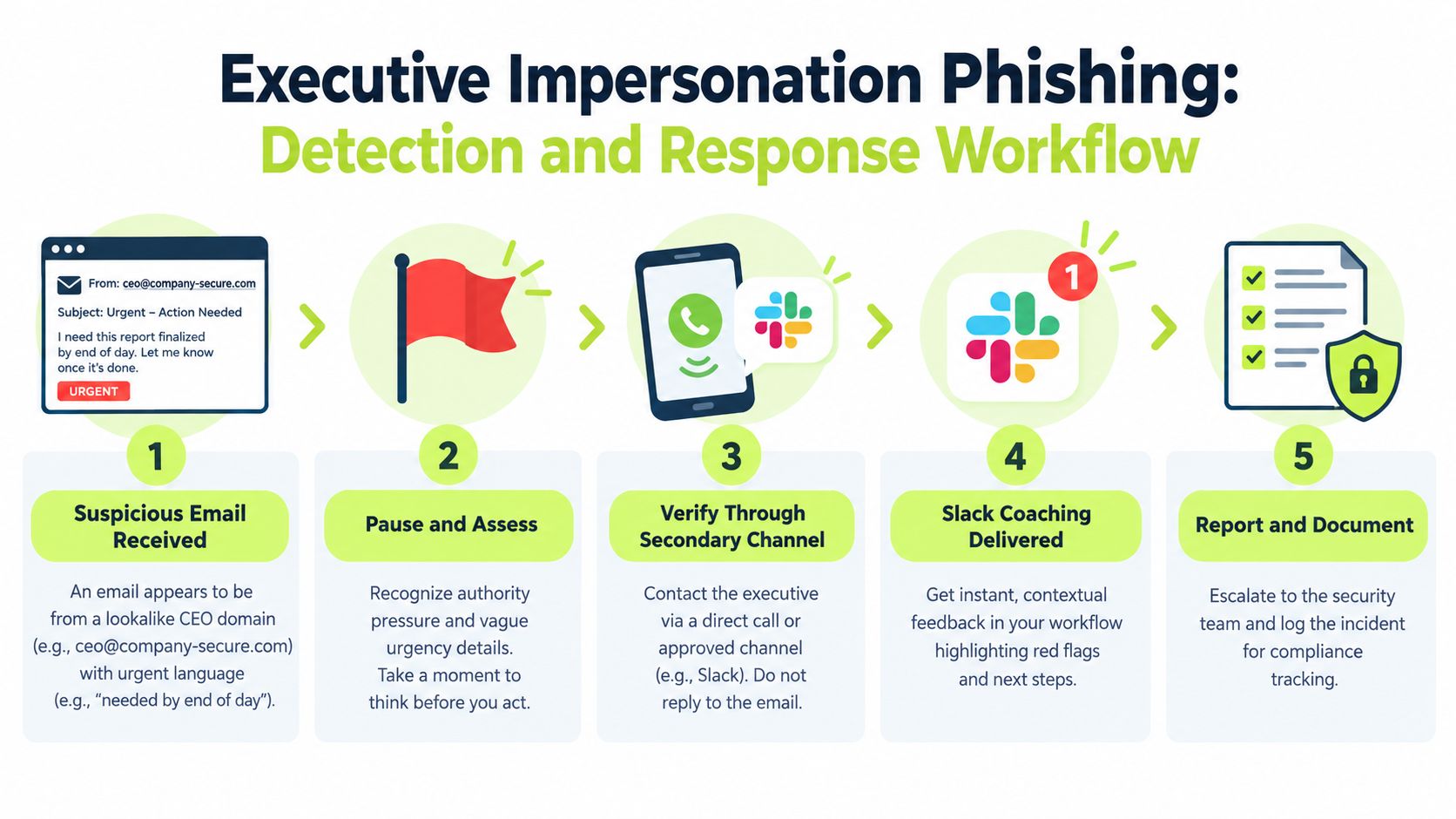
A message appears to come from the CEO, CFO, or CTO and asks an employee to make a payment, share employee information, or confirm access to a sensitive system. The request may use a familiar signature and a plausible business reason, but the critical question is whether the recipient lets authority replace verification.
This scenario tests a specific habit: verify unusual requests through a known, independent channel. It shouldn't test whether employees recognize a particular executive's writing style. A better exercise uses a realistic request that fits the employee's role, then checks whether the employee follows the organization's approval process rather than replying to the message.
Build the verification behavior
Don't simulate an actual wire transfer or ask employees to disclose personal information. Use a controlled landing page or a reply-tracking mechanism that records the attempted action without exposing data. Coordinate with finance and executive assistants so the request reflects real approval paths, then brief the relevant stakeholders before launch.
The most useful red flags may include a new bank account, a request to bypass normal approvals, unusual secrecy, or a demand to act while the executive is supposedly unavailable. The campaign should teach employees to call a known number, confirm in person, or use an established internal channel. A practical guide to protecting against social engineering attacks can support that policy discussion.
Immediate coaching script: “A senior title doesn't remove the need to verify. For payment, access, or employee-data requests, use a known contact method and follow the normal approval workflow before taking action.”
In Slack, send the coaching as a direct message immediately after the simulated interaction. Follow it with a short workflow exercise: the learner chooses whether to call the executive's known number, ask in a public channel, forward the request to finance, or reply directly. A private channel for finance and security can also provide a low-friction route for escalating suspected impersonation.
Track verification and reporting behavior, not only clicks. Department-level results can show where approval procedures are unclear, while anonymous trend reporting helps leaders improve the process without turning the exercise into public punishment.
2. Credential Harvesting via Fake Login Pages
A familiar service sends an alert that appears to require a sign-in. The destination resembles Microsoft 365, Okta, Slack, GitHub, or another tool the employee uses every day. The simulation tests the moment when convenience competes with inspection of the domain, login flow, and authentication prompt.
The safe version must never collect a real username, password, authentication code, or recovery key. Use a non-functional landing page, an approved simulation domain, and a clear stop condition before any data is entered. The landing page can record that the user reached the credential prompt, but it should prevent submission and explain why the page was suspicious.
The risk is particularly important for cloud-first teams because a stolen password can expose several connected services. MFA helps, but it doesn't make credential entry on a fraudulent page safe. Attackers can use adversary-in-the-middle techniques to capture sessions or manipulate authentication flows, so training should teach employees to inspect the destination and use password managers correctly, not just rely on an MFA prompt.
Progress from obvious to convincing
Start with an easy-to-spot login lure, then introduce more realistic variations after employees understand the expected behavior. Use legitimate authentication URLs in coaching, explain why a password manager may refuse to autofill on an unfamiliar domain, and show how to open the service from a saved bookmark instead of an email link.
A useful follow-up resource is this guide to authentication methods and account protection. For broader instruction about sensitive information, include the organization's personally identifiable information training in the learning path.
Slack coaching: “Stop before entering credentials. Open the service from a trusted bookmark or type the known address yourself. If the login page came from an unexpected message, report it and ask IT to verify the request.”
Slack-native follow-up works best when the lesson includes a short domain-inspection question, a reporting button, and a reminder to reset credentials only through the approved IT process if a real suspicious login has occurred. Security teams can also use workflow automation to trigger targeted training after a user reports a real suspicious message.
3. Malware and Attachment-Based Phishing
The message contains a purchase order, contract, résumé, invoice, or compressed archive. The sender may look familiar, and the attachment may fit a current project. The decision being tested is whether the employee opens the file immediately or checks the sender, file type, context, and approved document-sharing process first.
A safe simulation should use a harmless file or a controlled link that behaves like an attachment without containing macros, scripts, executable code, or active content. Security and IT teams should test delivery in advance and make sure endpoint controls won't quarantine the exercise unpredictably. The simulation should never alter a device, execute code, or create confusion about whether a real incident has occurred.
Make file handling observable
The coaching should address practical signals, not just the instruction to “be careful.” Employees need to know why an unexpected ZIP archive, double extension, macro-enabled document, or unusual sender address deserves extra scrutiny. They should also know where to request a file through a secure channel and how to report an attachment without forwarding it throughout the company.
For engineering teams, the same scenario can use configuration files, code archives, package notices, or repository invitations. For finance, it can use invoices. For legal teams, it can use contract revisions. Role realism improves the exercise, but it also creates a trade-off: a highly realistic attachment can cause unnecessary disruption if stakeholders haven't agreed on the safeguards.
Coaching script: “Don't enable content or open unexpected files to discover what they contain. Confirm the request through a known channel, use the approved file-sharing route, and report the message if the context doesn't fit.”
A Slack follow-up can provide three short examples of suspicious file properties, followed by a role-specific question. An engineer might choose the approved repository and dependency-checking process. An accounts-payable employee might route the invoice to procurement for verification. Security teams can record file-open events in their existing audit workflow, but the exercise shouldn't create real alerts in endpoint tools unless that behavior has been explicitly approved.
Schedule the drill away from the most operationally sensitive moments at first. Later campaigns can test whether employees still follow the process when a deadline or familiar business context makes the attachment feel routine.
4. Supply Chain and Vendor-Impersonation Phishing
A trusted supplier asks for a bank-account update. A cloud provider requests an administrator sign-in. A software partner sends a revised invoice or asks for access to a shared workspace. These messages exploit an existing relationship, so employees may lower their guard before checking the domain or approval path.
The business behavior is independent vendor verification. The simulation should test whether the recipient compares the request with vendor records, calls a known contact, and follows procurement or accounts-payable controls. It shouldn't reward employees for recognizing a fake logo. Attackers can copy branding easily, while the organization controls its verification process.
Use real procurement friction
Work with procurement, finance, and vendor-management owners to identify common communication patterns. A safe campaign might link to a page that records an attempted payment-change workflow without accepting bank details. It can then display the exact internal steps for confirming account changes, including who has authority to approve them.
The scenario should reflect the trade-off between speed and control. Employees may worry that verification delays a renewal, invoice, or service restoration. Coaching must make the approved route easy enough to use under pressure, otherwise the simulation exposes a process problem rather than an awareness problem.
Immediate feedback: “A familiar vendor name isn't proof of authenticity. Never change payment or access details from an unexpected message. Use the vendor record or an established contact to confirm the request.”
In Slack, create a finance verification route that lets employees forward the suspicious request to a designated channel or use a simple form. The channel should avoid posting sensitive invoice information publicly. A private finance and security workflow can confirm whether the request is legitimate and return a clear status to the employee.
Follow-up microlearning can distinguish between a normal invoice question, a payment-detail change, and a request for privileged access. Those actions carry different approval requirements, and the simulation should measure whether employees choose the right escalation route rather than treating every vendor message as the same kind of risk.
5. Urgency and Authority-Based Social Engineering
The message claims that an account will be suspended, a compliance deadline is about to expire, or a security incident requires immediate action. It appears to come from IT support, Legal, Compliance, HR, or another authority figure. The pressure is deliberate. The employee is being pushed to act before thinking.
This simulation tests emotional regulation and procedural discipline. A good campaign doesn't shame someone for reacting to urgency. It teaches a repeatable pause, such as checking the request through a known channel, asking a colleague, or opening the relevant system directly rather than following the message.
The measured outcome should include reporting and verification. In a large benchmark covering more than 55,000 phishing campaigns and over 212 million messages, the average simulated-phishing failure rate was 4.93%, while the average reporting rate was 18.65% (large-scale phishing benchmark). Those measures show why a low click rate alone doesn't establish that employees are taking protective action.
Train the pause
Begin with scenarios that are plausible but not maximally stressful. Once employees understand the response pattern, vary the authority figure, deadline, and requested action. Avoid threats involving payroll, health information, or personal emergencies unless HR and leadership approve the content and the campaign has strong safeguards.
Slack coaching: “Pressure is a signal to slow down, not a reason to skip verification. You can say, ‘I'll verify this and get back to you,’ then use a known-good channel.”
Slack can model that sentence in a short interactive lesson. The learner selects a safe response, reports the message, and receives a reminder about the relevant escalation channel. A follow-up pulse question can ask whether the scenario felt realistic, confusing, or punitive. That feedback helps security teams improve the exercise and preserve trust.
For distributed teams, test both email and collaboration-tool versions over time. An urgent message in a Slack-style environment may feel more immediate than an email, but the same verification behavior should apply. The point isn't to make employees suspicious of every urgent request. It's to make a calm verification step normal even when the request comes from a legitimate authority.
6. Watering Hole and Compromised Website Phishing
An employee receives a link to a technical guide, industry report, design resource, software utility, or package download. The site looks professional and the resource seems useful. The simulation tests whether the employee checks the domain, download source, publisher, and approved software process before opening or installing anything.
This scenario is especially relevant to engineers, DevOps teams, product managers, researchers, and remote workers who regularly find tools outside the organization's main software catalog. It should never lead to a real compromised website. Use a controlled domain, a harmless download placeholder, and an approved redirect that explains the signals the employee should have checked.
Match the working context
A generic “free guide” may produce a click without teaching much. A better exercise uses a resource employees might genuinely seek, such as a package release note or integration guide, while keeping the destination safely isolated. Development teams should receive coaching about approved repositories, dependency review, package provenance, and the difference between visiting a page and installing software.
The organization also needs to define which indicators employees can realistically inspect. Domain spelling, unexpected redirects, certificate warnings, publisher identity, and an unapproved download source can all matter, but a long list of technical checks may overwhelm nontechnical users.
Practical rule: “A clean-looking website isn't a trusted software source. Verify the domain and publisher, use approved repositories, and ask the security or engineering team before installing unfamiliar packages.”
In Slack, post a short URL-inspection exercise with an approved domain beside a lookalike domain. Keep the examples safe and avoid linking to attacker-controlled infrastructure. For engineers, route the follow-up into the team's existing software-supply-chain discussion. For other employees, focus on downloads, browser warnings, and the approved request process.
The campaign can also test reporting. An employee who avoids the download but never tells anyone may protect one device while leaving the same lure available to colleagues. A strong follow-up teaches both personal caution and the reporting behavior that helps security teams identify a broader campaign.
7. HR and Compliance-Based Phishing
An email appears to come from HR, Payroll, or Compliance and asks an employee to update direct-deposit details, complete a tax document, confirm an identity record, acknowledge a policy, or answer a benefits survey. These messages work because employees expect periodic administrative requests and may fear missing a deadline.
The simulation tests whether employees recognize that sensitive requests require an approved channel, even when the sender appears to be an internal department. It should never request real tax documents, bank details, identity numbers, or personal credentials. Use a safe landing page with fictional fields, block submission, and provide the legitimate HR portal or contact path immediately.
Protect trust while teaching caution
Coordinate closely with HR and Payroll. They should approve the wording, timing, landing page, and post-campaign communication. Avoid launching during an actual benefits or payroll deadline, when employees may be unable to distinguish the simulation from a critical business message.
The best pretext reflects normal communication patterns without creating operational confusion. For example, a simulated policy acknowledgment can test whether an employee opens an unexpected link, while coaching explains how official acknowledgments are normally delivered and where to find them.
A useful internal rule is that HR doesn't request sensitive personal data through an unexpected email. The rule should be precise enough to guide action, but it should also explain exceptions and provide a fast verification path.

Coaching script: “Don't send personal or payroll information in response to an unexpected message. Open the official HR system directly or verify the request with HR through the approved channel.”
Slack can make that approved route visible. A button or slash command can direct employees to the HR help channel, while a short lesson explains why a known portal is safer than an email link. Role-aware assignment is useful here, especially for new hires who may not yet know how HR communicates. Teams can reinforce that process with role-based security awareness training.
Measure whether employees report the request, use the correct HR channel, and understand the difference between an administrative reminder and a sensitive-data request. Those outcomes provide more useful guidance than a simple pass or fail, especially when HR wants to preserve confidence in legitimate internal communications.
8. BYOD and Personal Account Phishing
A personal email, cloud-storage service, banking provider, or mobile account sends a message to a device employees also use for work. The lure may ask the employee to recover an account, review a shared file, or confirm unusual activity. The business risk comes from blurred boundaries between personal and work identities.
This simulation needs more consent and transparency than a standard work-email exercise. Obtain explicit approval before targeting personal accounts or devices, define exactly what the campaign can observe, and explain why the organization is testing the behavior. Never access private messages, collect personal credentials, or create a test that employees could mistake for a real banking or identity-verification request.
Test account separation
The exercise should reinforce two habits. Employees should use approved work accounts and devices for work activity, and they should protect personal accounts with unique passwords, MFA, and careful recovery practices. They should also know what to do if a personal account is used for a work file or service and then appears compromised.
A safer approach is to deliver the simulation through an approved work channel while using a personal-service pretext, or to test a managed BYOD application without inspecting unrelated personal activity. Keep the learning objective narrow. The purpose is to improve account separation and reporting, not to audit an employee's private life.
Immediate coaching: “Personal and work accounts can intersect, but they shouldn't share passwords or recovery details. Verify the alert through the provider's official app or website, then report any work-related exposure to IT.”
Slack follow-up can include a short privacy-aware lesson on password managers, MFA, approved devices, and VPN use. It can also provide a direct route to the BYOD support team. For employees who work across phones, tablets, and home computers, the lesson should clarify which actions belong to IT, which belong to the service provider, and which require the employee to secure the personal account.
Track completion, reporting, and understanding without collecting personal-account content. A respectful program will produce better cooperation than a surprise exercise that feels invasive.
8-Scenario Phishing Simulation Comparison
| Scenario | 🔄 Implementation Complexity | ⚡ Resource Requirements | ⭐ Expected Outcomes | 📊 Ideal Use Cases | 💡 Key Advantages / Tips |
|---|---|---|---|---|---|
| Executive Impersonation Phishing | Medium, realistic spoofing + Slack coaching setup | Moderate, copywriting, lookalike domains, leadership coordination, Slack integration | ⭐⭐⭐⭐, high engagement; reveals escalation and verification gaps | Finance, C-suite, regulated industries | Pair with approval workflows; deliver instant Slack coaching to reinforce verification |
| Credential Harvesting via Fake Login Pages | Medium, build convincing non-functional login pages safely | Moderate, web pages, form simulation, IT coordination, monitoring | ⭐⭐⭐⭐, directly tests credential risk; easy to measure submissions | Cloud-first orgs, all staff levels | Use non-capturing pages; prompt MFA/password rotation and microlearning in Slack |
| Malware and Attachment-Based Phishing | High, safe realistic attachments and EDR integration required | High, test files, IT/security coordination, legal consent, SIEM/EDR logging | ⭐⭐⭐, tests file-handling behavior; reduces malware/ransomware exposure | Engineering, product teams, BYOD environments | Use benign but realistic attachments; log opens via EDR and coordinate with IT |
| Supply Chain & Vendor-Impersonation Phishing | High, tailored to real vendor relationships and procurement workflows | Moderate–High, procurement input, vendor data, finance coordination, Slack routing | ⭐⭐⭐⭐, uncovers vendor verification gaps; prevents payment fraud | Procurement, finance, distributed enterprises with many vendors | Coordinate with procurement; include vendor verification checklists and real contact info |
| Urgency & Authority-Based Social Engineering | Medium, requires psychological design and supportive framing | Moderate, content design, leadership buy-in, Slack microlearning | ⭐⭐⭐⭐, addresses emotional response; drives durable behavior change | All teams, high-stress roles, customer-facing staff | Pair with supportive messaging; teach "pause and verify" (e.g., take 30 seconds) |
| Watering Hole & Compromised Website Phishing | High, controlled test sites and web infrastructure needed | High, dev resources, hosting, DNS/web filtering coordination, download tracking | ⭐⭐⭐, tests website-download behavior; valuable for technical staff | Developers, DevOps, remote workers who download tools | Use controlled, believable test sites; focus on real tools and approved repos |
| HR & Compliance-Based Phishing (New Hire, Benefits, Policy) | Medium, requires close HR coordination and timing | Moderate, HR/Payroll alignment, Slack verification flows, tailored content | ⭐⭐⭐⭐, highly relevant; reveals personal-data handling weaknesses | All employees, remote/distributed organizations | Coordinate with HR; embed verification channels (Slack DM/commands) and policy microlearning |
| BYOD & Personal Account Phishing | High, legal/consent complexity and sensitive tracking issues | High, explicit consent process, policy alignment, careful measurement tools | ⭐⭐⭐, addresses BYOD risk; sensitive but high impact if done correctly | Remote-first, BYOD-heavy organizations | Obtain explicit consent; emphasize MFA, account separation, and clear BYOD policies |
Turn Eight Scenarios Into a Learning Loop
The examples work best as a program, not as eight disconnected tricks. Start by obtaining approval from security, IT, HR, finance, legal, and the business owners whose names or workflows appear in the simulations. Stakeholders should agree on the purpose, the population, the safe mechanics, the notification plan, and the escalation process before anyone receives a message.
Define the behavior in one sentence. “Verify payment-detail changes through a known vendor contact” is measurable. “Be more aware of phishing” isn't. That distinction determines the landing-page copy, the Slack lesson, the reporting fields, and the metric that matters after the campaign.
Use safe mechanics throughout. Never capture real credentials, request genuine sensitive information, deliver active files, or create an uncontrolled website. Use non-functional pages, harmless attachments, approved domains, and clear ownership for every simulated brand or department. Give HR and legal a review path for scenarios involving payroll, personal information, executives, or compliance deadlines.
Immediate coaching should be brief and non-punitive. Explain what decision was risky, identify the red flags, state the correct action, and give the employee a way to practice it. A learner who clicks an executive impersonation message may need a verification exercise. A learner who opens an attachment may need secure file-handling guidance. The follow-up should match the behavior rather than assign the same generic course to everyone.
Measure behavior across repetitions
Click-through remains useful as one signal, but it shouldn't stand alone. Track reporting, time to report, attempted data entry, verification choices, repeat behavior, and completion of corrective lessons. A benchmark across 42 million phishing simulations and 14.8 million users reported susceptibility moving from 33.2% before training to 20.1% after 90 days and 4.2% after one year of continuous training, alongside an 86% reduction in global phishing click rates (global security awareness benchmark). The useful lesson is the value of sustained practice, not the promise that every organization will reproduce those outcomes.
Repeat campaigns should vary the channel, pretext, difficulty, and requested action. Current coverage points to AI-generated lures, collaboration-tool attacks, and multi-channel social engineering as areas that conventional email-only examples often miss. A 2025 report also described a year-over-year decline in organizations running phishing simulation campaigns, from 86% to 73%, which makes disciplined program ownership particularly important (Fortinet security awareness and training report).
Slack-native delivery can support this learning loop with role-aware assignments, recurring microlearning, automated reminders, pulse quizzes, progress tracking, and immediate corrective feedback. Evidence synchronization with Vanta or Drata can help GRC teams maintain audit-ready records when those tools are part of the compliance workflow. Vigil Security is one option for delivering phishing campaigns and short security lessons inside Slack, with workflow automation and evidence synchronization designed for distributed teams.
Don't treat a successful simulation as proof that the organization is safe. Treat it as a signal about which business process needs clearer verification, which group needs more practice, and which reporting route should be easier to use. Review results with process owners, protect employee privacy, and adjust the next scenario based on observed behavior.
Choose the example closest to your organization's highest-risk workflow. Document the exact verification action employees should take, obtain stakeholder approval, launch a safe drill, and schedule the next reinforcement before the lesson fades. The strongest phishing program makes the secure response familiar enough that employees can use it when the request looks urgent, personal, or convincingly real.
Vigil Security provides Slack-native phishing simulations with immediate coaching, recurring microlearning, role-aware assignments, reporting workflows, and compliance evidence support for distributed teams. Use it to turn these phishing simulation examples into repeatable practice, then visit Vigil Security to explore the platform.