Most advice on how do I stop spoof emails starts in the wrong place. It tells people to add a filter, check the From address, or flip on DMARC as if a single control can block every fake message. That thinking fails in real mail systems, where attackers exploit compromised accounts, lookalike domains, and misconfigured routing, while organizations still need to move money, reset passwords, and approve vendors through email.
The safer answer is a two-layer program, DNS authentication for what can be authenticated, and out-of-band verification for everything that still needs a human decision. The scale of the problem makes that clear, the FBI's 2024 IC3 report recorded 193,407 phishing or spoofing complaints and more than $16 billion in reported losses across internet-crime categories, with total complaints reaching 859,532 FBI IC3 annual report. That's why suspicious sender addresses, urgent payment requests, credential prompts, and unexpected attachments should be treated as security events, not inbox clutter.
Why DNS Records Alone Cannot Stop Every Spoofed Message
A DNS record can help prove where a message came from, but it can't tell you whether the request inside the email is real. That's the trap in most spoof-email guidance, it assumes the attack lives only in the sender field, when in practice the attacker often aims at the payment process, the help desk, or the executive assistant.
The technical controls only cover part of the problem
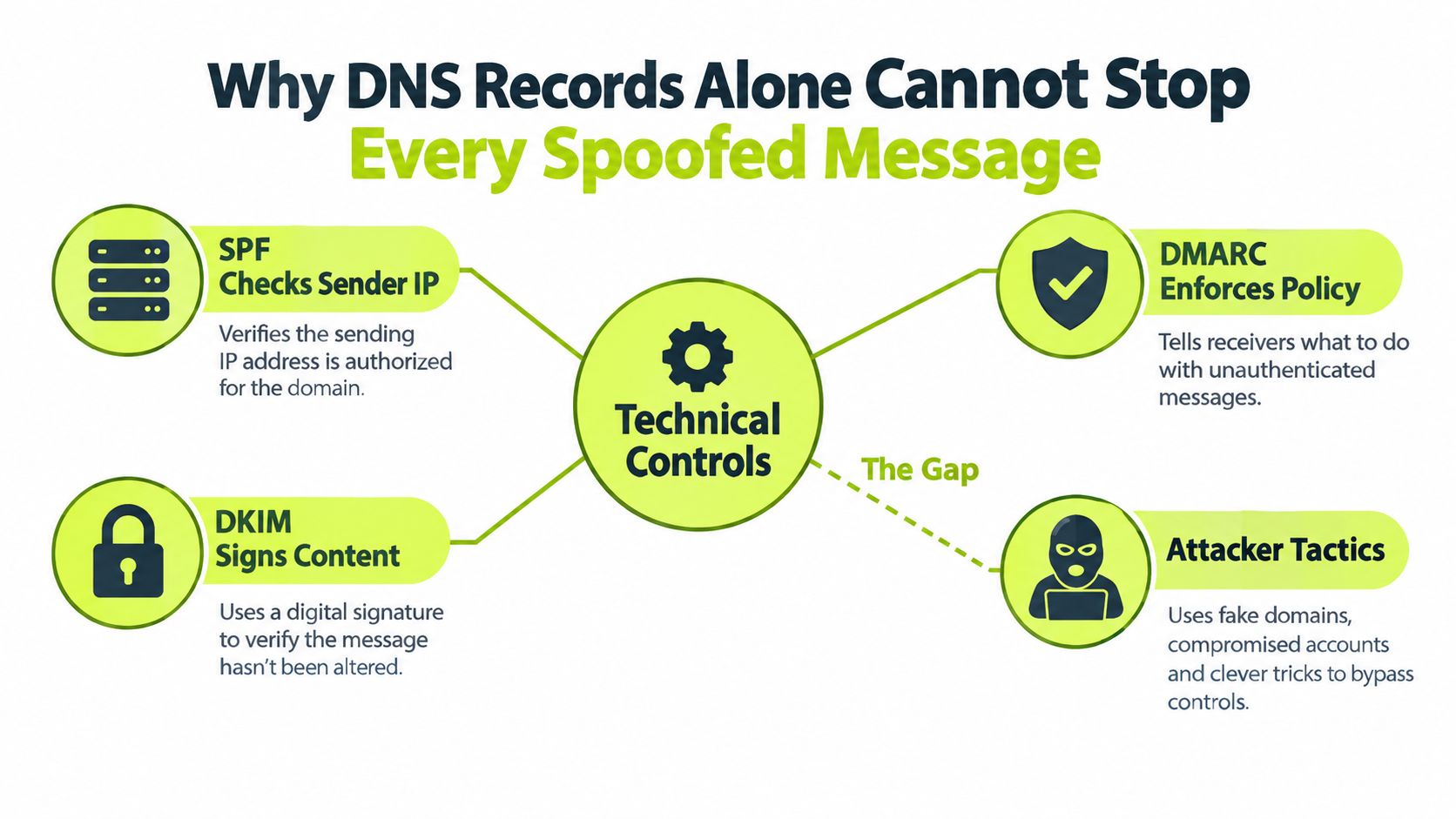
SPF checks whether the sending server is allowed to send for a domain. DKIM signs the message so the recipient can verify it wasn't altered in transit. DMARC connects those checks to the visible From domain and lets the owner tell receivers what to do when authentication fails, and NIST describes the three as complementary controls for source authentication, message integrity, and reporting NIST email authentication guidance.
That still leaves a wide gap. A compromised legitimate mailbox can send from a real account, a lookalike domain can pass casual inspection, and a rushed employee can act on a convincing but false request even when the message never truly spoofed the domain. A useful mental model is this, DNS controls reduce impersonation of your domain, but they don't replace verification of the business action.
Practical rule: if the email asks for money, credentials, or a sensitive change, the security decision doesn't happen in the inbox.
Security teams that want a broader operating model usually pair domain authentication with process controls, user reporting, and a known escalation path. One useful reference point is security in layers, because spoof prevention works much better when mail controls and human checks are designed together.
Staging Your Email Authentication Protocols
The worst DMARC rollout is the one that goes straight to enforcement before anyone knows every legitimate sender. I've seen that break marketing platforms, ticketing systems, HR tools, and transactional services because the domain owner only remembered the obvious mailboxes, not the SaaS tools that send on behalf of the company.
Start with sender inventory, not DNS edits
List every system that sends mail under your brand. That includes Microsoft 365 or Google Workspace, CRM platforms, support desks, marketing automation, payroll, and any vendor that sends invoices or notifications. Then separate direct senders from relays, because DMARC only becomes useful when the sending system is known and aligned with the visible domain.
After that, publish SPF with only approved senders, enable DKIM signing for each legitimate stream, and begin DMARC in monitoring mode. CISA recommends starting with a monitoring policy so owners can identify all mail streams before enforcement, and Google advises allowing SPF and DKIM to authenticate mail before moving DMARC ahead CISA BOD 18-01 guidance.
Treat monitoring as discovery, not a checkbox
DMARC reports are messy at first. They show unknown sources, alignment problems, and forwarding side effects, and that's exactly what you want to see before tightening policy. NIST notes that a successful SPF or DKIM result can be enough for DMARC authentication when alignment is correct, so the key question isn't “is DKIM on,” it's “does the message align with the From domain and the policy?”
A clean rollout usually looks like this, but the pace should match your environment:
- Inventory every sender: Include internal tools, SaaS apps, and outsourced vendors.
- Publish SPF carefully: Keep it limited to authorized systems.
- Enable DKIM everywhere possible: Fix key rotation issues before enforcement.
- Start DMARC with monitoring: Use
p=nonefirst to collect reports. - Validate legitimate traffic: Confirm that business-critical mail still lands.
- Tighten gradually: Move toward stronger policy only after the reports stabilize.
A staged rollout protects the business from self-inflicted mail outages, which are often more painful than the spoofing problem itself.
For teams that want a practical glossary while they work through policy choices, understand DMARC policies is a helpful companion because it maps the policy terms to the operational decisions administrators make.
Moving Safely from Monitoring to Strict Enforcement
The transition from p=none to rejection is where many organizations either gain real protection or create avoidable support tickets. DMARC is not a one-time DNS change, it's a control loop. You review the reports, fix what's broken, and only then move the policy forward.
Read reports as an inventory signal
Aggregate reports tell you which sources are sending as your domain, which ones fail alignment, and where third-party services are drifting. They also expose the mistakes that commonly trip up enforcement, multiple SPF records, too many DNS lookups, forgotten subdomains, and vendors that send with broad infrastructure instead of a narrow authorized path. If you skip that review, you end up rejecting mail you need.
A practical sequence is simple. Keep p=none long enough to see the actual mail streams, correct alignment for approved vendors, and then move to quarantine once the false positives are under control. Reject comes last, after the business mail you care about has been passing consistently. CISA's staged model exists for a reason, because the policy only becomes safe when the sender inventory is accurate.
Enforcement works when the exceptions are boring
Some vendors will resist DMARC alignment because their platform is built around their own envelope domain. That's a business decision, not a reason to abandon enforcement. In those cases, make the vendor fix the configuration, route the traffic through an approved service, or replace the vendor if the mail stream is critical enough to justify the effort.
DMARC also deserves to be treated as a governance signal. If a new sender appears in the reports and nobody owns it, that's not just a mail issue, it's a change-control issue. The same applies to a sender that suddenly starts failing after a software change, a merger, or a new regional office launch.
Enforce only after the exceptions stop changing. Stability first, hard policy second.
When teams ask how to understand DMARC policies, the answer is usually to stop seeing them as labels and start seeing them as operational states, monitoring, containment, then enforcement.
Closing the Gap on Lookalike Domains and Compromised Accounts
Even a perfect SPF, DKIM, and DMARC setup won't save you if the attacker uses a fake but convincing domain or walks in through a stolen mailbox. That's where many incident teams get surprised, because the email looks authentic enough to pass a quick review, and the request itself feels routine.
Fraud often succeeds after authentication passes
The FBI's 2025 Internet Crime Report recorded 24,768 business-email-compromise complaints and about $3.046 billion in reported losses, with businesses also reporting losses from BEC scams that had a confirmed AI nexus McDonald Hopkins summary of the FBI report. That lines up with what security teams see in practice; the message may look internal, but the target is a payment change, a payroll update, or a credential handoff.
Identity verification has to become a formal rule, not an improvisation. Any request to change payment details, send a wire, reset a password, share confidential data, or approve an invoice should be checked through a separate trusted channel. Use a known phone number, a separately initiated chat, or a previously verified contact path, never the details inside the suspicious email.
Use business verification as a habit
A good verification habit also applies to external suppliers and new contacts. If a message claims to come from a partner you've never dealt with, the team should verify the company through a second source before acting. A resource like SOSfinder's business verification workflow is useful because it reinforces the same idea, verify the organization outside the email thread before money or access changes hands.
Bottom line: technical authentication can narrow the blast radius, but only a human check can stop a convincing request from becoming a transfer.
If your finance team already uses dual approval, keep it. If it doesn't, add it for high-risk actions. That one process change often blocks the kind of fraud that authentication alone can't catch.
Embedding Verification Habits into Daily Workflows
Annual security training rarely changes behavior on its own. Verification has to appear inside the tools people already use, including chat, email, and approval systems. Spoof prevention therefore combines staged DNS controls with repeated, out-of-band decisions by the people handling money, credentials, and urgent requests.
Put the response habit beside the decision
A Slack-based training flow keeps practice close to the moment when someone might trust a message. Short prompts, phishing simulations, and immediate coaching can rehearse three actions: confirm through a separate channel, report suspicious email quickly, and pause before opening links. Role-based assignments make the exercises more relevant for finance, HR, support, and executives, whose exposure differs by job.
Teams building that routine can use phishing simulation training to reinforce recognition and reporting without sending employees to a separate system.
The workflow should also define what happens after a report. Route the message to a monitored security queue, tell the employee whether further action is needed, and record recurring patterns for the next exercise. That feedback closes the gap between knowing a rule and applying it under pressure.
Use short nudges throughout the year
Microlearning works when each reminder addresses one decision. A brief invoice-fraud prompt, a sender-verification challenge, or a policy reminder after a simulated phish can reinforce the expected behavior more effectively than a long compliance presentation. It also gives security and compliance teams a record of assignment completion and user responses.
The goal is selective caution, not suspicion of every message. Make the verification path automatic for payment changes, credential requests, and urgent instructions. Employees who know which channel to use are less likely to let a convincing email become an unauthorized action.
Vigil Security provides Slack-based security awareness training, phishing simulations, and automated reminders. Teams can evaluate whether its lessons and drills fit their existing reporting and verification workflow.
Executing a Rapid Response to Suspected Fraud
A finance manager spots a thread that looks real, but the payment details changed at the last minute. The email used the right tone, referenced the right project, and arrived at the right time. The mistake wasn't in the filter, it was in the trust decision, and the damage depends on how fast the team reacts next.
Lock down the message and the account path
The first move is evidence preservation. Save the original email, including headers, and capture the exact request that triggered concern. Then notify IT or security immediately, because the account behind the email may need session revocation, credential reset, inbox-rule review, or MFA re-registration if it was compromised.
If money might move, finance has to call the bank or payment provider at once and request a freeze or reversal procedure. If payroll, vendor banking, or direct deposit details changed, restore the approved records and alert the people who own those systems. The speed matters because fraudulent transfers and account abuse can spread faster than the inbox alert that exposed them.
Contain, then review the process
Once the immediate damage is contained, review what failed in the workflow. Was the request approved by email alone? Did someone use contact details from the suspicious message? Did the team have a verified callback process for urgent changes? Those questions matter more than the branding of the phish.
The internal lesson should be specific and action-focused. If a user clicked, confirm whether a malicious link was opened. If credentials were entered, reset them and check for unauthorized inbox rules. If the sender was a compromised vendor, notify the vendor and tighten the approval path for future changes. A practical reference for frontline triage is is this a scam email, because teams need a fast checklist before they escalate.
The best incident response for spoof email is calm, boring, and immediate.
When the dust settles, convert the incident into a policy update, a training prompt, or a workflow change. That's how a single bad message becomes a better control the next time it appears.
If you're ready to harden spoof-email defense beyond basic DMARC setup, Vigil Security can help you train people where they already work and reinforce the verification habits that stop fraudulent requests from turning into losses. Use it to pair awareness, phishing simulations, and Slack-native nudges with the DNS controls your mail team already manages.