You open your inbox on a Monday morning and see an email marked Final Notice. It says an invoice is overdue, a shared document needs your approval, or a delivery will be canceled unless you pay a small fee. The sender's name looks familiar, the branding seems right, and the message is written clearly. Then the quiet question arrives: is this a scam email?
Don't guess from appearance. In the next few minutes, you can check the sender, inspect the true destination of every link, assess attachments and pressure tactics, and verify the request through a channel you already trust. The safest decision is rarely “click and see.” It's to pause the message, validate the request independently, and act only when the evidence supports it.
A Suspicious Message in Your Inbox Right Now
Take the overdue invoice example. The message says your account will be suspended unless you settle the balance today. It includes a familiar company logo, a professional signature, and a payment button. You're busy, the amount looks plausible, and ignoring a genuine invoice could create its own problem.
That's why “is this a scam email?” is the wrong question if it only leads to a gut reaction. The better questions are: Did this request come from the organization shown? Is the requested action normal for that organization? What happens if I'm wrong?
A false positive usually costs a few minutes. A false negative can expose your credentials, redirect a payment, or start a longer conversation with an attacker. Treat uncertainty as a reason to verify, not as permission to proceed.
The safest response to uncertainty
Leave the email open if you need to examine it, but don't click, reply, download, or call any number inside it. If your mail client offers a phishing report function, use that after preserving the information your security team may need. In a workplace, ask your IT or security contact to review the message rather than forwarding it casually to colleagues.
Practical rule: A legitimate request can survive independent verification. A scam depends on keeping you inside the attacker's version of events.
Look at the message as a claim, not an instruction. The claim might be that your vendor changed bank details, your manager needs a confidential favor, or your account requires an immediate reset. None of those claims becomes trustworthy because the email uses a familiar logo or knows your name.
What you'll do next
Start with the full sender address, not the display name. Check where links lead without opening them. Review attachments as potential threats, read urgency and secrecy as behavioral signals, then contact the supposed sender through a known website, phone number, or existing conversation.
That workflow works whether the message is crude, polished, short, or apparently personal. It also protects you from the most dangerous mistake in email security, treating a familiar appearance as proof of identity.
Why Scam Emails Are Harder to Catch Than They Used to Be
Phishing is an industrial activity, not an occasional nuisance. The Anti-Phishing Working Group recorded 1,003,924 attacks in the first quarter of 2025, the largest quarterly total since late 2023, followed by 1,130,393 attacks in the second quarter and 853,244 in the fourth quarter. Its annual reporting described 3.8 million phishing attacks in 2025, compared with 3.76 million in 2024. These figures are summarized in Barracuda's 2026 Email Threats Report.
That volume changes the defender's problem. Attackers don't need every message to work. They can produce large numbers of short-lived campaigns, test different wording, impersonate different brands, and move on when filters or domains are blocked.
Fluency no longer proves legitimacy
Spelling mistakes used to be useful clues. They still matter when they appear alongside other evidence, but clean grammar is no longer reassuring by itself. Attackers can use AI tools to produce natural, on-tone messages, while campaigns increasingly combine familiar branding with targeted context.
Barracuda analyzed more than 3.1 billion emails in January 2026 and found that 48% of malicious email activity was phishing, while 34% of companies experienced at least one account takeover incident each month. The same report found that over 10% of HTML attachments were malicious and that 70% of malicious PDFs contained QR codes leading to phishing websites. Those figures appear in Barracuda's analysis of phishing attack statistics.
The everyday consequences are straightforward:
| Signal | Five Years Ago | Today |
|---|---|---|
| Writing quality | Typos and awkward phrasing often exposed a scam | AI-polished language can sound professional |
| Brand appearance | Fake logos and layouts were often visibly poor | Impersonation can look convincing at a glance |
| Personal context | Messages were more likely to be generic | Attackers can tailor requests around names, roles, and active work |
| Technical payload | Suspicious links and files were common clues | QR codes, redirects, attachments, and conversation-only scams complicate checks |
| Best defense | Pattern recognition and caution | Independent verification of identity, context, and requested action |
The conclusion is blunt: you can't reliably judge authenticity from the email's surface. Detection has moved from “does this look strange?” to “can I prove this request through a separate route?” That is a workflow decision, not a design opinion.
A Five-Step Check You Can Run on Any Email
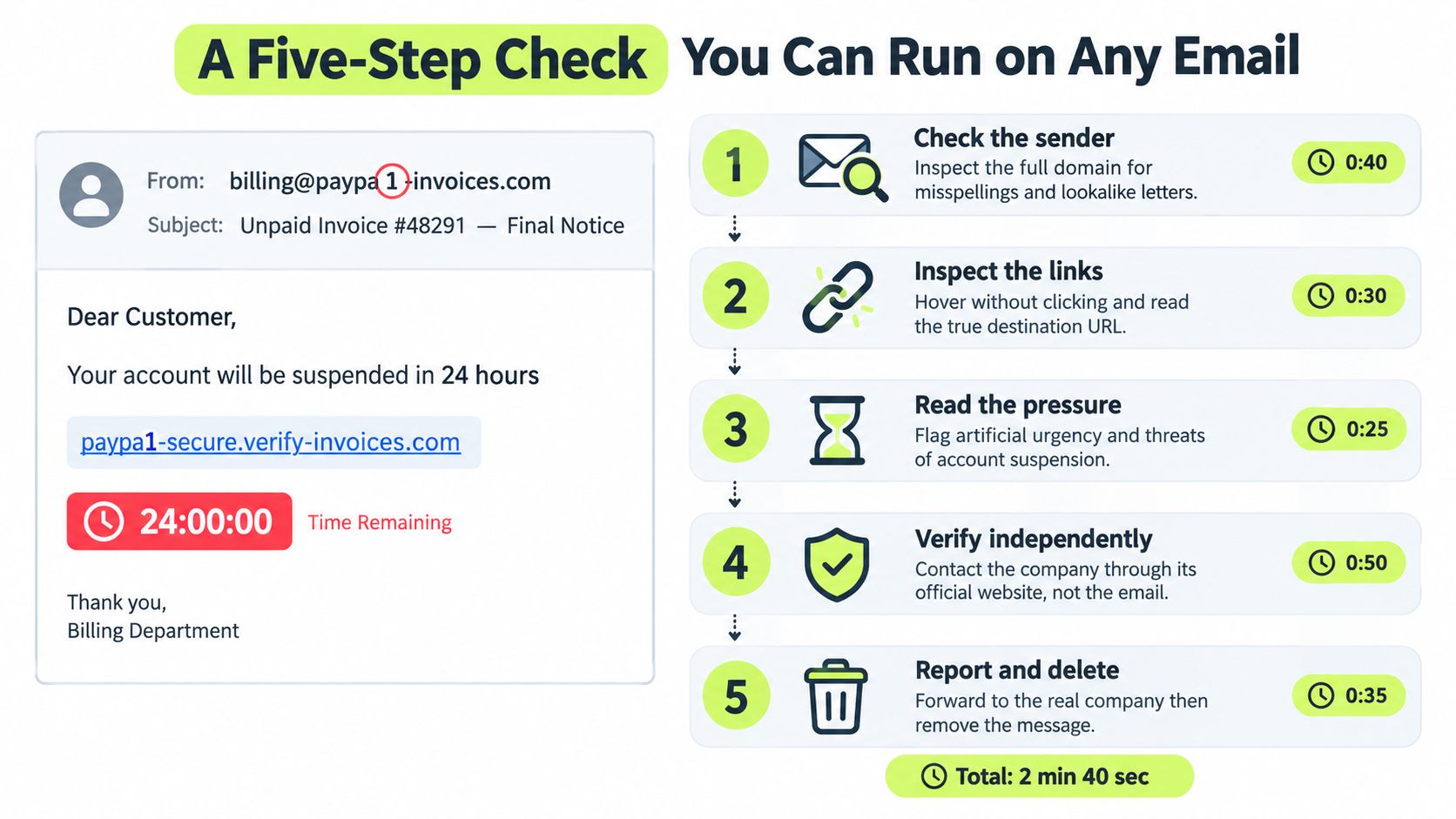
Use this order when an email claims you owe money, need to sign in, must approve a change, or should share information. Consider a sample message from billing@paypa1-invoices.com with the subject Unpaid Invoice #48291, Final Notice. Its body says your account will be suspended in 24 hours and includes a payment link.
1. Check the sender
Open the full address behind the display name. In the sample, the digit 1 replaces the letter l in paypa1. That small change matters, but don't stop at spelling. Compare the domain with previous messages from the organization and ask whether the address matches the relationship you already have.
A message from a known vendor should normally fit the vendor's established communication pattern. A new domain, a free mailbox, an unexpected reply address, or a display name that doesn't match the actual address deserves verification.
2. Inspect links without clicking
Hover over a link on a desktop, or use your mail client's link preview. If you can copy the destination safely, examine the complete address in a plain text field. Look for a lookalike domain, a shortened URL, a long chain of redirects, or a trusted brand name placed in an unrelated domain.
The sample link, paypa1-secure.verify-invoices.com, does not belong to the organization suggested by the display text. Don't “test” it in a browser. The destination itself is evidence.
3. Review attachments
Unexpected files deserve suspicion even when the email doesn't contain a link. Be especially cautious with Office files that request macros, password-protected archives, and PDFs that direct you to scan a QR code or visit a login page.
A familiar file type isn't a safety certificate. If you weren't expecting the document, confirm why it was sent before opening it.
4. Read the pressure
Urgency is useful to attackers because it narrows your decision time. Account suspension threats, secrecy requests, unusual payment instructions, gift-card demands, wire-transfer changes, and instructions to bypass normal approval are strong behavioral warning signs.
Urgency alone doesn't prove fraud. A real outage or deadline can be urgent too. Treat it as a signal that increases the need for an independent check.
5. Verify independently
Close the email and use a trusted route. Type the company's website into your browser yourself, use a phone number from a previous invoice, or contact your colleague through your normal chat directory. Don't use the phone number, reply address, QR code, or website supplied by the suspicious message.
For more practice applying this kind of judgment to everyday online situations, use these internet safety quiz questions. The same order works tomorrow: sender, links, attachments, pressure, independent verification.
After verification, report the message through your organization's process, then delete it if your security team doesn't need the original. Never forward a suspicious email from your main account just to ask whether it looks real. Use the approved reporting tool or send it to the designated security address.
What a Real Scam Email Actually Looks Like
A polished impersonation often differs from a genuine vendor email in details that are easy to ignore. The logo may be copied correctly. The signature may include a real employee's name. The footer may contain links that lead to a convincing imitation of the company's website.
Take a legitimate invoice message from a vendor you already use. It arrives in an existing thread, references a purchase you recognize, uses the vendor's established domain, and provides payment instructions that match your contract or previous invoices. If bank details changed, the vendor's normal process would usually give you a separate way to confirm that change.
Now compare a polished impersonation. It may use the vendor's display name but come from a similar domain. It may place the logo in the right position but route the footer links somewhere else. It may include an invoice number and amount that look plausible, while changing the bank account or adding a new payment deadline.
| Element | Legitimate Email | Scam Impersonation |
|---|---|---|
| Sender display name | Matches the established contact or billing team | Uses a familiar name while hiding a different address |
| Logo and layout | Consistent with previous correspondence | Copied branding creates surface-level confidence |
| Signature block | Contains normal contact details and expected formatting | May use a real person's name with altered contact information |
| Footer links | Lead to the organization's known web properties | Point to unrelated, lookalike, or redirected domains |
| Invoice details | Match records, purchase orders, and prior messages | Use believable details to support a false request |
| Payment instructions | Follow the agreed process | Introduce new bank details, gift cards, transfers, or unusual urgency |
The critical test is not visual quality. It's continuity and independent confirmation. Does the message fit the transaction history? Does the sender's identity match the organization's known contact? Can the requested change be confirmed without using any detail in the email?
This is a classic social engineering attack. The attacker isn't merely trying to make a fake page look real. They're shaping your expectations so that the requested action feels routine.
A convincing email is still only an unverified claim.
If the message asks you to change payment details, disclose credentials, approve access, or break a normal process, stop relying on the inbox as the source of truth. Check your accounting system, contact the vendor through an established number, or ask the supposed colleague face to face or through a known internal channel.
The Scam That Asks You to Just Reply
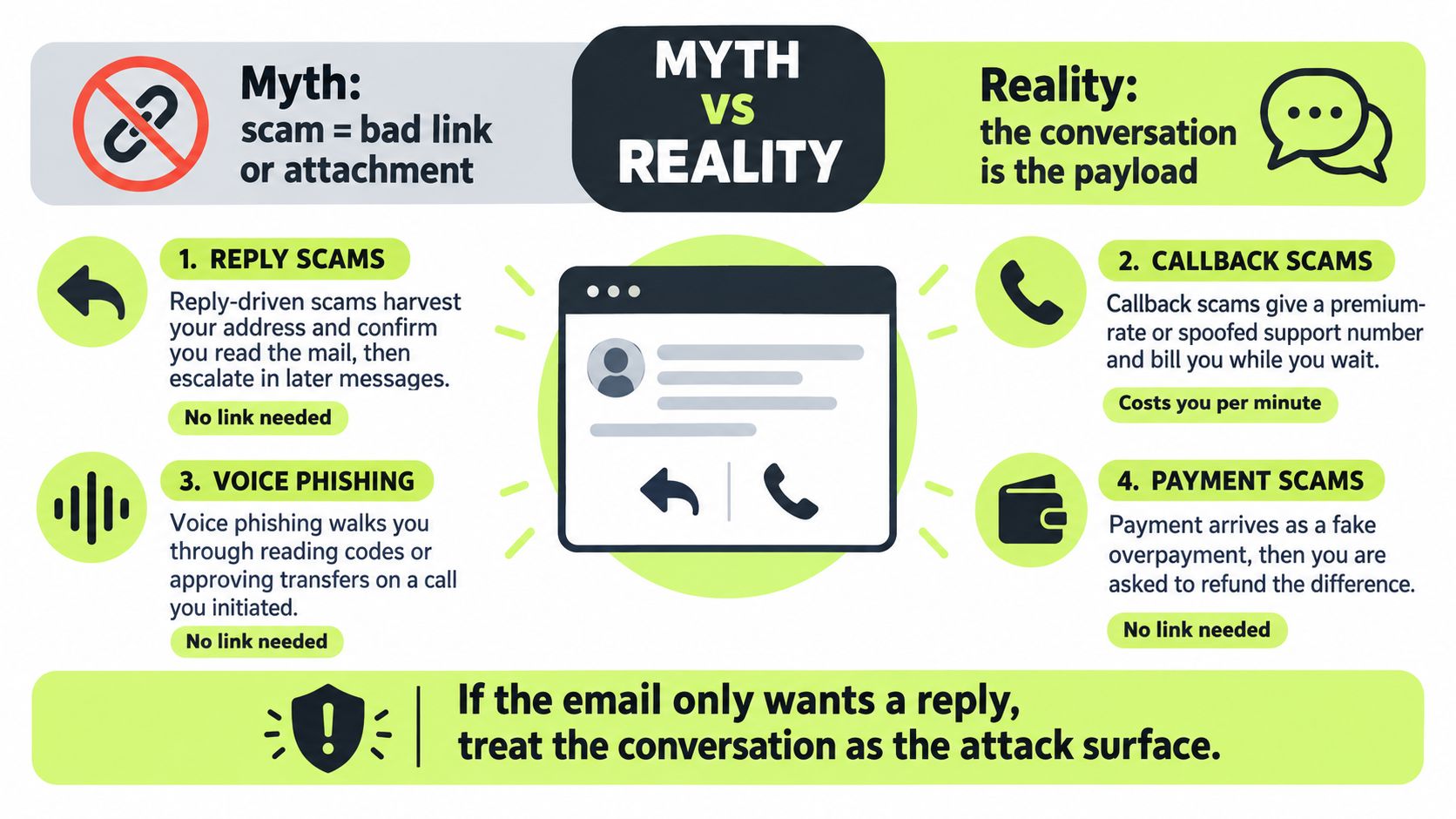
A scam doesn't need a malicious link or attachment. Sometimes the attacker wants only a reply, a phone call, or a short conversation that creates the next opportunity.
A fake executive may ask an employee to handle a confidential wire transfer. A spoofed manager may request gift cards as a “quick favor.” An overdue invoice message may ask an accounts-receivable employee to confirm a billing contact before escalating toward payment fraud. A fake support email may provide a phone number and instruct the recipient to call about an account problem.
Conversation is the payload
These messages can bypass link scanners and file sandboxing because the email itself may contain no malicious object. The attacker is using persuasion to move you into a reply, a phone call, a payment workflow, or a manual credential reset.
A reply also confirms that your address is active and that you read the message. Later emails can become more personal, more urgent, and more convincing. A callback can place you with an attacker who guides you through reading out a verification code, approving a transfer, or installing remote-access software.
Hoxhunt's 2026 trends report describes a 14x surge in AI-generated phishing attacks that bypassed email security filters and identifies callback phishing as part of the current threat mix. Pew Research Center survey data also reports that 63% of U.S. adults receive scam emails at least weekly, showing why reply-only fraud deserves routine attention rather than an afterthought.
The response rule
Treat these requests as high risk when they combine secrecy, urgency, money, identity changes, or a request to move the conversation off normal channels. Don't call the number in the email. Find the organization's official website yourself, use a previously verified contact, or ask the person through your normal workplace channel.
If you already replied, don't continue the conversation to “see what they want.” Report it, preserve the thread, and tell your security or finance contact exactly what information you shared.
What to Do in the First Hour After You Spot a Scam
The first hour is for containment, not investigation by yourself. Don't click further, reply, call the supplied number, or forward the email from your main account. Use your organization's Report Phishing button or send the message to the security team through its approved route.
Preserve the original message before deleting it. Security staff may need the full headers, sender details, links, attachment names, and timestamps to understand what happened. If your mail system offers a reporting function that preserves those details automatically, use it.
If you interacted with the message
Choose the response based on what you did:
- Clicked a link: Stop interacting with the page and tell security what opened, whether you entered information, and whether a file downloaded.
- Entered a password: Change it immediately from a trusted device and use the organization's process to revoke active sessions or reset access. Don't reuse the exposed password elsewhere.
- Opened an attachment: Disconnect from the network only if your security process instructs you to do so, then contact IT or security promptly. Record the filename and any warning or prompt you saw.
- Shared payment information: Contact finance and the bank immediately through known contact details. Ask them to watch for unauthorized activity and follow their fraud-response process.
- Sent personal or customer data: Tell the responsible privacy, legal, or security contact what information left the organization. Avoid minimizing the incident because the message looked harmless.
Write down what happened while you still remember it. Include when you received the message, what you clicked or opened, what you entered, who you contacted, and any unusual screen or phone conversation. Clear notes help responders act faster and prevent conflicting accounts.
Turn the incident into a habit
After the immediate response, make the workflow easier to repeat. Keep a short red-flag card near your screen with the questions that matter: Who sent this? Where does it lead? What does it ask me to do? Can I verify it elsewhere?
Run a brief inbox sweep each week. Remove old suspicious messages, review reporting options, and confirm that your team knows where to send a questionable email. Short recurring practice is more useful than relying on memory from a long annual presentation.
For teams, phishing simulation training can turn the workflow into a practiced response. Vigil Security delivers short security lessons, phishing simulations, and reporting feedback inside Slack, with progress and compliance evidence for administrators.
Most importantly, don't punish people for reporting a suspicious message. Reward early escalation, investigate near misses, and make independent verification part of normal work. The safest employee isn't the person who never encounters a scam. It's the person who knows exactly what to do before a suspicious request becomes an incident.
If your team needs a repeatable way to practice scam-email detection, Vigil Security provides Slack-native lessons, phishing simulations, reporting feedback, and automated evidence for security and compliance teams. Visit the platform to see how recurring training can make sender checks, independent verification, and safe reporting routine.