You've been asked to prove your organization is HIPAA compliant. You have training certificates, a vendor agreement folder, and security settings someone configured when the company started. But when you try to connect each requirement to a dated record showing who implemented it and whether it works, the gaps become harder to ignore.
HIPAA compliance requirements are operational responsibilities, not a certificate you earn once. A defensible program connects patient information, identified risks, protective controls, workforce behavior, and evidence. The practical question is whether you can show what your organization does, who owns it, and how you know it's working.
Who Must Comply and the Three Safeguard Categories
Covered entities include health plans, health-care clearinghouses, and health-care providers that conduct standard electronic transactions. A clinic that bills an insurer electronically is a familiar example. Being a health-related business, by itself, doesn't settle whether HIPAA applies.
Business associates perform services involving protected health information on a covered entity's behalf. Examples include billing companies, transcription services, cloud hosts, and IT support firms whose work involves maintaining or accessing patient records. Those relationships need appropriate business associate agreements, but a signed agreement doesn't replace operational safeguards.
Think of the covered entity as a building owner and its business associates as contractors. The contractors have responsibilities of their own, while the owner still needs to understand who enters the building and what they do there.

Identify the information you must protect
Electronic protected health information, or ePHI, is protected health information created, received, maintained, or transmitted electronically. It can sit in an electronic health record, an email attachment, a backup, or a scanner's saved files. Don't limit your scope to the main clinical application.
According to the HHS Security Rule overview, most covered entities had to comply by April 20, 2005, while small health plans had until April 20, 2006. The rule's objectives are confidentiality, integrity, and availability, meaning information stays appropriately private, remains trustworthy, and is accessible when needed.
Use the safeguards as your program map
HIPAA Security Rule safeguard categories
| Category | What It Protects | Example Requirements |
|---|---|---|
| Administrative | Governance of the compliance program and workforce | Risk analysis, security official, workforce training, access management, contingency plan |
| Physical | Facilities, workstations, and devices | Facility access controls, workstation security, device and media disposal |
| Technical | Systems and ePHI in use, at rest, and in transit | Unique user IDs, automatic logoff, encryption, audit controls, transmission security |
These categories work together. A locked laptop doesn't resolve excessive account permissions, and a strong password policy doesn't protect an unattended reception screen.
For teams commissioning patient-facing applications, Ekipa AI's healthcare software engineering services provide a relevant starting point for discussing how safeguards fit into software delivery. Keep architecture decisions tied to your own risk analysis rather than treating a development engagement as proof of compliance.
If you manage several frameworks, a comparison of security compliance standards can help organize overlapping controls without confusing their legal scope.
Start with a practical self-check: Does your organization handle ePHI, and which vendors handle it on your behalf? The answer establishes the boundaries of the program you need to prove.
How to Run a HIPAA Risk Analysis Step by Step
A security product can address a risk. It can't tell you whether you've found all the places patient information goes.
The HHS guidance on risk analysis treats an accurate, organization-wide assessment of risks to ePHI as the starting point for Security Rule implementation. The analysis must lead to risk management, not a completed questionnaire.
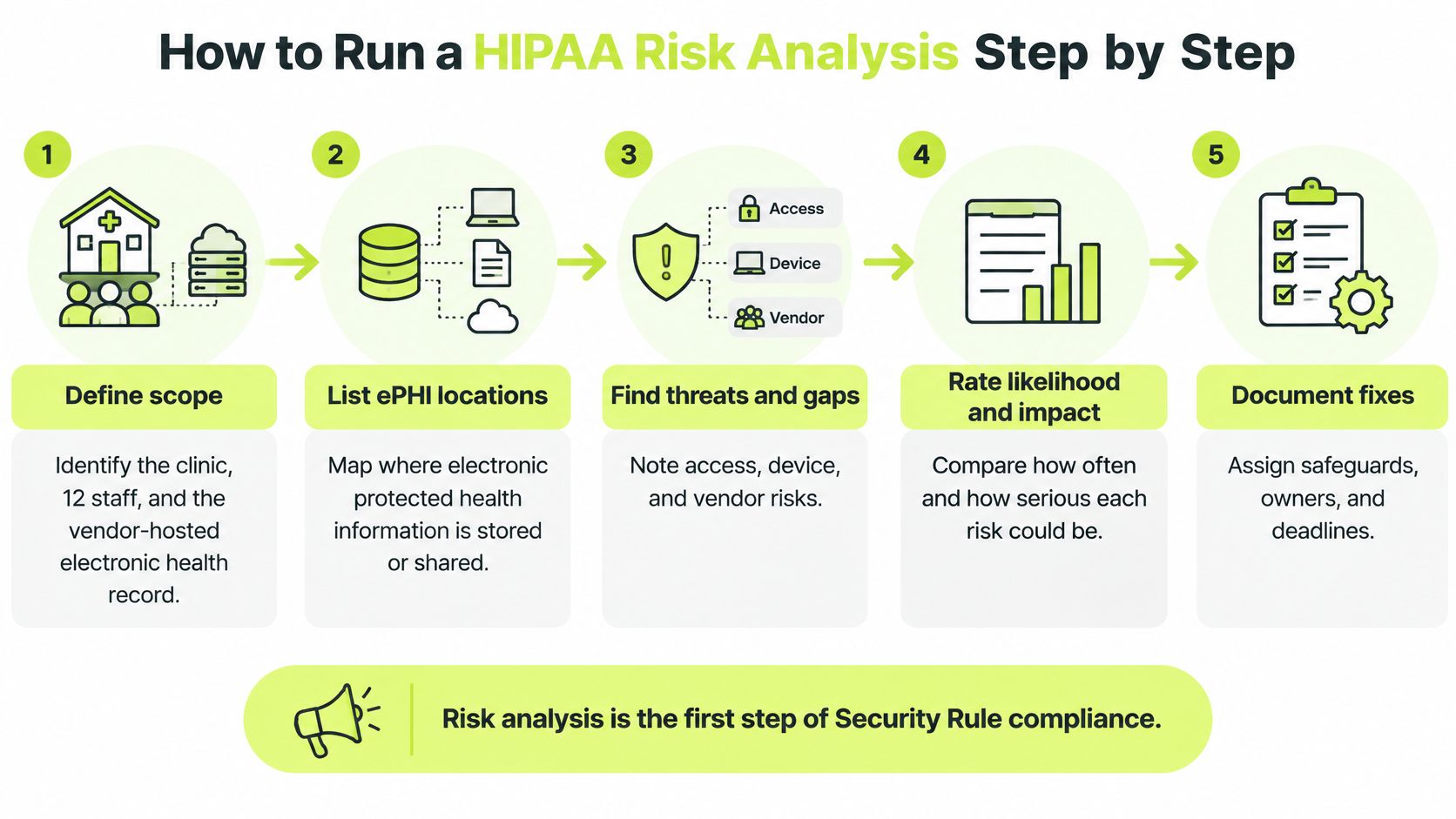
Use the process below to connect discovery with documented decisions.
Follow the information through the clinic
Consider a hypothetical small clinic with a vendor-hosted electronic health record, a shared scanner, and laptops that leave the building. Its assessment should examine the ordinary workflow, including the shortcuts staff use when the official process is inconvenient.
Define scope. List every location, application, device, and service that creates, receives, maintains, or transmits ePHI. Include remote work, backups, and personal phones used for work email. Record exclusions and explain them rather than omitting systems.
Inventory ePHI and data flows. Follow a patient document from receipt through scanning, upload, billing, storage, and disposal. Ask whether the scanner keeps a local copy and whether staff download records before sending them to another provider. Identify each vendor along that route.
Identify threats and vulnerabilities. A stolen laptop is a threat scenario; an unencrypted drive or weak device management is a vulnerability. Other scenarios include phishing, an exposed file-sharing link, unpatched software, and a former employee's active account.
Evaluate existing controls. Check what happens in practice. If policy says devices are encrypted, inspect the management console and investigate exceptions. If staff are supposed to report suspicious messages, test whether they know the reporting route.
Estimate likelihood and impact. Use defined criteria to assign high, medium, or low risk. Consider both exposure and consequences, including unauthorized disclosure, corrupted records, and interruption of patient care. Keep the rationale so another reviewer can understand the rating.
Document selected safeguards. Give each material risk an owner, an implementation deadline, a control, and an evidence location. Record the remaining risk after implementation and who approved accepting it, or what further remediation is planned.
Schedule reassessment. Establish a review cadence and trigger additional reviews when systems, vendors, locations, or workflows change materially. A new patient portal or acquisition can invalidate assumptions even when the previous assessment was thorough.
Produce a register someone can act on
For the clinic, a useful entry might describe scanned referral documents remaining on the shared workstation. The owner could be the IT manager, with remediation covering scanner settings, local-file cleanup, and verification that the revised workflow still supports clinical staff.
Practical rule: A risk register entry isn't closed because someone bought a tool. Close it when the safeguard is implemented, tested, and supported by dated evidence.
Designate a security official to coordinate policies and implementation. That person needs cooperation from clinical operations, HR, engineering, procurement, and IT, because no single department sees every ePHI workflow.
For an additional walkthrough, use this video alongside your own inventory and working risk register.
Administrative, Physical and Technical Safeguards in Practice
A policy saying access is restricted is weaker than a record showing who approved access, which permissions were granted, and when they were removed. Implement safeguards so you can inspect both their configuration and their operation.
Separate standards from implementation choices
Required implementation specifications must be implemented. Addressable specifications require an assessment of whether they're reasonable and appropriate in your environment. Addressable doesn't mean optional or available for indefinite postponement.
A fire-protection analogy helps: the duty to protect the building remains, even when its layout affects which protective system makes sense. Document the decision, the supporting risks, and any reasonable and appropriate alternative. If neither the specification nor an alternative is reasonable and appropriate, document that conclusion and its rationale.
The terminology matters because some items below are required standards containing addressable implementation specifications.
Required and addressable Security Rule specifications
| Standard | Category | Specification Type |
|---|---|---|
| Risk analysis | Administrative | Required |
| Data backup plan | Administrative | Required |
| Unique user identification | Technical | Required |
| Emergency access procedure | Technical | Required |
| Audit controls | Technical | Required standard |
| Automatic logoff | Technical | Addressable |
| Encryption and decryption | Technical | Addressable |
| Integrity controls for ePHI | Technical | Required integrity standard, with addressable authentication specification |
| Transmission security | Technical | Required standard, with addressable integrity and encryption specifications |
| Workstation use and workstation security | Physical | Required standards |
| Device and media disposal | Physical | Required |
| Facility access controls | Physical | Required standard, with addressable implementation specifications |
Don't treat a proposed regulatory change as an effective requirement. Maintain a process for reviewing finalized rules and effective dates before revising your compliance obligations.
Test controls against ordinary work
Administrative safeguards should connect workforce decisions to system access. Define who authorizes onboarding permissions, how role changes affect access, and how HR alerts IT when someone leaves. Set an internal removal window, then retain tickets or identity-platform records showing whether staff met it.
Contingency planning needs more than successful backup notifications. Test whether you can restore usable records, identify who authorizes emergency operations, and explain how staff will work during an outage.
Physical safeguards cover reception areas, workstations, equipment rooms, and media. Position screens away from public view, manage visitors, secure portable devices, and sanitize storage before reuse or disposal. Keep disposal records that identify what happened to the device or media.
Technical safeguards should make activity attributable to individual users. Configure unique accounts, emergency access procedures, appropriate session controls, and protections for stored and transmitted ePHI. Audit logging should support investigation of who accessed, changed, or sent information, with a defined review process.
For cloud-hosted workflows, assess cloud computing security concerns such as exposed storage, excessive permissions, and unclear vendor responsibilities. For document exchange, Documind's guide to HIPAA document security offers practical context for evaluating sharing workflows.
Write the policy your team can actually follow, then verify that they follow it. A polished policy describing controls you haven't implemented creates an evidence problem.
Version policies, record approvals, and update them when practices change. Distinguish required compliance documentation from operational records such as system logs, whose retention needs a separately justified schedule.
Breach Notification Deadlines by Number of People Affected
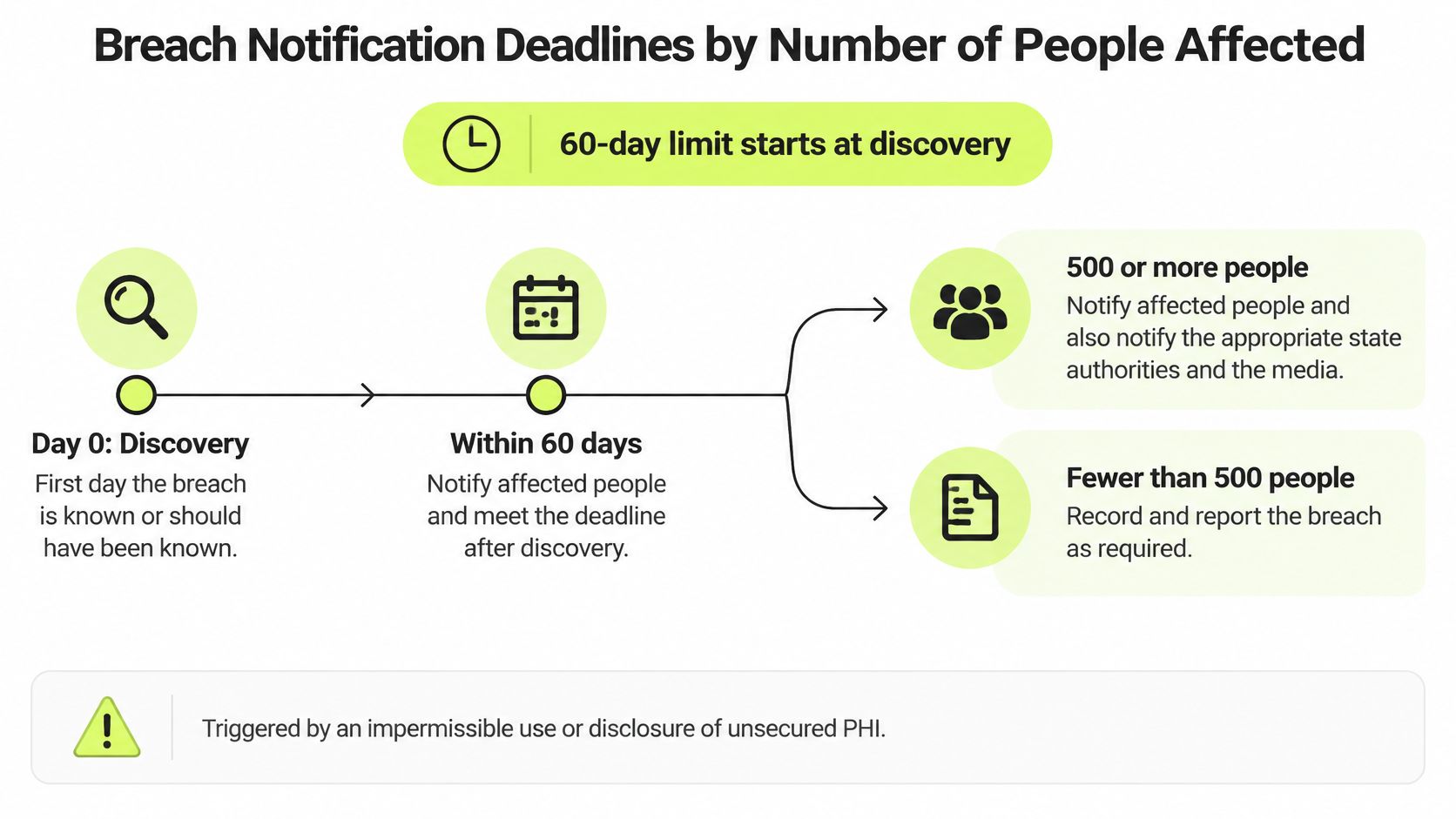
The breach clock runs from discovery, not from the day leadership finishes its investigation. Under the HHS breach notification guidance, affected individuals generally must receive notice without unreasonable delay and no later than 60 calendar days after discovery; HHS reporting follows the size-based paths below.
Breach notification requirements by breach size
| Breach Size | Notify Individuals | Notify HHS | Notify Media |
|---|---|---|---|
| Fewer than 500 individuals | Without unreasonable delay and within 60 days of discovery | Within 60 days after the end of the calendar year of discovery | Not required under the HIPAA media-notice threshold |
| 500 or more individuals | Without unreasonable delay and within 60 days of discovery | Without unreasonable delay and within 60 days of discovery | Required where more than 500 residents of a state or jurisdiction are affected |
The table describes breaches of unsecured PHI. The individual-notice deadline doesn't become an annual deadline just because an incident qualifies for annual HHS reporting. Likewise, the HHS threshold and the state-or-jurisdiction media threshold aren't interchangeable.
Use this visual as a triage prompt, while keeping the distinct notification paths in your written runbook.
Investigate without stopping the clock
An impermissible use or disclosure requires prompt assessment. Don't assume that recalling an email, receiving a deletion promise, or finding no obvious misuse establishes that notification isn't necessary.
Before concluding that an incident isn't a reportable breach, document an assessment addressing:
- Information involved. Identify the PHI, its sensitivity, and the risk that individuals could be identified.
- Recipient or accessor. Establish who received or accessed the information and their relationship to the organization.
- Actual acquisition or viewing. Preserve evidence showing whether the information was opened, viewed, retained, or otherwise acquired.
- Mitigation. Record retrieval, deletion confirmation, access revocation, and other actions that reduced exposure.
Say a clinic discovers that an employee emailed patient records to the wrong recipient. The clinic should preserve the original message and attachment, establish discovery, identify the affected people, contact the recipient appropriately, and route the facts to the breach-response owner.
Don't let staff delete the message to tidy up the mistake. Investigators may need message headers, delivery information, access records, and the attachment itself to evaluate exposure.
Prepare a notice people can use
An individual notice should describe the incident and the types of information involved. It should explain protective steps the person can take, what the organization is doing to investigate and mitigate the incident, and how to obtain further information.
Assign separate owners for investigation, legal review, recipient lists, notice production, and submission. Business associates should have a clear escalation route to the covered entity, with contractual responsibilities reflected in the response procedure.
Timestamp detection, triage, containment, legal review, notification decisions, and evidence preservation. Practice those handoffs in a tabletop exercise so an absent approver or unclear mailbox doesn't delay the response.
Training and Audit Evidence Auditors Ask For
An auditor rarely opens with "show me your training." The request sounds more like this: who needed this module, who completed it, what did they score, and what happened next. Completion alone proves an activity occurred. It says nothing about whether the right person received relevant instruction, understood it, or changed an unsafe practice.
Regulators consistently tie enforcement findings to gaps in risk analysis, so treat training as an output of that analysis rather than a standalone certificate file. The risks you identified should decide who gets which module, and your records should let you walk that line backward. Training evidence works like a chain of custody in an investigation: each record needs a date, an owner, and a clear link to the risk it addresses.
Keep evidence of assignment and understanding
Tie each training assignment to the person's responsibilities and the risk scenarios they face. Reception staff need practical guidance on identity verification and visible screens. System administrators need instruction on privileged access and incident escalation.
Preserve why someone was assigned training, including onboarding, a role change, vendor access, or a material technology change. Store the content version and the assessment standard alongside completion and results, so you can establish what the person was taught and what counted as passing.
Audit evidence to keep for each requirement
| Requirement | Evidence to Keep |
|---|---|
| Risk analysis and risk management | Scope, asset and data-flow inventory, risk ratings, risk management plan |
| Workforce training | Assignments, completion records, assessment scores, reminders, overdue status |
| Breach investigation | Discovery date, documented risk assessment, notices sent, mitigation steps |
| Business associate agreements | Signed agreements, vendor evaluations, access reviews |
| Policies and procedures | Versions, approval dates, change history, updates after practice changes |
Set each record's retention period against HIPAA's documentation requirements and any other legal obligations that apply, and keep superseded versions so you can show what was in effect on a given date. A risk-analysis report, a signed agreement, and a phishing score are different record categories. One blanket schedule usually keeps some too briefly and others forever.
Show what happened after a weak result
Completion and comprehension are different evidence fields. Use scenario-based questions with a defined passing standard, and retain reassessment or coaching records when someone doesn't demonstrate understanding.
For phishing exercises, preserve the response and the corrective action alongside the click outcome. A person who reports a suspicious message after coaching tells a different compliance story than a person who repeatedly misses the reporting step.
Short refreshers and incident-linked coaching document ongoing risk treatment between annual cycles. A practical discussion of security awareness training for employees can help structure that reinforcement, and IamVera.AI's examples of evidence records for regulated casework show how to document decisions and follow-up.
Audit test: Can you produce a report showing who was assigned each module, who completed it, their assessment results, overdue items, and the action taken afterward?
Every record should trace back to a specific risk or control. A certificate without assignment history, dated content, and follow-up answers the easy question while the hard ones stay open.
Privacy Rule Duties and Penalties for Noncompliance
The Privacy Rule governs how protected health information may be used and disclosed. The Security Rule governs safeguards for electronic protected health information. A technically secure system can still support an impermissible disclosure if someone uses information for an unauthorized purpose.
Permitted activities include treatment, payment, and health-care operations, subject to the applicable conditions. Staff need procedures that distinguish those activities from disclosures requiring authorization or another legal basis.
Apply minimum necessary to the actual task
The minimum necessary standard generally calls for limiting applicable uses, disclosures, and requests to the information needed for the purpose. It has exceptions, including disclosures to or requests by health-care providers for treatment, so don't teach it as an absolute restriction on every clinical exchange.
Consider a billing employee processing a routine claim. If diagnosis and payment information are sufficient, routine access to unrelated clinical notes needs justification. Configure role permissions around the task rather than giving everyone the broadest available record view.
- Patient access. Route record requests to a named owner and track receipt, processing, and response.
- Privacy notices. Maintain an appropriate Notice of Privacy Practices and ensure staff know how patients receive it.
- Other patient requests. Establish procedures for amendment requests, requested restrictions, and other applicable privacy rights.
Understand enforcement without reducing it to a fine
HHS's Office for Civil Rights enforces civil HIPAA requirements. Civil penalties depend on the applicable legal tier and circumstances, including knowledge, reasonable cause, willful neglect, and correction. Avoid assuming that an organization escapes responsibility because leadership didn't know about a problem.
Knowing wrongful acquisition or disclosure of individually identifiable health information can also involve criminal liability. Treat suspected misuse as an investigation and escalation matter, not merely a training issue.
A documented program doesn't guarantee immunity. It does let the organization show what it understood, which protective measures it implemented, when it discovered a problem, and how it responded. Preserve those facts rather than reconstructing them after an enforcement inquiry begins.
Confirm Your Gaps and Start Your Next Audit Cycle
Start with the requirement you'd have the hardest time proving, not the policy that's easiest to rewrite. Use a short working session with security, HR, IT, and the operational owners of patient-information workflows.
- Confirm your role. Establish whether the organization is a covered entity, a business associate, or both, and identify the services within scope.
- Check assessment coverage. Compare the latest risk analysis with current applications, locations, devices, and vendors.
- Exercise incident response. Run a tabletop involving a misdirected disclosure and test discovery, escalation, assessment, and notification decisions.
- Pull actual evidence. Open the records supporting each requirement rather than accepting a dashboard's completed status.
- Assign targeted learning. Match instruction to job responsibilities, require demonstrated understanding, and follow up on overdue or unsuccessful assignments.
Give every gap an accountable owner
The output should be a gap list with an owner, due date, and evidence location for each item. Define what acceptable closure looks like before someone begins remediation, and have a reviewer verify the result.
Training is one control among several; it doesn't replace risk analysis, access management, or incident response. Vigil Security offers Slack-native security and compliance training with lessons that can be attached to editable controls mapped to HIPAA.
Make the next review a working check of completed actions, not another policy-reading meeting. Which requirement would you be least able to prove to an auditor this week?
Vigil Security delivers short, interactive security-awareness lessons inside Slack, with assignment, comprehension, and follow-up records that support your HIPAA training evidence. Visit Vigil Security to evaluate how control-mapped lessons and audit-ready reporting could fit your compliance workflow.