Phishing prevention was already included in 98% of respondents' security awareness programs in 2024, according to Fortinet. Teaching the topic isn't the same as preparing someone to challenge a convincing request. An employee can finish every assigned lesson and still approve a fraudulent payment in a busy Slack thread.
Effective security awareness training for employees focuses on decisions, not attendance. It gives people usable rules, lets them rehearse realistic situations, and checks whether they report concerns and choose safe actions across email, chat, vendor interactions, and generative AI.
What Security Awareness Training for Employees Covers
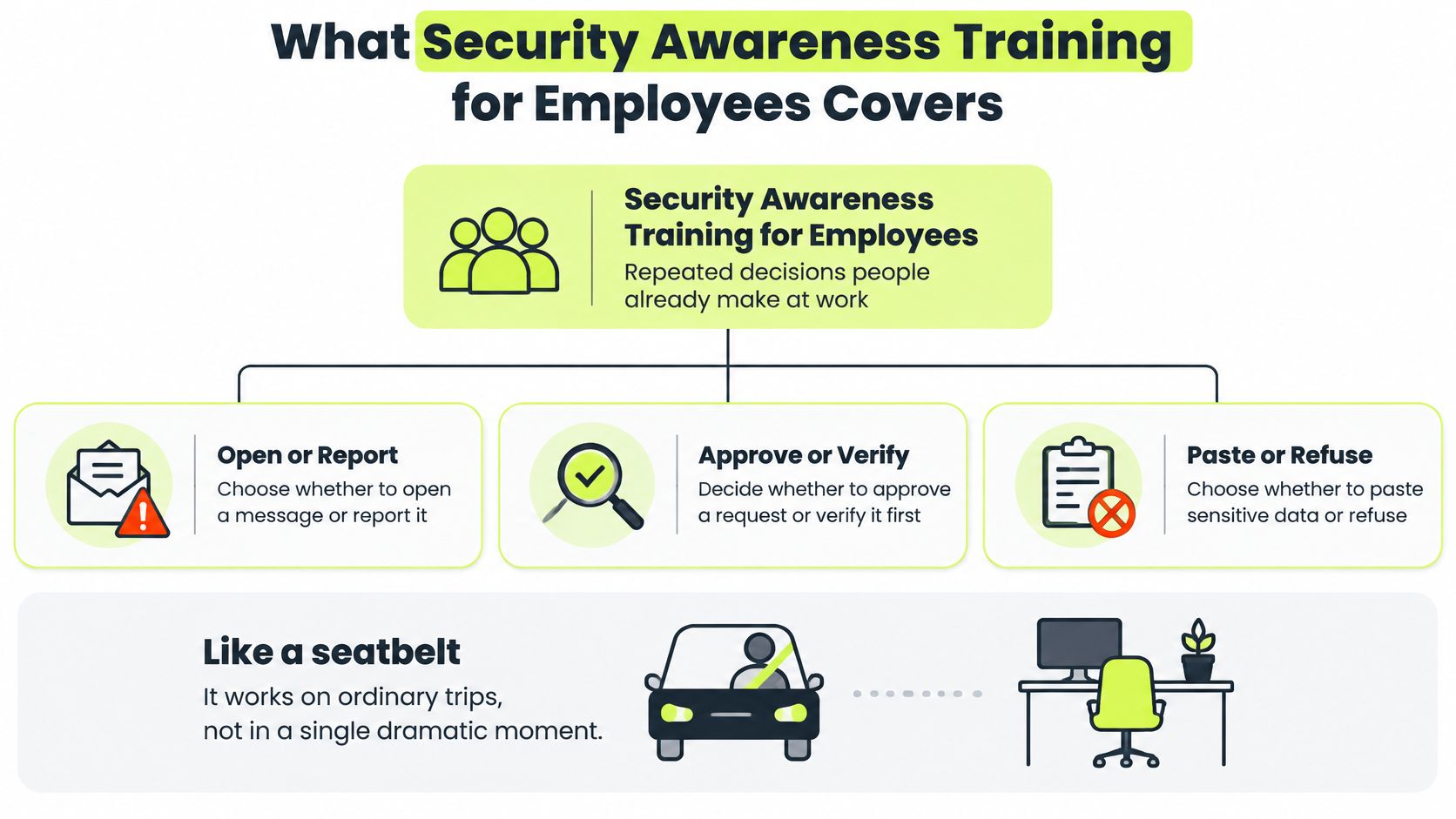
Security awareness training is repeated practice in decisions people already make: open or report, approve or verify, paste or refuse. Employees need to recognize when an ordinary task crosses a security boundary and know what to do next.
A seatbelt earns its value on ordinary trips, not in a one-time demonstration. Training works the same way: it reinforces safe actions during normal work instead of reserving security for an annual event.
The decision hierarchy below keeps that purpose visible.
Build coverage around work
Use this employee security awareness coverage plan as a proposed starting schedule, then adjust assignments to your organization's exposure.
| Topic | Who | Cadence | Behavior to change |
|---|---|---|---|
| Security foundations | All employees | Quarterly lesson plus weekly 30–60 second refreshers | Protect credentials and report incidents |
| Threat defense | All employees | Monthly simulation plus coaching | Verify requests and report suspicious messages, including SMS and mobile lures |
| Privacy and compliance | All employees, extra for data owners | When controls or policy change | Handle personal and customer data correctly |
| Remote and physical security | Distributed and traveling staff | Twice a year | Secure devices, networks, and shared spaces |
| Role-based workflows | Finance, engineering, executives, support | On role change and quarterly | Use the safe action for that job's risky task |
| Modern work and generative AI | By role | When the AI policy changes | Keep confidential data out of unapproved tools |
Start foundations with password-manager use, unexpected authentication prompts, the reporting route, and data classification. Threat defense then adds manipulation: an urgent approval request, a replacement login page, or a message that impersonates a colleague in a chat thread.
Privacy lessons should explain the duties attached to controls your company maintains, rather than reciting unrelated frameworks. Remote-work lessons should cover screen locking, device storage, travel, and shared spaces. Teams that also run connectivity education for staff can use Purple's guide to education staff connectivity for WiFi partners as a companion resource on the staff-education side of network programs.
Role-based instruction turns general advice into job decisions. Finance verifies bank changes through a second channel, engineers protect source code, executives challenge voice and video requests, and support staff check authorization before releasing customer information. Modern-work lessons add approved AI tools, prompt restrictions, output verification, and disclosure reporting, so employees rehearse the exact decision each role faces rather than a generic rule.
Keep threat defense current
In IBM's 2025 Cost of a Data Breach study, which examined 600 breached organizations, phishing was the most common initial attack vector at 16% of breaches, with an average cost of approximately USD 4.8 million.
That cost argues for teaching verification, not suspicious spelling. A static PDF can describe a rule, but a scenario tests whether someone applies it under pressure, whether the lure arrives by email, chat message, vendor request, or AI-generated voice note.
This week, select the coverage rows that match your risks, name an owner for each, and schedule the first cycle. Keep refreshers focused on a single decision employees can use immediately, and judge each topic by whether people report and verify, not whether they finished the lesson.
Why Human Behavior Still Decides Most Breaches
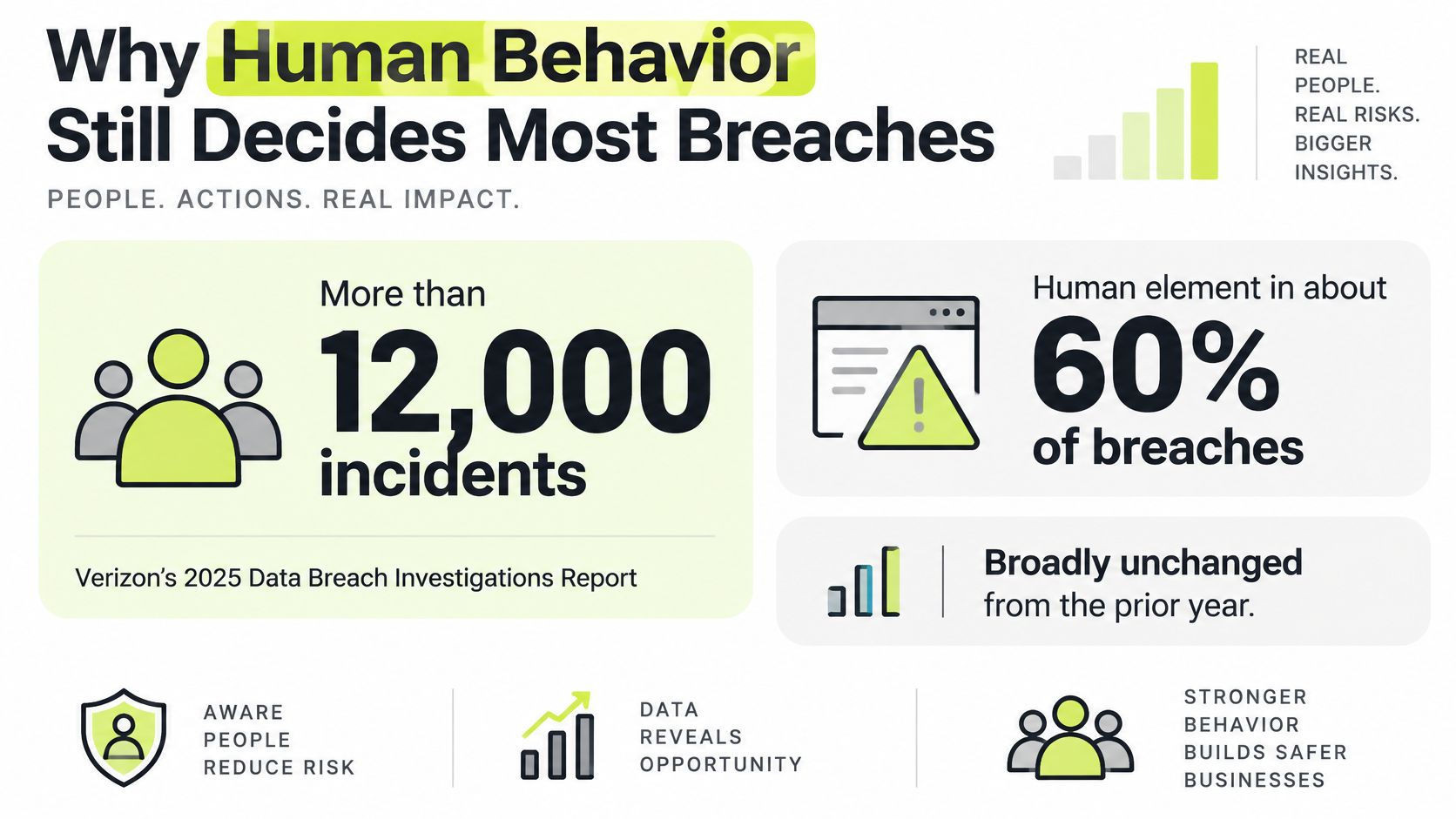
In Verizon's 2025 Data Breach Investigations Report, the human element appeared in approximately 60% of breaches, while third-party involvement doubled from 15% to 30%. Those findings describe persistent exposure, not a temporary knowledge gap that a course can permanently close.
The breach pattern makes the case for ongoing attention.
Human involvement isn't employee blame
A breach involving a person doesn't prove that person caused it through carelessness. Attackers exploit confusing processes, excessive permissions, plausible identities, and requests that resemble legitimate work. Leaders should pair training with access controls, secure defaults, and verification procedures employees can follow.
The practical question is narrower than “Did someone click?” Ask what the person was trying to do, which cue looked trustworthy, and whether the company gave them a safe route to check. A finance employee weighing a bank-change request, an engineer granting access, and an executive challenged by a familiar voice all need a decision they can rehearse, then a reporting route they can use when the answer feels wrong.
Third-party exposure extends the teaching boundary. Vendor contacts, external collaborators, shared mailboxes, and outsourced support can all appear inside otherwise trusted workflows.
Leadership rule: Fund the safe workflow as well as the lesson. Employees can't reliably verify requests if the company hasn't defined an approved verification route.
For distributed teams, practice has to reach chat approvals, identity prompts, shared services, vendor messages, and AI-generated requests that arrive with polished wording. Include credential protection, incident reporting, and safe data handling whenever employees interact with people outside the organization.
Physical handling deserves attention too. Use the device handling mistakes discussed by myhalo as prompts for conversations about storing, transporting, and protecting work devices, then translate those discussions into your own procedures.
Give the control operational ownership
Ask leadership for a standing calendar slot and a budget tied to identifiable exposures: vendor approvals, privileged access, customer records, and distributed work. Assign security ownership of scenarios, People Operations ownership of onboarding coordination, and managers ownership of follow-through.
Use the accompanying video as a discussion prompt, then ask employees to identify the action they'd take in their own workflow.
Completion by itself is weak evidence that this control works. Leaders need to know whether employees can recognize a concern, use the reporting route, and recover after a mistake.
Why Annual Modules Lose to Short Repeated Practice
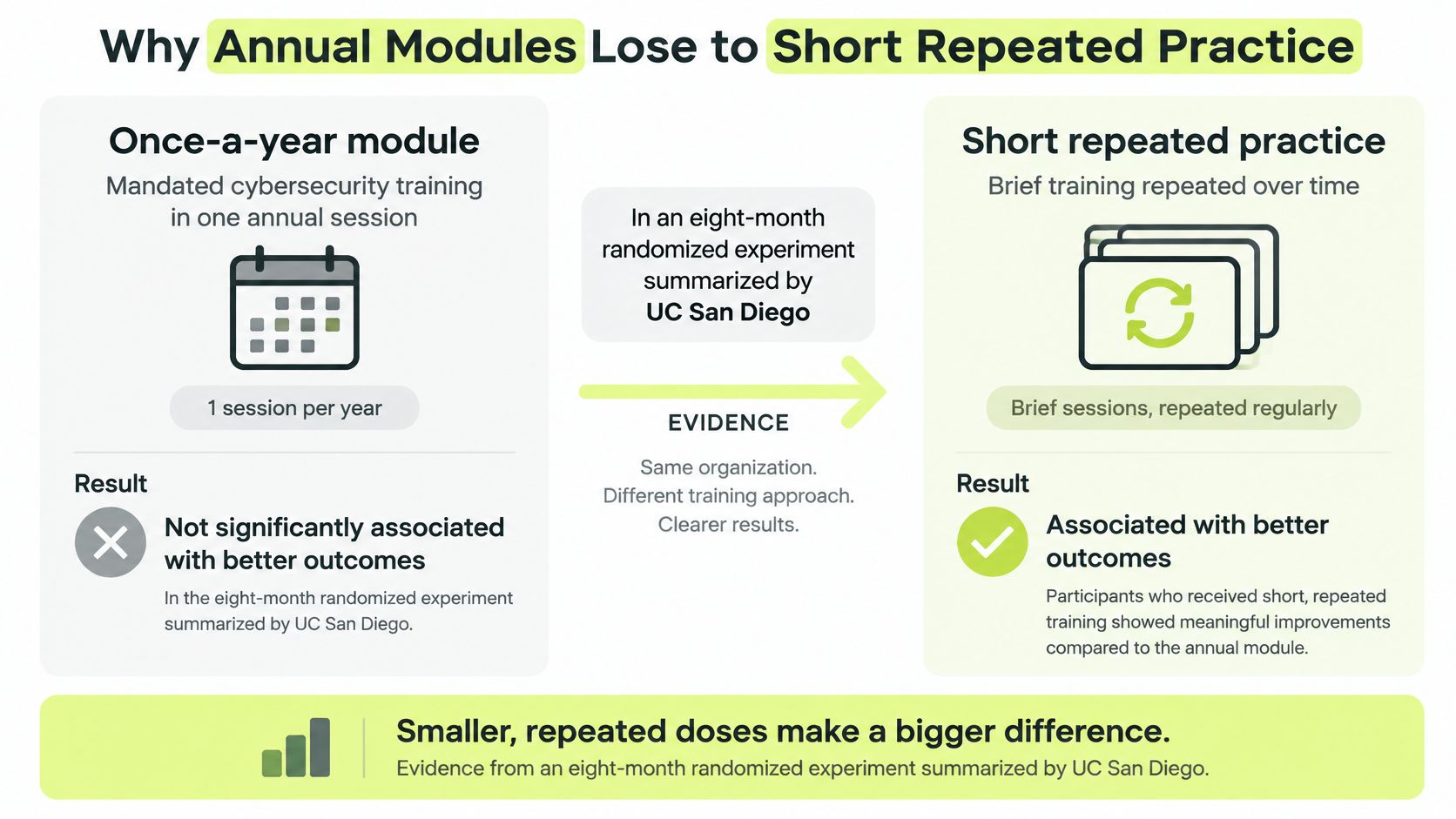
Completing mandated cybersecurity training wasn't significantly associated with avoiding later phishing messages in an eight-month randomized experiment summarized by UC San Diego, while embedded training reduced clicking by only 2%. That's a warning against equating assigned content with protection.
It isn't proof that every short lesson works, either. Changing the format without changing the decision employees practice can produce another attendance exercise.
The comparison below highlights the program-design choice, but repeated practice still needs behavioral evaluation.
Replace content exposure with retrieval
An annual module usually asks employees to recognize the correct answer while security is already on their minds. A realistic workplace decision asks them to notice the risk while they're thinking about invoices, deployments, or customer requests.
Microlearning should bridge that difference. Give employees a brief situation, ask them to choose an action, and explain the consequence. A refresher about account security might ask whether to approve an unexpected sign-in prompt, rather than repeat a definition of multifactor authentication.
Use short lessons during the workday, with lightweight reminders between assigned modules. Keep each interaction narrow enough that the learner can explain the rule afterward.
Make simulations teach something useful
A simulation should resemble a request the recipient might reasonably receive. For a team that coordinates work in Slack, an email-only exercise leaves an important workflow untested.
After an unsafe action, provide immediate corrective feedback. Explain which part of the request required verification and show the approved next step. Don't wait until a later score report, when the employee may no longer remember the context.
| Annual-module habit | Better practice to test |
|---|---|
| Present broad advice | Ask for a concrete decision |
| Treat everyone identically | Match the workflow to the role |
| Delay feedback | Explain the safe action immediately |
| Report attendance | Examine observable behavior |
Avoid public call-outs and deliberately humiliating lures. Employees need to feel able to report a real mistake without first calculating the personal cost of admitting it.
Match practice to responsibility
Finance staff should rehearse changes to payment instructions. Engineers need examples involving repositories, credentials, and AI coding workflows. Executives should practice challenging urgent voice or video requests without relying on familiarity alone.
These exercises should expose both learning gaps and process gaps. If employees disagree about which channel counts as approved verification, the organization needs a clearer procedure, not another generic warning.
Shorter isn't automatically better. A useful lesson gives the employee a decision, a usable rule, and feedback they can apply at work.
Retain required acknowledgments where necessary, but don't make them the whole program. Treat recurring practice as a control to test and improve, not a guaranteed cure for phishing.
Metrics That Show Behavior Changed
A raw click rate can mislead a program owner. An obvious credential lure and a well-timed supplier request aren't equivalent tests, even if both contain a link.
NIST's Phish Scale assigns simulated messages a human-detection difficulty rating, helping teams interpret results in light of the lure and the recipient's context. Use that approach to distinguish a harder exercise from deteriorating behavior.
Record context before judging outcomes
Keep campaign records detailed enough to explain why results changed. The following security awareness metrics worth tracking connect each observation to a practical decision.
| Metric | What to record | How to read it |
|---|---|---|
| Lure difficulty | NIST-style human-detection rating | Don't compare a hard lure with an obvious one |
| Recipient role | Team or job of each person | Look for gaps by role, not one company percentage |
| Exposure timing | When the simulation arrived | Note fatigue or campaign clustering |
| Click or comply rate | Share who took the unsafe action | Interpret only beside difficulty and role |
| Report rate | Share who flagged the message | A rising report rate is the healthier signal |
| Time to report | Minutes from delivery to report | Shorter is better if reports stay accurate |
| Repeat-failure rate | People who miss more than once | Coach repeats; don't punish one hard lure |
| Comprehension | Score on authored questions | Set and publish a pass line before assignment |
| Completion | Finished assigned lessons | Proves exposure, not operational readiness |
Start with difficulty, role, and timing because they describe the test conditions. A request arriving during a finance close may have different relevance from the same request sent to engineering. Record those differences without assuming timing caused the result.
Then examine unsafe actions alongside reporting. An employee who clicks and immediately reports needs a different conversation from someone who complies, notices a problem, and stays silent.
Separate readiness from audit records
Leading indicators help identify what to coach: reporting accuracy, reporting speed, repeated unsafe actions, and gaps by role or channel. Healthier results mean employees flag relevant concerns promptly and fewer people repeat the same mistake under comparable conditions.
Completion records, assessment scores, and certificates provide evidence of training activity. They're useful for audits, but they don't independently show that someone will challenge an unexpected request during work.
For a deeper look at interpretation, use this discussion of whether phishing simulations work when designing your evaluation criteria.
A spike on a demanding impersonation exercise may reveal an unfamiliar scenario or unclear verification rule. Investigate before declaring a company-wide failure. Repeated misses on straightforward lures call for focused coaching and a check that the reporting mechanism is accessible.
Review question: Which role and channel still can't demonstrate the safe action under a realistic request?
Don't collapse finance, engineering, executives, and support into a single readiness percentage. Give each group a relevant test, compare like with like, and document what you changed after reviewing the results.
How to Run Training Inside a Slack-First Company
Build the rollout around the places where employees already receive requests and make decisions. Slack delivery should remove unnecessary friction without turning every channel into a stream of security notifications.
This process keeps delivery, practice, and administration connected.
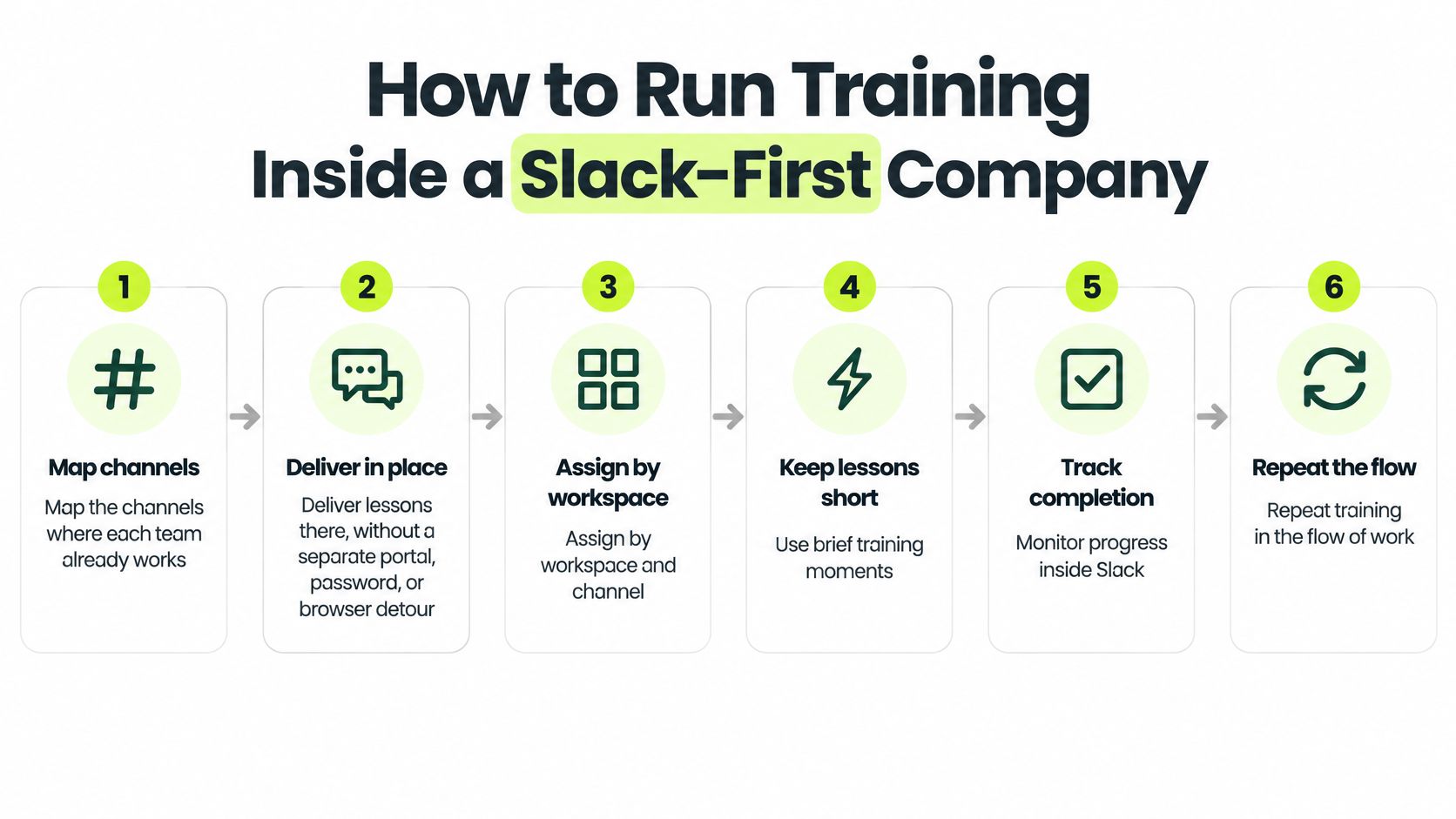
Configure the learning workflow
Map the working channels. Identify where each team receives approvals, vendor requests, and operational updates. Deliver lessons in the working environment rather than sending people through a separate portal. Include threads if that's where decisions happen.
Assign by audience. Use workspace, channel, team, or individual assignments so employees receive relevant material. Check contractors in guest channels explicitly: confirm they can access their assigned lesson and know where to report a concern without exposing private employee records.
Set a sustainable schedule. A proposed starting point is quarterly lessons with weekly 30–60 second refreshers. Automate overdue reminders, but allow administrators to nudge a person or channel selectively. Someone who mutes direct messages may need a channel assignment instead.
Connect practice to response
Run drills in the relevant medium. Use suspicious-message exercises where employees chat, with mobile-style or SMS scenarios for phone-heavy roles. Obtain appropriate authorization and avoid collecting real credentials. Follow an unsafe response with private coaching and a focused remediation lesson.
Make learner actions obvious. Give employees a simple in-chat route to start the next lesson, check progress, and flag a suspicious message. Publish the reporting instructions in a place they can retrieve quickly. Also define an alternative route for times when Slack itself is unavailable or suspected compromised.
Keep administrator evidence usable. Maintain assignment, attempt, comprehension, completion, and overdue records, plus traceable certificates where required. Restrict access to learner-level results. The customer remains responsible for workspace setup, administrator designations, authorized users, and configuration.
Use a compliance training software evaluation to check whether those operational requirements fit your existing evidence workflow. A polished learner interface won't compensate for records your compliance team can't reconcile.
Pilot before expanding
Run a 30-day pilot in a single channel as a practical test, not a promise of measurable risk reduction within that period. Choose a team with a clear owner and a workflow you can rehearse safely.
Capture the baseline, deliver the assigned material, run the drill, and review reporting behavior with the channel owner. Record delivery failures and notification problems alongside learning gaps. Expand only after employees can find the lesson, understand the safe action, and use the reporting route.
Three Workplace Scenarios Employees Should Rehearse
A useful scenario stops at a moment of choice. Ask the employee what they'd do next before revealing the explanation, then make the answer specific enough to use during work.
A vendor payment change arrives in Slack
A finance lead receives a message saying a familiar supplier has changed bank details. The tone resembles the CFO's, the invoice looks plausible, and the sender says payment must happen before the deadline.
The safe action is to stop and verify through a previously established contact route. Don't use a phone number supplied in the same thread. Report the suspicious request and preserve the message for review.
Ask: Which contact would you use to confirm this change? An answer such as “I'd ask the sender again” reveals a verification gap. For additional discussion of manipulation and identity claims, use scam prevention with Digital Footprint Check.
An engineer wants help from a public AI tool
An engineer is preparing a prompt containing a customer example and internal source code. The tool could help resolve the issue, but the engineer isn't sure whether the company permits that information to leave its environment.
In a 2025 survey of 12,037 employees across the United States, United Kingdom, France, Germany, the Netherlands, and South Africa, 60.2% used AI tools at work, while only 18.5% knew their employer's AI-use policy, according to KnowBe4's survey announcement.
The safe action is to use an approved tool and keep client data and internal source code out of this unapproved prompt. Replace sensitive content with a synthetic example, verify the output, and report any accidental disclosure through the incident process.
Ask: What must you remove or replace before submitting this prompt? Employees shouldn't have to invent data-classification rules under deadline pressure. Give them permitted examples, prohibited examples, and an escalation route.
A traveler receives an unexpected identity prompt
A traveling employee connects to public WiFi and receives an authentication approval request they didn't initiate. They're about to join a meeting and consider approving it to clear the notification.
Deny the prompt and notify IT or security. Move to a trusted company connection or personal hotspot where available, but don't assume changing networks resolves a potentially compromised account.
Ask: What should you do about the unexpected prompt before continuing work? Use phishing simulation examples to develop related exercises without copying a single lure repeatedly.
These rehearsals test payment verification, AI data handling, and identity decisions. Each fits a short chat interaction while revealing more than a policy acknowledgment.
Choose a Continuous Program and Pilot One Channel
Use a standalone annual module for a one-time policy acknowledgment. Readiness comes from continuous practice: employees handle sensitive requests throughout the day, work in Slack, and need evidence that goes deeper than attendance.
A company without a chat-based workforce may need a different delivery channel. The principle stays the same: train people where they work, assign the decisions their roles actually face, and evaluate demonstrated behavior rather than completion alone.
Define a pilot you can judge
A pilot works like a dress rehearsal: same decisions, smaller audience, low cost of mistakes. Pick one channel and run a 30-day pilot covering security foundations, one role-specific scenario, and a suspicious-message drill. Set the reporting route and coaching process before launch so employees are judged on behavior rather than procedural guessing.
Judge the pilot against concrete criteria:
- Response behavior: Did employees report the concern, and how quickly?
- Repeat mistakes: Did follow-up coaching resolve the specific misunderstanding after a failed attempt?
- Workflow fit: Could people finish assigned lessons without leaving Slack?
- Evidence quality: Could the administrator trace assignments, attempts, scores, and completion records?
Skip the satisfaction score. Employees can enjoy a lesson without being ready, and a hard exercise can feel uncomfortable while teaching exactly the judgment you need.
Match the platform to the boundary
Vigil Security fits teams that want employee training and compliance delivered inside Slack, with no separate portal or password. Delivery, smart reminders, grading, and certificates happen in the same workspace where employees already spend their day. Antivirus, endpoint protection, remote access, IT helpdesk, and consumer technical support sit outside that boundary.
The customer still owns workspace setup, administrator designations, and configuration. Vanta and Drata are optional destinations for customer-directed training-completion evidence; Vigil does not pull broader business data from them. Teams evaluating 250 or more learners should plan to discuss scope directly with the vendor rather than self-selecting a plan.
This week, name the pilot channel, its owner, and the first role-specific decision employees will rehearse. Bring that scope to a demo so pricing, rollout planning, and compliance workflow discussions address a real implementation instead of an undefined company-wide launch.
Vigil Security offers Slack-native security awareness and compliance training with recurring lessons, assessments, reminders, and completion evidence. Contact Vigil Security at vigilsecurity.app to discuss a single-channel pilot built around your team's risky decisions, reporting behavior, and audit requirements.