Windows Active Directory is Microsoft's enterprise identity management system, built on a hierarchy of domains, trees, forests, and organizational units. It uses Kerberos and LDAP to centralize authentication, authorization, group membership, computer accounts, and policy management across Windows networks.
The architecture is still familiar to anyone who has inherited an enterprise environment: users sign in through a domain, applications query directory attributes, workstations receive policy, and administrators delegate access through groups. In a Slack-first organization, that same on-premises directory may sit behind cloud identity services, SaaS applications, VPNs, privileged workflows, and compliance evidence collection.
The difficult part isn't learning what a domain controller does. The difficult part is managing the dependencies around it without allowing legacy applications, excessive privilege, replication assumptions, or poorly coordinated security changes to undermine the whole identity plane.
Understanding Active Directory Architecture
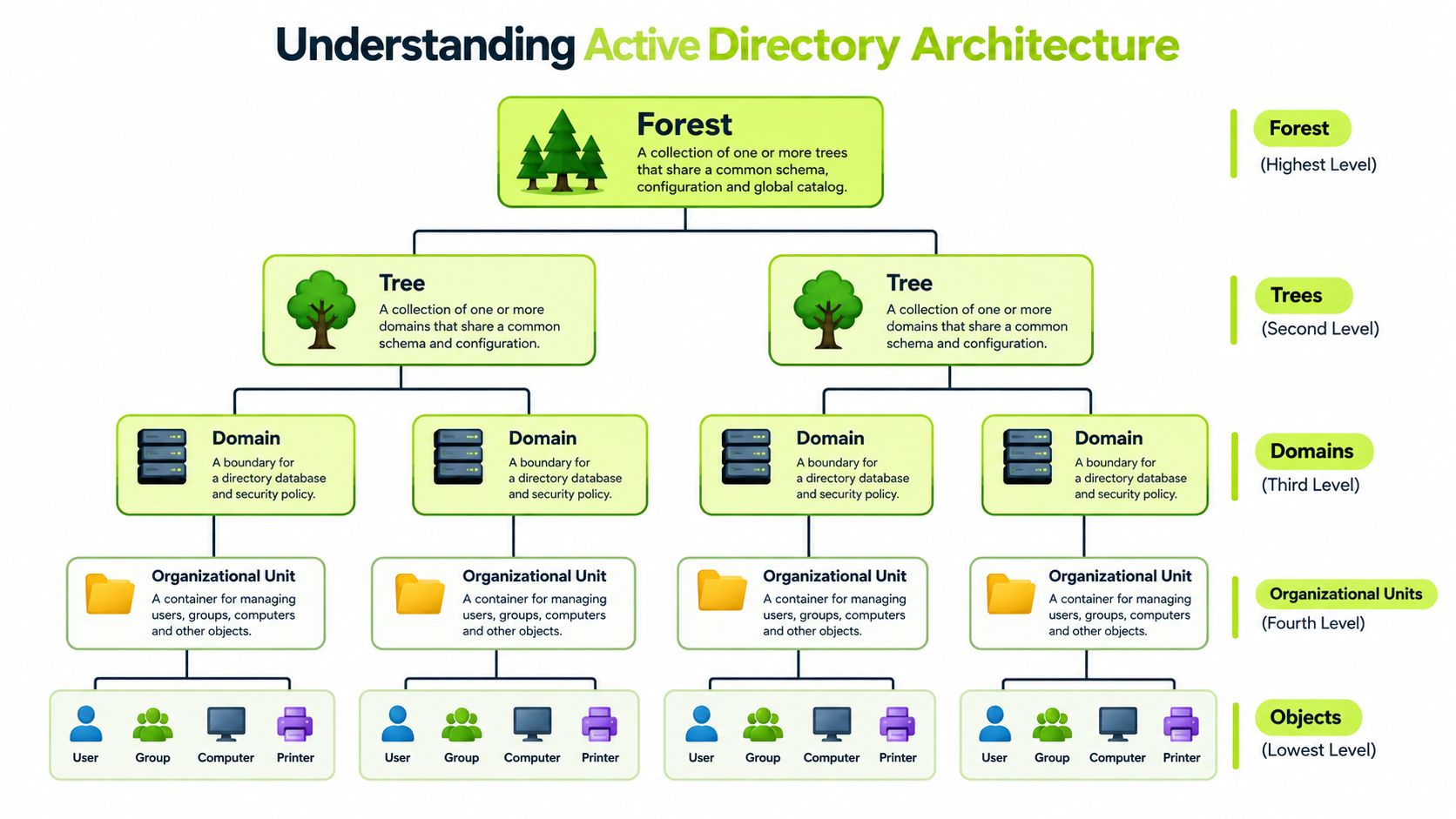
A useful mental model starts at the top. A forest is the broadest security and schema boundary. It can contain one or more trees, which are collections of domains with contiguous DNS namespaces. A domain provides an authentication and administration boundary, while organizational units, or OUs, organize users, computers, groups, and other objects for delegation and Group Policy application.
The distinction matters operationally. Forests define the broadest trust and schema context. Domains contain directory partitions and domain controllers. OUs are administrative containers, not independent security boundaries. They let teams apply policy and delegate tasks without creating another domain merely to represent a department or geography.
The hierarchy in practice
Objects are the working units of the directory. A user account can belong to groups, a computer account can receive policy, and a service account can authenticate an application. Domain controllers store and replicate these objects, while DNS helps clients locate directory services and Kerberos authenticates domain identities.
That distributed design is why topology matters. Sites, subnets, replication connections, naming, delegation, and recovery procedures all influence whether the directory behaves predictably during a network failure or administrative mistake.
Microsoft documents a maximum lifetime capacity of almost 2.15 billion objects for each domain controller in an Active Directory forest. That's an engineering limit, not a statement about normal deployments, but it demonstrates the scale AD was designed to support. The same Microsoft documentation on Active Directory limits also explains why domain-controller counts, domain structure, and replication design require deliberate planning.
| Model | Structure | Administrative effect |
|---|---|---|
| Flat network directory | Few meaningful containers | Broad permissions and weak policy separation |
| Domain and OU hierarchy | Forests, trees, domains, OUs, objects | Delegated administration and targeted policy |
| Multi-domain forest | Multiple domain boundaries | Separation, trust management, and added complexity |
| Multi-forest environment | Independent forest structures | Stronger isolation, but more integration work |
Practical rule: Create a new domain or forest only when you can name the security, legal, administrative, or replication boundary it provides. OUs should handle organization and delegation wherever that boundary doesn't require stronger isolation.
History and Evolution of Active Directory
Windows Active Directory became Microsoft's enterprise directory service with the release of Windows 2000 Server on February 17, 2000, replacing the older Windows NT domain model with a hierarchy based on domains, trees, and forests. Microsoft had already brought the first Windows 2000 Active Directory domain online in Redmond on April 9, 1999, which shows that the architecture was developed and tested before the public operating-system release. The historical account is documented in Microsoft's overview of Active Directory's 25-year evolution.
The original design established more than a new account database. It integrated DNS for service discovery, adopted Kerberos version 5 as the primary authentication protocol, and retained NTLM for compatibility. It also created the structural foundation later expanded through Group Policy, OUs, domain trusts, replication, and additional identity services.
Why old design choices still matter
Many enterprise processes still trace directly to that early architecture:
- Centralized sign-in depends on domain authentication and locator services.
- Administrator delegation depends on groups, OUs, and access control entries.
- Workstation management depends heavily on computer objects and Group Policy.
- Access decisions often depend on nested group membership and directory attributes.
- Application integration frequently assumes LDAP queries, Kerberos service tickets, or NTLM fallback.
This history explains why modernization rarely begins with a clean replacement. A current environment may contain applications designed around assumptions that were reasonable when NTLM compatibility, broad domain administration, and long-lived service credentials were common.
The useful lesson isn't that AD is outdated. It's that architecture has inertia. A directory can continue serving modern workloads, but only if administrators understand which dependencies are structural, which are historical, and which are merely convenient habits. Treating every old configuration as mandatory preserves unnecessary risk. Treating every legacy dependency as disposable breaks business services.
Directory Services Compared
A workload that accepts LDAP is not automatically a candidate for AD DS. Start with the identity boundary it requires. Windows Active Directory Domain Services runs on domain controllers and maintains users, computers, groups, credentials, authentication, and policy relationships across a domain.
AD Lightweight Directory Services, or AD LDS, supplies directory functions without becoming the Windows domain. It does not provide the same domain authentication model, computer-account management, or Group Policy foundation. Microsoft's protocol documentation distinguishing AD DS from AD LDS is useful when an application team uses “Active Directory” to describe any LDAP-based service.
The distinction is architectural. AD DS joins identity, devices, authentication, policy, and administrative trust. AD LDS keeps application directory data separate, which can reduce the blast radius of an application schema or its administrators. That separation also means AD LDS cannot replace AD DS for domain-joined workstations, Windows sign-in, or domain policy.
| Service Type | Authentication Model | Group Policy Support | Domain Controller Role | Primary Use Case |
|---|---|---|---|---|
| AD DS | Domain authentication with Kerberos and compatible protocols | Yes | Yes | Windows identity, devices, policy, and authorization |
| AD LDS | Application-specific directory authentication | No | No | Application directory data and LDAP integration |
| External enterprise directory | Depends on implementation | Usually platform-specific | Usually no Windows domain-controller role | SaaS, Linux, federation, or specialized identity workloads |
Choose AD DS when the workload needs domain identities, Kerberos tickets, Windows-integrated sign-in, computer accounts, device policy, or authorization based on the enterprise directory. Choose AD LDS when the application needs an LDAP-compatible store for its own objects and can manage authentication independently.
Two deployment errors appear repeatedly. An organization may install AD DS solely because a product advertises LDAP support, then give that product unnecessary proximity to the domain. The opposite error places an application on AD LDS even though it expects domain authentication or Group Policy. In both cases, familiarity has replaced dependency analysis.
Use these questions during design review:
- Does the workload need domain-joined computers?
- Does it require Kerberos tickets or Windows-integrated sign-in?
- Must policy apply to users or devices?
- Should its objects share the enterprise directory's trust and administrative boundaries?
The answers define the service boundary. LDAP compatibility alone does not.
Essential Administrative Tasks
A routine account change can become a production incident when it reaches the wrong OU, group, or domain controller. Effective AD administration therefore depends on controlled changes, clear ownership, and evidence that the change converged. Graphical consoles remain useful for investigation, while repeatable PowerShell workflows improve review, consistency, and rollback.
Start with object hygiene. Create users and computers in OUs that match their management scope, assign access through approved role groups, and disable or remove stale accounts under the organization's lifecycle policy. Direct permissions on individual users create hidden dependencies and make later audits harder.
Operating controls that hold up in production
Apply these controls during normal administration:
- Create with ownership: Record the business owner, purpose, expiration condition, and intended group memberships for non-person accounts.
- Delegate narrowly: Give service desk staff only the rights they need for password resets, account recovery, or specific OU operations.
- Review privileged groups: Inspect domain-level administrative groups and high-impact delegated groups. Confirm the business need for every member and remove access that no longer has an owner.
- Check replication health: Use
repadminanddcdiagto find failures before making changes that depend on directory convergence. - Validate the client path: A successful write on one domain controller does not prove that every application, site, or service can immediately read the new value.
Replication latency is an operating condition, not an exception. An integration that writes an attribute and immediately queries another domain controller may receive the previous value. Automation should include retries, deliberate domain-controller selection, and error handling that distinguishes delay from an actual failure.
Least privilege is an operating model, not a permissions cleanup project. Separate routine and privileged accounts, delegate tasks by OU or function, and require review for high-impact changes.
Migration planning exposes dependencies that daily administration can conceal. Before moving between domains or forests, document naming, trusts, SID history decisions, service accounts, workstation transitions, and application ownership. A practical directory migration approach helps structure that preparation, particularly when the work includes applications, service identities, and human change management rather than user objects alone.
Group Policy Implementation and Management
A policy change that looks harmless in a test OU can disrupt login scripts, line-of-business applications, or workstation behavior across production. Treat Group Policy as controlled configuration, with a defined owner, scope, test population, and removal plan.
Start by separating objectives. Domain controllers, member servers, workstations, and users rarely need identical settings, so keep their policies distinct where requirements differ. Link GPOs to OUs that represent management scope rather than the company's reporting structure. This makes ownership and impact easier to understand.
Test the processing path
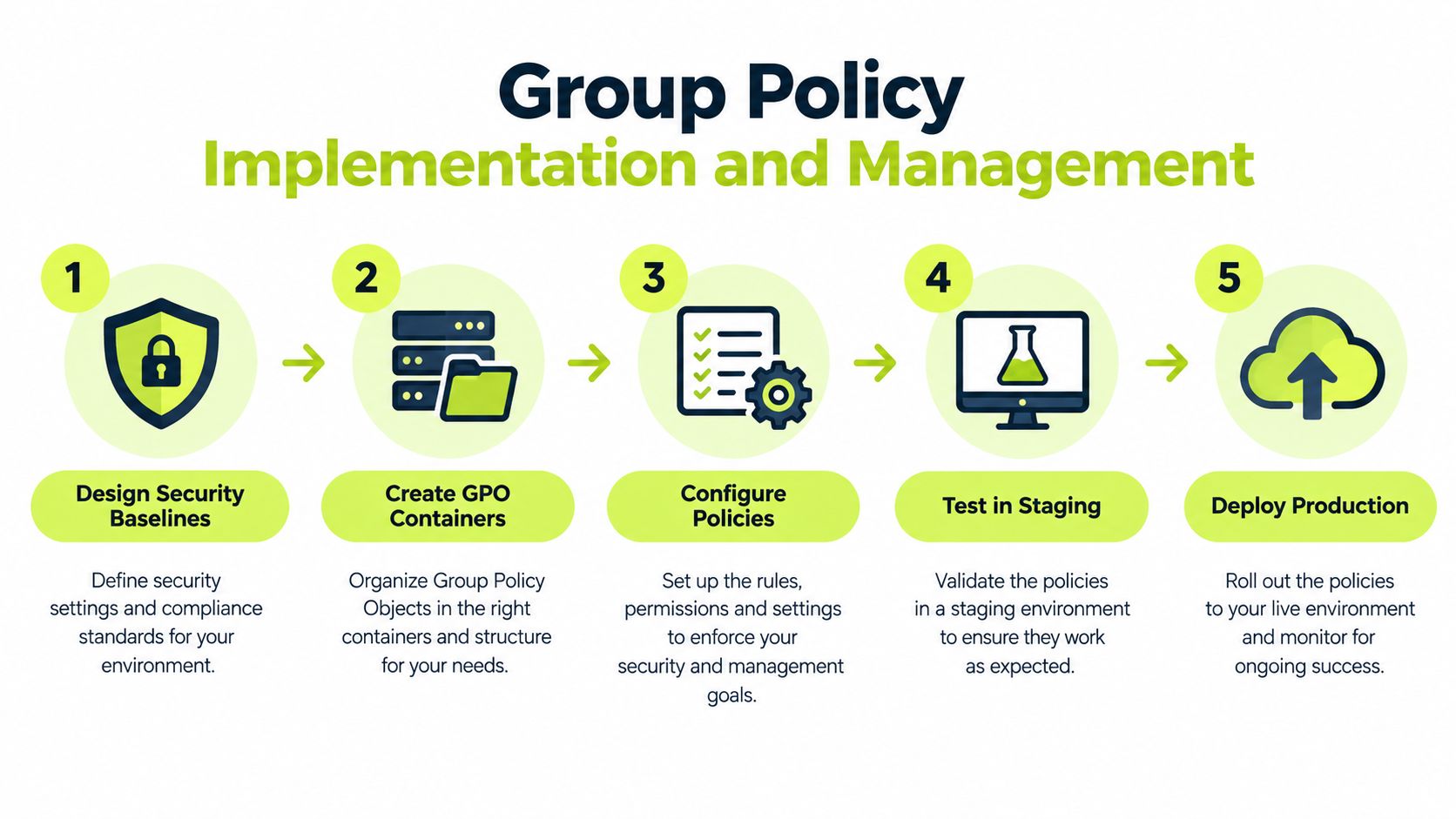
Use a repeatable sequence:
- Define the baseline: State the control, affected systems, and acceptable exceptions.
- Create the GPO: Record its purpose, owner, scope, and naming convention.
- Configure only the target settings: Avoid bundling unrelated changes.
- Test representative paths: Include users, computers, applications, and sites.
- Roll out gradually: Expand scope in stages and retain a practical rollback method.
Purpose-based GPOs shorten diagnosis. If an application breaks, administrators can identify the policy responsible through gpresult, Resultant Set of Policy, and event logs. An “everything” GPO hides that relationship and turns routine troubleshooting into policy archaeology.
Processing order also matters. Inheritance, enforced links, security filtering, WMI filters, and loopback processing can change the effective result. Document exceptions beside the configuration, then revisit them when applications or operating systems change. An exception created for a legacy dependency needs an owner and an exit condition, especially in hybrid environments where cloud controls and on-premises policy may overlap.
The Microsoft Learn Group Policy training path explains processing, storage components, administrative templates, and Central Store practices. Use it alongside hands-on validation, not as a substitute for testing the actual domain, sites, and device groups.
Securing Domain Controllers and Identity Infrastructure
A compromised domain controller can alter the directory database, authentication paths, policies, and device access across the organization. Treat it as an identity-system component, not as another Windows server.
Start with the physical and platform controls. Restrict access to the server room, run a currently supported Windows Server release, and use TPM-enabled hardware with BitLocker where feasible. Microsoft documents these measures in its Active Directory security best practices.

The larger control is administrative separation. Use privileged-access workstations or jump servers, keep domain controllers away from routine browsing and email, and remove software that does not support their directory role. Restrict network routes, especially internet access and unnecessary outbound connections.
Maintain separate accounts for daily work and administration. Apply a domain-controller-specific security baseline, then monitor changes to privileged groups, administrative logons, unusual authentication, and high-impact directory permissions. Independent review or dual authorization adds protection when one change could affect the entire identity tier.
These controls create friction. A controlled jump path takes longer than a remote session from a laptop, and service owners may resist the delay. That is an operational cost worth accepting because privileged access should be rare, attributable, and constrained.
Apply least privilege access to administrators, service accounts, help desk operators, applications, and automation identities. In hybrid and Slack-first organizations, informal approvals and chat-based requests can bypass that boundary, so record ownership, approval, and expiry for high-level access rather than relying on conversation history.
Kerberos Modernization and Behavioral Change Management
Kerberos hardening is a service transition with a cryptographic component. A warning event becomes useful only when someone can identify the application, locate its owner, confirm supported encryption, test the change, and give the service desk a precise response. That ownership chain matters more than changing a domain-controller setting in isolation.
Microsoft guidance directs administrators to update domain controllers beginning with the January 13, 2026 updates, monitor KDCSVC audit events 201–209, remediate affected service accounts, and enter Enforcement mode after warning or blocking events are resolved. Microsoft states that Enforcement mode will block vulnerable connections after applicable April 2026 updates are installed on domain controllers. See the Microsoft guidance for managing Kerberos KDC use of RC4 for the required sequence.
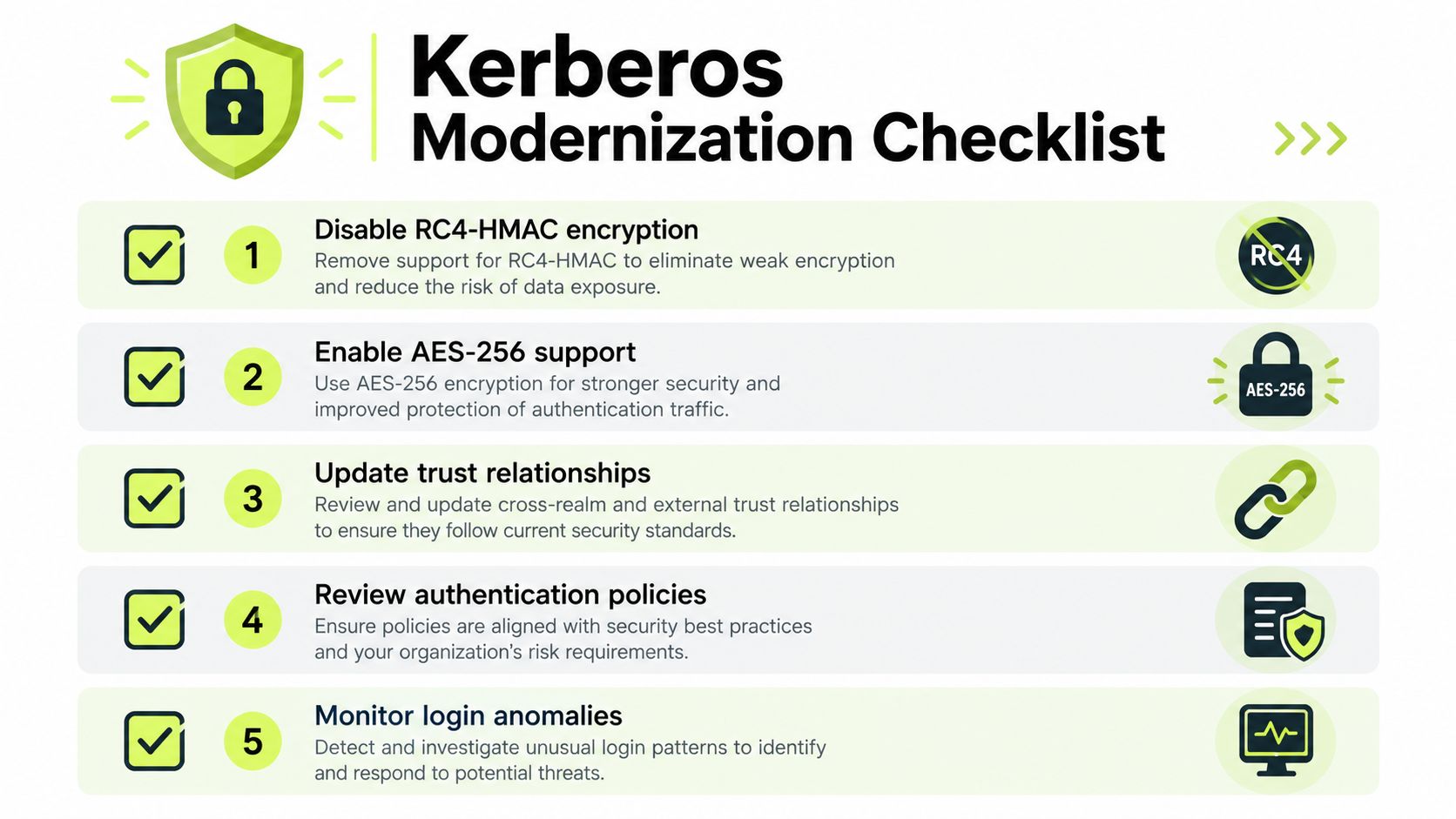
Treat the work as an ownership problem first. Infrastructure teams collect and classify KDC events, connect recurring failures to accounts and services, and separate genuine dependencies from isolated incidents. Application owners then test encryption support, replace obsolete settings, or bring in the vendor. A supplier's silence should create a documented exception, not an open-ended delay.
Service desk staff need a short decision tree for authentication failures, including the user symptoms to capture and the team responsible for escalation. Security should approve exceptions and record their reason, scope, compensating control, owner, review date, and removal condition.
Stage the rollout around human behavior. Notify affected teams before enforcement, rehearse escalation, and publish an error message that identifies the next action. In a Slack-first organization, chat can expose an issue quickly, but a conversation is not an inventory or an approval record. Store ownership, test results, and exceptions in the system used for operational accountability.
Success means RC4 no longer works where it should not. It also means the organization can explain which services authenticate, why they depend on particular settings, who supports them, and how recovery proceeds when a legacy dependency fails.
Hybrid Identity and Cloud Integration
A Slack-first company can have cloud applications at the center of daily work while Windows sign-in, file access, internal applications, and privileged workflows still depend on AD DS. Hybrid identity succeeds only when each decision has a clearly defined authority.
AD DS may remain authoritative for users, groups, and device relationships. Cloud identity services can manage SaaS access, modern authentication, conditional access, and collaboration workflows. The risk lies in the handoffs: synchronization errors, stale attributes, duplicate identities, and unclear group ownership can grant access in one environment while leaving another unchanged.
Start with an identity ownership record for every important object and access path. It should answer five questions:
- Authoritative source: Where is the user, group, or attribute created and changed?
- Synchronization direction: Which attributes flow to cloud services, and which are prohibited from flowing back?
- Authentication method: Does the path use password validation, federation, pass-through, certificates, or application-specific sign-in?
- Access decision: Is access based on an AD group, cloud group, device posture, conditional access, or application policy?
- Failure owner: Who handles provisioning delays, disabled accounts, and unexpected access?
Cloud collaboration increases the number of places where an identity can receive permissions. Guest and hospitality networks may also connect identity with the network experience through passwordless WiFi for hospitality, rather than treating the directory solely as a Windows login system.
Private applications and remote access require separate trust decisions. Apply zero trust network access principles by evaluating user identity, device context, application authorization, and network location independently. Document the fallback path when synchronization fails, and assign ownership before a production incident exposes the gap.
Real World Use Cases and Compliance Considerations
In a regulated environment, Active Directory supports daily operations and provides evidence for access controls. Its records can show group membership, delegated permissions, authentication events, and policy assignments. Auditors need more than a console screenshot. Evidence should identify the owner, review activity, scope, and relevant timing.
Consider a privileged access review. The control owner defines which groups and delegated rights fall within scope. IT exports current membership and change history, while GRC maps the records to the applicable control. That workflow often reveals dormant accounts, inherited permissions, and application identities without a current owner.
The same evidence model applies to change management. A Kerberos hardening change may be technically correct while still creating incidents if service owners do not know which applications depend on older behavior. In a Slack-first organization, administrators may receive reports in a channel, application owners may approve changes in a ticket, and the service desk may handle the resulting sign-in failures. Those records should connect to the directory change, not remain scattered across separate tools.
Make directory evidence explain behavior
Compliance evidence should connect three layers:
- Configuration evidence: Which policy, group, account setting, or protocol configuration exists?
- Operational evidence: Who reviewed, approved, changed, or remediated it?
- Behavior evidence: Did administrators and users complete the required training, respond to a simulation, or follow the escalation process?
A compliance management solution can organize these records, but it cannot establish ownership on its own. Directory data still requires defined retention, review schedules, and accountable control owners.
Active Directory can demonstrate that an account belongs to a group or that a policy is linked. It cannot prove that the owner understands the risk, that a service supports a protocol change, or that the application team can recover when authentication behavior changes. Those conclusions require operational records and human follow-through.
Future Outlook for Active Directory Management
Active Directory will remain in service wherever Windows endpoints, internal applications, regulated workloads, and legacy integrations still rely on domain identity. Cloud adoption changes the surrounding design, yet it does not automatically remove domain controllers or the responsibility for operating them safely.
The planning question is structural: which identity dependencies are deliberate, documented, and supportable? Hybrid identity can make access easier for users, while synchronization errors, excessive privilege, and unclear application ownership can extend one failure across on-premises and cloud systems. In Slack-first organizations, change records, service-owner decisions, and incident reports also need a clear connection to the directory objects and authentication paths involved.
A practical roadmap starts with the foundations that survive platform changes:
- Reduce unnecessary complexity: Retire obsolete domains, trusts, groups, and policy exceptions instead of preserving them by habit.
- Modernize dependencies: Replace legacy authentication, weak service-account practices, and undocumented application bindings.
- Automate evidence collection: Schedule privileged-group reviews, replication checks, policy reporting, and account-lifecycle validation.
- Practice recovery: A backup that has not been restored in a controlled test remains an assumption, not a recovery capability.
- Train by role: Domain administrators, application owners, service desk staff, and users require different procedures for identity changes and failures.
- Budget for ownership: Each integration needs an accountable owner for compatibility, incident response, and retirement.
Microsoft's documented scale limits show that AD supports very large environments. Scale still does not excuse disorder. Clear administrative boundaries, reliable replication, controlled delegation, and tested recovery usually provide more value than an elaborate forest design that nobody can explain.
The future-facing administrator separates retained dependencies from abandoned configuration. That distinction supports safer Kerberos changes, cleaner hybrid identity, and fewer surprises when legacy systems finally leave the environment.
Quick Reference Commands and Troubleshooting
PowerShell and the built-in diagnostic tools are most effective when each command answers a specific question. Don't run a broad command dump during an incident. Establish whether the problem is object state, authentication, policy, DNS, connectivity, or replication, then test that layer directly.
| Task Category | Command | Purpose | Common Parameters |
|---|---|---|---|
| User lookup | Get-ADUser -Identity jsmith -Properties * |
Retrieve a user and selected attributes | -Filter, -SearchBase, -Properties |
| Group membership | Get-ADGroupMember -Identity "Finance-Users" |
List direct group members | -Recursive |
| Computer lookup | Get-ADComputer -Identity "PC-001" -Properties * |
Inspect a computer account | -Filter, -SearchBase |
| Replication status | repadmin /replsummary |
Summarize replication failures | /bysrc, /bydest, /errorsonly |
| Replication detail | repadmin /showrepl |
Display inbound replication results | /all, /verbose, /errorsonly |
| Domain-controller health | dcdiag /v |
Test core domain-controller services | /test:DNS, /test:Replications |
| Policy result | gpresult /h report.html |
Generate applied-policy evidence | /scope computer, /scope user |
| Site and topology review | Get-ADReplicationSite, Get-ADReplicationConnection |
Inspect replication objects | -Filter * |
A practical incident sequence
- Confirm scope: Determine whether one user, one computer, one site, or multiple domain controllers are affected.
- Check object state: Verify the account is enabled, the password state is expected, and group membership is correct.
- Test authentication path: Identify whether the failure involves Kerberos, NTLM fallback, LDAP access, or a cloud sign-in.
- Check policy application: Use
gpresultand relevant event logs rather than assuming the linked GPO applied. - Review replication: Run
repadmin /replsummary, then inspect the specific connection and naming context. - Validate the original symptom: A clean diagnostic result isn't enough if the application still fails.
For LDAP integrations, use authenticated LDAP over TLS where supported, avoid anonymous binds, query indexed attributes, and don't repeatedly search the entire directory. Also account for replication latency. A successful write may not be immediately visible from every domain controller.
Vigil Security helps distributed teams connect identity and compliance practices to daily behavior through short, interactive security training inside Slack. Use it to reinforce privileged-access habits, authentication-change procedures, phishing response, and audit evidence workflows, then visit Vigil Security to see how the platform fits a Slack-first security program.