An employee is at a desk, facing a deadline, when a call appears to come from the company. The caller knows the manager's name and asks the employee to approve a login prompt before the account locks. Wanting to help, the employee follows the instructions.
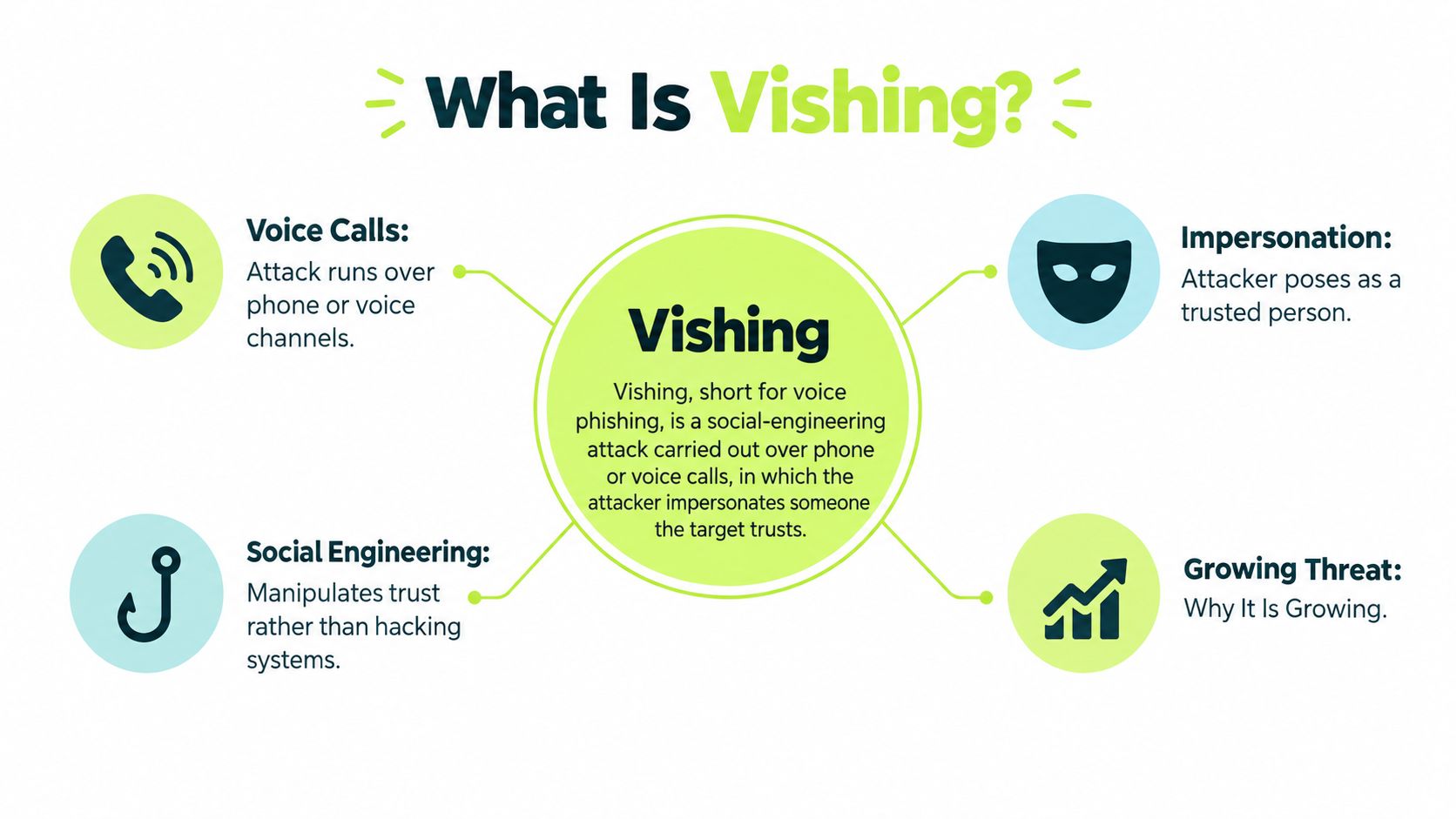
Vishing, or voice phishing, is a social-engineering attack carried out through phone or voice calls. Social engineering means persuading someone to take an action. The attacker impersonates a trusted person or organization to obtain passwords, codes, money, or approvals. Vishing calls rose sharply in 2024, but a familiar voice or company-looking number is not proof of identity.
The key risk is a verification failure, not just a voice that sounds fake. Voice and caller ID can seem convincing, just as a borrowed uniform can. The dependable response is to hang up and call a number you already trust. Make that a repeatable habit, especially when a caller creates urgency or asks you to approve access.
What Vishing Means and Why It Is Growing
Vishing, short for voice phishing, works by persuasion. Social engineering means the attacker talks a person into opening the door instead of breaking the lock. Picture a con artist in a borrowed uniform, holding a clipboard. The lock still works. Someone inside chooses to open it.
Email filters miss most of this. A phone call carries no link to score, and the network doesn't prove that the name on the screen belongs to the person speaking.
CrowdStrike's 2025 Global Threat Report recorded a 442% increase in vishing between the first and second halves of 2024. The same incident roundup notes that the FBI's Internet Crime Complaint Center logged 193,407 phishing and spoofing complaints in 2024, the largest category in that report, with about $70 million in reported losses.
Those totals aren't a clean count of voice attacks. People file the same call as impersonation, tech-support fraud, phishing, or a business compromise, and plenty of calls never get reported.
Three ingredients do the work: a trusted identity, manufactured urgency, and a request for access. Spot any one of them on an unexpected call and you already have enough reason to stop.
Warning Signs and the Right Response
You don't need to prove the caller is lying. Attackers win by getting one small yes at a time: stay on the line, read a code, approve a prompt. One red flag is enough to refuse.
| Warning sign | What it sounds like | Right response |
|---|---|---|
| Unsolicited request for a password or MFA code | "Read me the code we just sent so I can verify you" | Hang up and never share codes |
| Urgency or secrecy | "Don't tell your manager, the transfer closes in 20 minutes" | Pause and verify through a known channel |
| Unexpected MFA approval prompt | Repeated push notifications at odd hours | Deny the prompt and report it |
| Request to reset MFA or change contact details | Help desk asked to re-enroll an "urgent" traveling executive | Require a ticket and a callback to the directory number |
| Caller ID that looks internal | Local or company number on screen | Still call back on a number from the directory |
| Pressure to stay on the line | "I can't wait while you look that up" | End the call and initiate contact yourself |
| Accurate internal details | Project names, org chart, colleague names | Treat as no proof and verify independently |
MFA (multifactor authentication) is the second check after a password, often a code or a phone prompt. A caller who needs you to read that code, or to approve a prompt you didn't start, is asking you to throw the second check away. If you want a plain walk-through of what each factor really proves, compare MFA verification factors before you decide which prompts your team is allowed to approve.
When the rule gets stricter
A displayed number isn't proof. Spoofing can make a call look local or internal when it started somewhere else. A voice that sounds like a colleague is a weak signal too.
The sentence to use is simple: "I'll call you back on the number in our directory."
A few requests change the response, not the habit.
- Help-desk MFA resets or contact changes need a ticket plus a callback to the directory number. No exceptions for "traveling executives."
- Payment changes need a second channel and a second approver who wasn't on the original call.
- Remote-access software is an automatic stop. Don't install anything a caller names.
A legitimate colleague or vendor will accept a callback. A refusal to be called back is the strongest warning sign on the list.
Vishing Compared With Phishing and Scam Calls
| Attack type | Main channel | Typical pretext | Usual goal |
|---|---|---|---|
| Vishing | Phone call or VoIP voice | Trusted bank, IT help desk, or executive | Passwords, MFA codes, payment approval |
| Phishing | Email with link or attachment | Fake invoice, login page, or shared document | Credentials entered on a fake site |
| Smishing | SMS text message | Delivery fee, bank alert, or prize | Clicking a link or sharing a code |
| Consumer imposter call | Phone call | Government agency or tech-support firm | Money transfer, gift cards, or remote access |
| Business email compromise | Email thread | Fake vendor or executive payment change | Payment redirected to an attacker account |
The difference that matters is that vishing is a live conversation. The caller hears you hesitate, answers your question, and changes the story. A phishing email is fixed text sent in bulk. Filters can scan its links and attachments. A phone call has nothing to scan, so the control has to be a person following a procedure.
Channels also get chained. An email or text tells you to call a number, a pattern often called callback phishing. You dial the attacker, and the call does the rest. Text lures work the same way, which is why it helps to separate smishing from phishing before you write one rule for every message.
Consumer imposter calls are the close cousin. The tactics match, but the usual ask is a wire, gift cards, or remote control of a home computer, not a corporate login. Business email compromise aims at the payment process itself, often without a voice at all. If you want the account-side habits that survive both email and voice, strengthen your accounts against phishing and then apply the same "stop first" rule to the phone.
The label matters less than the response. Whether you call it vishing, impersonation, or tech-support fraud, the first move is the same: stop, verify, and only then act.
If an inbound call ends in a secret, a payment, or an approval, treat that call as a suspect channel.
How a Vishing Call Unfolds From Pretext to Payout
A successful call is a short chain. Each stage has an attacker move and a natural reaction from the person who picks up.
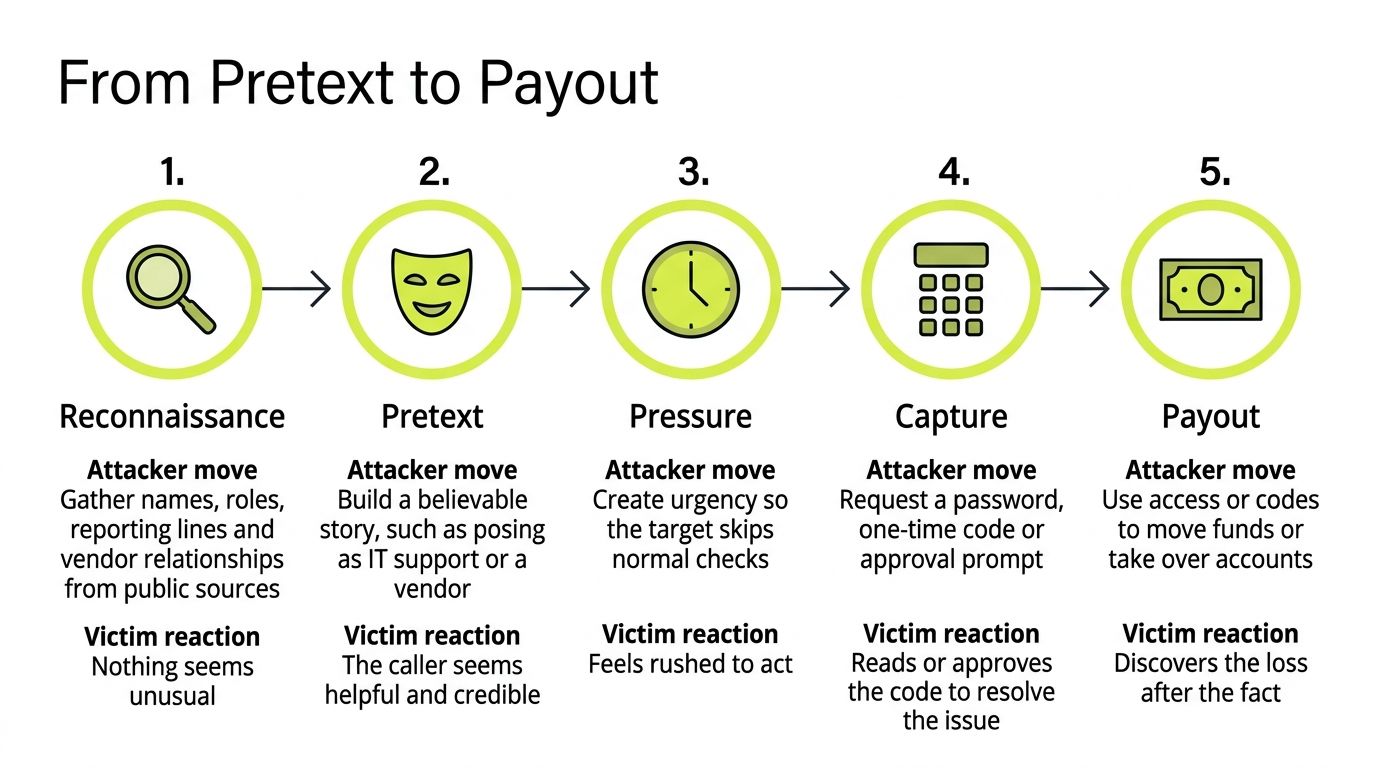
- Reconnaissance. The caller gathers names, roles, reporting lines, and vendor names from the company site, professional profiles, and press releases. Nothing about that research feels unusual to you, because the details are public.
- Pretext. They build a story: IT support, a bank fraud desk, an executive, a supplier. Telephone networks don't verify caller identity, and voice-over-internet services make the displayed number easy to change, so the screen can show a familiar local or corporate number while the story lands.
- Pressure. Urgency, secrecy, and "don't call anyone else" are there so you skip the check you'd make on a calm day. You feel rushed, which is the point.
- Capture. The ask looks small. Read a password, read a one-time code, tap Approve on a push prompt, install remote-access software, or confirm a new bank account.
- Payout. Those secrets or approvals become a login, a payment, or a taken-over account. You often find out after the money or the access is already gone.
Where a cloned voice fits
AI voice cloning doesn't have to be perfect. Attackers combine a short voice sample with a spoofed number, public org details, and a plausible job, such as an urgent payment or an account recovery. The FCC's guide on unwanted robocalls notes that spoofed caller ID can make a call appear local even when it starts elsewhere. A voice that resembles a manager makes the same request feel personal.
The mechanic is ordinary trust. People treat a familiar voice as proof. The call only works if you do that. This is the same family of tricks as other social engineering attacks, just delivered by voice instead of a message. Each stage above is a place the chain can break, before any code is read aloud.
Real Incidents That Show the Pattern

A phone call can turn a routine support request into access to a company network. In 2020, the FBI and CISA warned about attacks in which callers targeted employees and persuaded them to share account access information or bypass protections. With remote work, some identity checks that once happened face to face were harder to perform. The call reached an employee at home, but the target was the workplace network.
In 2023, CISA documented the Scattered Spider group calling IT help desks. Staff reset passwords and multifactor authentication (MFA) tokens for people who were not actually on the phone. One successful reset could let an attacker take over an account. The CISA advisory on Scattered Spider describes the pattern and the defenses organizations should adopt.
In both cases, the voice call was a route to access, not the final objective. Attackers wanted credentials or account changes that would let them sign in as an employee and reach more sensitive accounts. Mandiant's reporting also describes voice phishing as a recurring way attackers gain initial access. The key lesson is about verification: a familiar voice or convincing explanation cannot confirm that a caller is authorized.
CISA recommends practical controls:
- Authenticate employee-to-employee calls over public telephone networks with a formal identity check, rather than relying on a familiar voice.
- Limit VPN access to managed devices. A VPN, or virtual private network, connects a device to a company network. Restricting access to managed devices means a stolen password alone may not be enough.
- Monitor domains that imitate the organization's brand or login pages.
- Train people to treat unexpected calls and verification requests cautiously.
For distributed teams, a help-desk password reset or MFA re-enrollment can be a valuable target because it may restore access to an account. A repeatable callback habit helps: end the call, then contact the help desk through a number or channel already on file. That checks the person's identity instead of asking employees to judge whether a voice sounds real.
Myths About Spotting a Fake Voice
Most bad advice about vishing tells you to listen harder. Listening is the wrong skill.
Myth one: it's only a consumer phone scam. Help desks and cloud accounts are common targets. One call can open an identity path into systems that already use single sign-on.
Myth two: robotic speech or a foreign accent gives it away. Voice cloning makes that cue unreliable. FBI Internet Crime Report coverage for 2025 identified more than 22,000 complaints involving AI-related fraud and nearly $900 million in associated losses. The Bureau noted voice clones in business email compromise, confidence scams, employment lures, and investment fraud.
Myth three: a familiar voice proves identity. A short public recording is enough raw material for a passable imitation of a manager or a family member.
Myth four: caller ID that matches the company proves the call. The number is chosen by the caller, not confirmed by the network.
Myth five: an alert employee will always notice. A good pretext answers questions in real time. Alertness isn't a control you can audit.
The habit that replaces all five
Verify through a channel the caller didn't choose. Banks already do a version of this. They don't trust the number a stranger reads out. They call the customer back on the number on file.
Don't train people to recognize a fake voice. Train them to authenticate a trusted person when the voice may sound real.
End the call. Use a known number or the internal directory. Put high-risk approvals through the workflow you already have. Treat urgency, secrecy, and any request for credentials or remote access as risk signals, not as reasons to hurry.
Confirm the Caller Before You Act
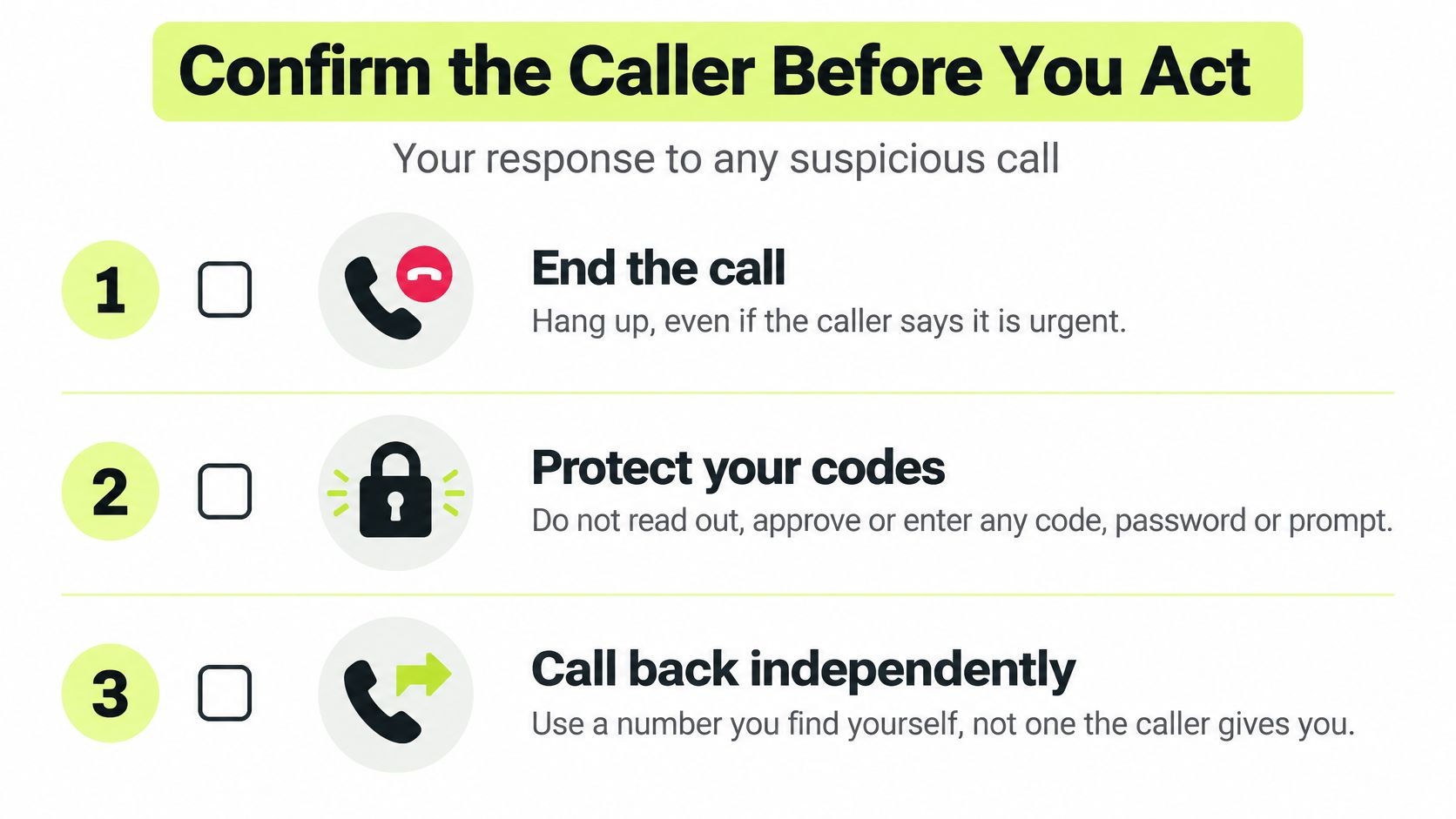
A caller's voice and displayed number are not proof of identity. CISA's guidance on social engineering emphasizes using procedures to resist manipulation. Treat a suspicious call as a verification problem: separate who the caller claims to be from the channel you use to check.
Follow the same steps each time:
- End the call, even if the caller says it is urgent.
- Do not read, approve, or type a code, password, or unexpected prompt. Deny a push notification you did not initiate.
- Call back using a number from your internal directory or the organization's official site. Do not use a number supplied by the caller.
- Tell your security team when the call happened, the number displayed, what the caller requested, and what you shared. Keep those details.
- If you shared a credential, reset the password, revoke active sessions, re-enroll multifactor authentication (MFA), and review sign-in logs that day.
- Report the attempt to the FBI's Internet Crime Complaint Center or the FTC. Contact your bank too if money or account details were involved.
Individuals can use the same callback habit. Hang up, then call the number printed on a bank card or statement. For other forms of manipulation, these steps to protect against social engineering attacks apply beyond phone calls.
Policy, practice, and the two-minute decision
Write the rule down: never share passwords or MFA codes, change payment details, or approve remote access because of an inbound call. Route high-risk requests through a second channel and an approval workflow.
Practice builds the habit. Help desks, finance teams, and executive assistants can rehearse ending a suspicious call and verifying the request through a trusted channel. Measure whether people verify, not only whether they complete training. Vigil Security offers short lessons and weekly refreshers in Slack, along with phishing simulations that provide instant corrective feedback.
A callback takes a moment. Verify through a known channel before sharing a code, approving a prompt, or moving money. If your team already works in Slack, visit Vigil Security to see how its training supports distributed teams.