A finance analyst emails a quarterly forecast to an outside contractor. The contractor needs something for a project, but does this version include figures they shouldn't see? Someone asks whether the file was allowed to leave the company. Nobody can give a confident answer.
That uncertainty is where data classification becomes useful. It gives employees a shared way to recognize information, understand its risks, and choose the right action before clicking Send.
What Data Classification Means and Why It Matters
Data classification is the structured process of assigning persistent labels to data assets so an organization can manage, protect, and govern them consistently. In its Initial Public Draft of IR 8496, published November 15, 2023, NIST describes classification as a foundation for applying cybersecurity and privacy requirements systematically at scale.
A data asset might be a customer record, source-code repository, contract, or employee file. Classification connects that asset to handling rules, rather than leaving each employee to invent their own interpretation of sensitive.
Think of a filing cabinet. A folder tab tells you which drawer holds the folder and who may open it. A digital classification label serves a similar purpose, but systems can also use it to restrict access, protect transmission, determine storage, and manage retention and disposal.

A shared rule for a moving file
For the analyst, a Confidential label should make the next action clear: check whether the contractor is authorized, then use the approved sharing method. The label shouldn't merely decorate the spreadsheet.
Distributed teams need that consistency because information travels through SaaS applications, chat tools, laptops, and vendors. Governance supplies the ownership and policy behind those decisions. Kagool's approach to governing enterprise data is a useful resource for considering that broader organizational responsibility.
Practical rule: A label is useful only when someone can explain what action it requires.
When someone asks, “What is data classification?” the practical answer is a connection between information and proportionate protection. Start by asking what harm would follow if the data leaked, changed without authorization, or disappeared.
The Four Classification Levels Compared
Public, Internal, Confidential, and Restricted provide a workable starting scheme, with each level connected to an explicit handling rule.
Classification levels, typical data and handling rules
| Level | Typical data | Handling rule | Example |
|---|---|---|---|
| Public | Press releases, published pricing, job postings | No disclosure restriction; keep content accurate | Published product brochure |
| Internal | Org charts, internal wiki pages, meeting notes | Employees and authorized contractors only; no external sharing | Team onboarding handbook |
| Confidential | Customer records, contracts, unreleased product plans, source code | Need-to-know access with encryption in transit and at rest | Signed vendor agreement |
| Restricted | Payment card data, health records, credentials, acquisition files | Named-person access, audit logging, minimum necessary retention, no email attachments | Cardholder data export |
Treat these as proposed policy defaults, not universal requirements. Organizations choose different names, thresholds, and safeguards; Contesimal's discussion of naming conventions for document classification can help teams make their terminology understandable.
What separates the levels
Public means approved for publication, not available for anyone to edit. A product brochure can be shared freely while its master copy remains protected against unauthorized changes.
Internal covers routine working information that isn't intended for public distribution. Contractor access should mean authorized contractors within the approved environment, not permission to forward documents to any external address.
Confidential calls for a business reason to access the information. A signed vendor agreement belongs with the people managing that relationship, not automatically with everyone who can open the company drive.
Restricted is reserved for information requiring the tightest handling. Retention should be no longer than necessary while still meeting applicable obligations, not arbitrarily short. Distinguishing payment information from personal information also matters when choosing safeguards; this guide to PCI and PII explains those categories.
Use a simple initial question: Who would be harmed, and how badly, if this reached the wrong person? Then assess the consequences of alteration and loss of access too. Sensitivity names alone can't capture every protection need.
How a Label Turns Into Handling Rules
Consider a customer-email spreadsheet initially marked Internal under a team's local policy. The owner must first check whether that starting label is appropriate for personal information. When someone joins it with purchase history, the combined dataset requires a fresh decision, not automatic inheritance of the original label.
The operational sequence makes that decision enforceable.
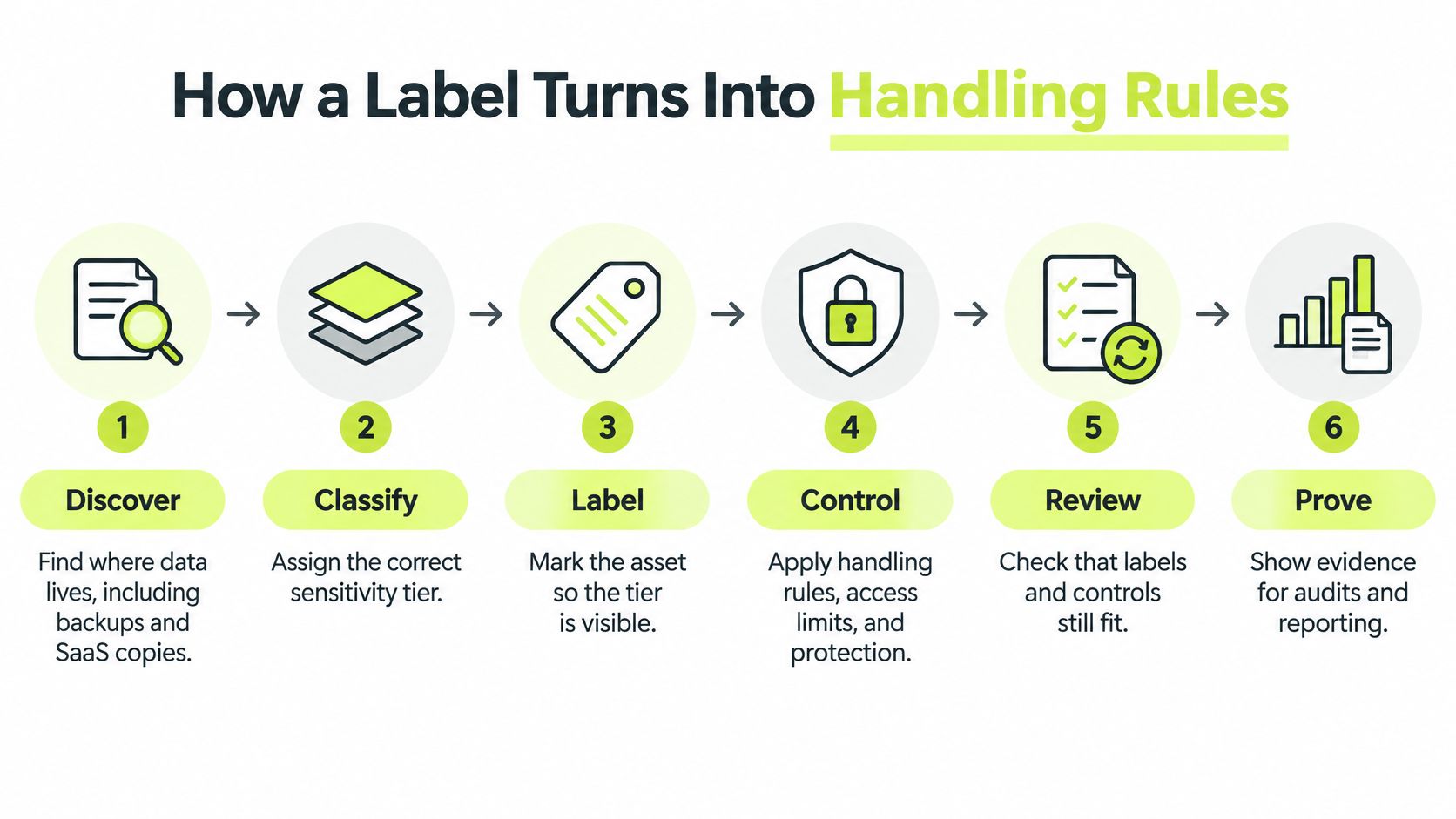
Follow the spreadsheet through the workflow
- Discover. Locate the spreadsheet, its source records, downloaded exports, SaaS copies, and backups. Record the marketing process that uses it.
- Classify. The accountable owner evaluates the combined email and purchase-history data and assigns Confidential under the organization's policy.
- Label. Attach the classification as supported metadata, with a visible marking where useful. A filename alone isn't a dependable enforcement mechanism.
- Control. Move the spreadsheet into a restricted-access folder before any marketing export. Apply identity-based access, encryption, sharing restrictions, and an approved retention rule.
- Review. Reassess the decision when fields, recipients, purposes, or applicable obligations change. Give the owner a scheduled review date as well.
- Prove. Keep evidence of permissions, blocked sharing attempts, approved exports, and completed reviews. Test the controls rather than assuming configuration means enforcement.
For example, a data loss prevention rule can stop an external upload while allowing an approved transfer to the marketing platform. A retention timer can flag or delete an expired export through the organization's approved disposal process.
Check the destination too
The destination needs its own controls. An authorized export isn't permission to place the resulting file in a broadly accessible shared drive.
Sector-specific obligations add further requirements. For health information, consult the relevant HIPAA compliance requirements when defining permitted handling, rather than assuming a Confidential label establishes compliance.
The question to ask of any label is concrete: What does this trigger, and who checks it?
Rating Data by Confidentiality, Integrity and Availability
Rate the consequences of a security failure, not just how private a file appears. The federal FIPS 199 standard, issued in 2004, establishes confidentiality, integrity, and availability as security objectives, each assessed at low, moderate, or high potential impact.
Confidentiality concerns unauthorized disclosure. Integrity concerns unauthorized modification or destruction. Availability concerns losing timely, reliable access.
Impact of exposure, alteration and loss by objective
| Objective | Question it answers | Low-impact example | High-impact example |
|---|---|---|---|
| Confidentiality | What happens if unauthorized people see it? | Routine internal meeting notes without sensitive details | Patient records |
| Integrity | What happens if it is changed or deleted without approval? | Draft team wiki page | Published financial figures used in filings |
| Availability | What happens if people cannot access it when needed? | Nonessential team wiki page | Clinic appointment scheduling system supporting time-sensitive care |
These examples illustrate possible assessments, not fixed classifications. Meeting notes containing acquisition plans wouldn't belong in the low-impact example.
Different risks need different controls
Say a government office publishes emergency notices. Disclosure isn't the main concern because residents are supposed to read them. Unauthorized changes, however, could misdirect people, so the office should protect publishing permissions and verify changes.
A clinic offers another useful distinction. A de-identified scheduling-capacity view might have low confidentiality impact but high availability impact if staff depend on it to arrange time-sensitive care. A patient-identifiable scheduling system needs a separate confidentiality assessment and shouldn't automatically receive a low rating.
Publicly readable doesn't mean safe to alter or safe to lose.
For overall system categorization, the highest assessed impact provides a conservative baseline. Do not translate a high availability rating directly into a secrecy label, though. Availability requires recovery planning and resilient service, while confidentiality demands restrictions on disclosure.
When information enters an AI workflow, tracing its destinations helps reveal additional exposure points. Agntz's guide to mapping AI data paths provides context for examining those routes.
Keep the impact rationale alongside the label. An auditor should be able to see why the owner chose the protections, not merely which dropdown value they selected.
How to Build a Classification Program in Six Steps
Build a program around decisions that business owners can explain and administrators can enforce. The NIST SP 800-60 working draft connects information types and impact assessments to proportionate safeguards, providing a risk-based foundation rather than a naming exercise.
Use a pilot to expose problems before introducing the scheme across the company. Include ordinary work such as downloading reports, inviting contractors, and sending approved exports.
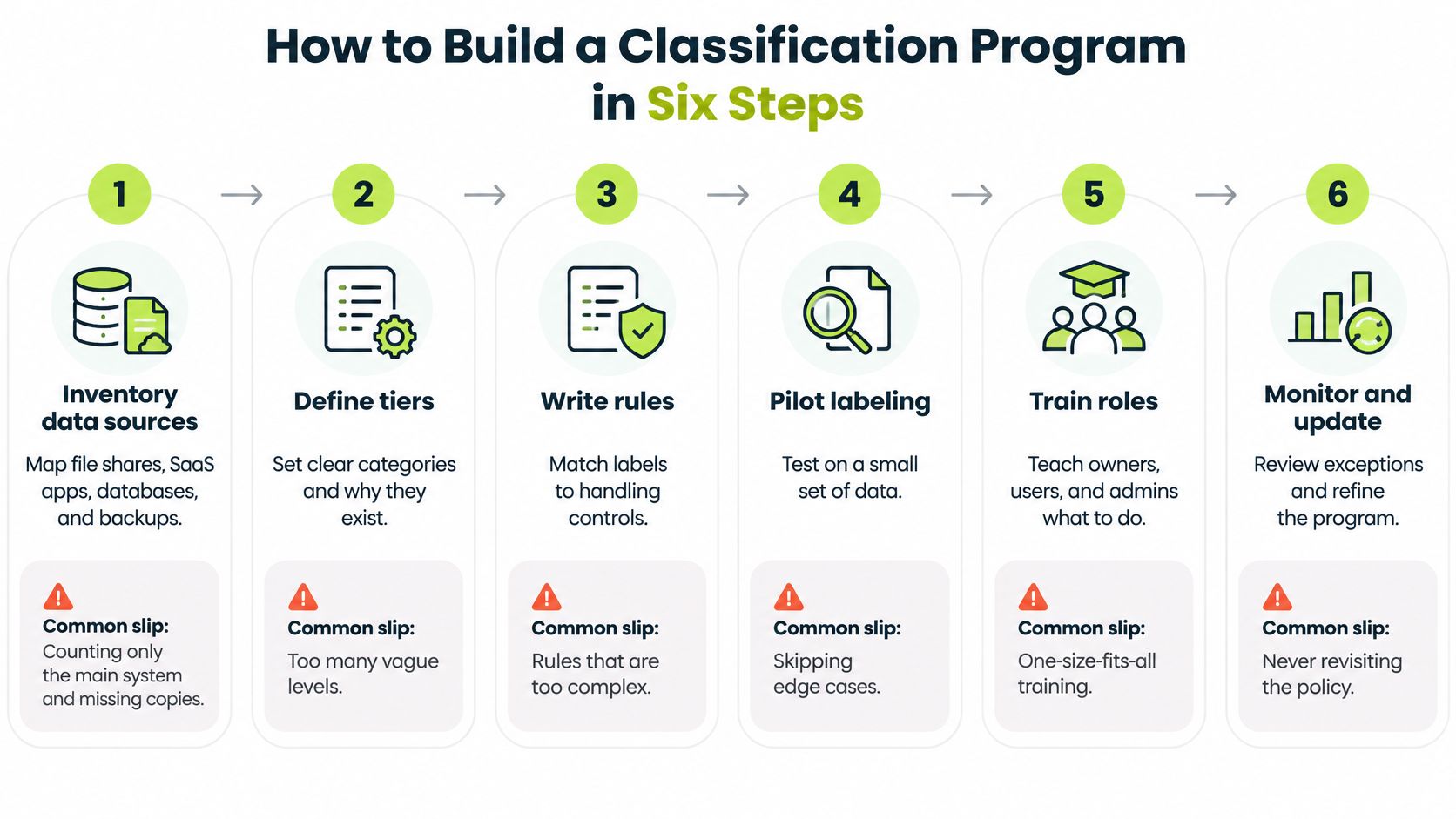
Build the foundation
Inventory data sources. Map file shares, SaaS applications, databases, and backups, then identify the exports and integrations connecting them. Record locations, purposes, and existing permissions because a list of application names won't show how people use the information. The common slip is counting the main database while missing the spreadsheet downloaded from it.
Assign accountable owners. Choose someone who understands each dataset's business purpose and can explain the consequences of exposure, alteration, or unavailability. IT can implement safeguards, but shouldn't have to guess whether a forecast contains market-sensitive plans. Record a delegate so decisions don't stall when the owner is unavailable.
Define understandable levels. Give each tier a written definition, an impact threshold, and a recognizable example. Include an escalation route for ambiguous cases, such as logs containing both technical diagnostics and user identifiers. Avoid names without decision criteria, which leave employees guessing between Confidential and Restricted.
Test the controls and maintain the decisions
Map levels to handling rules. Specify access, sharing, storage, transmission, retention, and disposal requirements, then identify the system enforcing each rule. Write documented labeling procedures so users and administrators follow the same process. The common failure is a policy that says external sharing is prohibited while the collaboration platform still allows unrestricted guest links.
Pilot in a working department. Apply labels through the tools employees already use, and test copies, exports, integrations, and restored files. Ask participants to perform realistic tasks, including an approved external transfer and a blocked transfer. A clean demonstration folder won't reveal the problems in everyday collaboration.
Manage exceptions and reviews. Require an accountable approver, a reason, compensating safeguards, and a review or expiry date for exceptions. Track labeling coverage alongside overdue reviews, unresolved copy problems, and evidence of control tests. An exception without an end condition can become permanent policy.
A working program has broad coverage, explainable decisions, few unresolved exceptions, and reviews completed when due. Owners can demonstrate that the intended safeguards operate in the places where employees work.
Don't reward label volume alone. Reward teams for finding an unprotected export and fixing the route that created it.
Common Mistakes and Why Labels Go Stale
A file can be labeled correctly and still be exposed. A label is the start of a control chain: teams must find the file and its copies, apply the right handling rules, and revisit the decision when its context changes.
Mistake one is trusting the dashboard
Classification coverage and the ability to locate data are different capabilities. A dashboard may show that known assets have labels while missing exports, duplicate files, or data stored in unmanaged locations.
Pair coverage reporting with an owner-maintained map of sources, destinations, and copies. Investigate unknown exports and unmanaged storage instead of treating them as outside the count. An unseen copy cannot benefit from a policy that only applies to the original.
Mistake two is treating a label as permanent
A record that presents little risk on its own may become sensitive when combined with identifying fields. Sharing it with a new audience can also change the consequences, even when its contents stay the same.
Set review triggers for aggregation, new recipients, new purposes, and changed retention needs. The workflow owner should reassess the intended use before approving a change. Otherwise, a label can remain accurate for the file's original purpose but wrong for how it is now being used.
Mistake three is treating AI ingestion as ordinary copying
Preparing unstructured data for AI use requires attention to both the source material and the proposed use. Automated detection can flag candidate content, but uncertain or consequential decisions need human review. Record what remains uncertain, the approved purpose, and which destinations are permitted.
A dataset's label does not determine whether using it to train a model, generate an answer, or share information with a new audience is acceptable. Review the proposed use as well as the source material.
Making Labels Stick Through Role-Aware Training
Teach employees the decision and the action, not just the vocabulary. The ISO 27001-aligned statement of applicability calls for classification according to security needs and documented labeling procedures, reinforcing the need for consistent instructions.
Labels require interpretation and practice, just as other workplace handling instructions do.
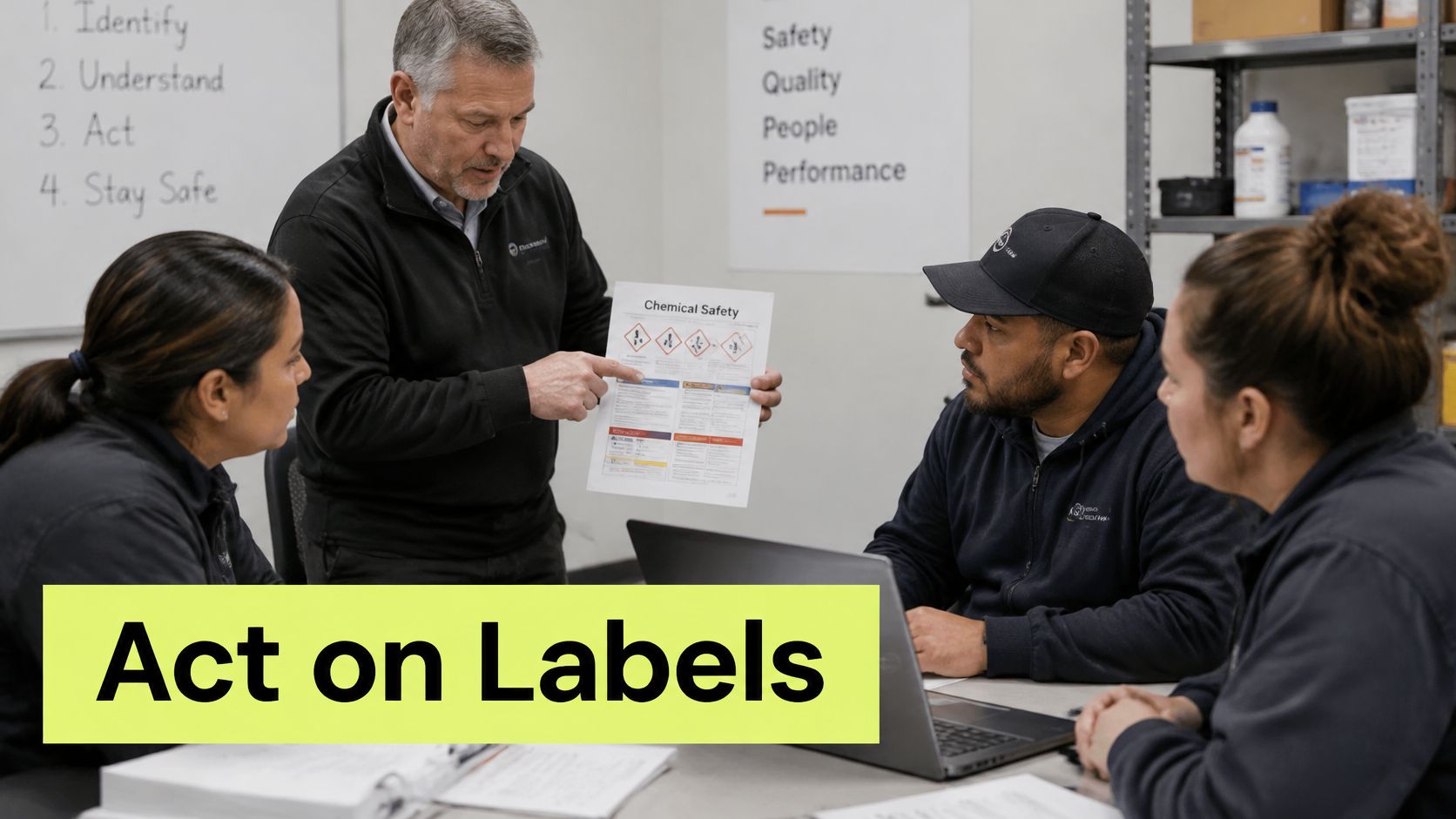
Give each role a recognizable decision
An engineer exporting diagnostic logs should check for user IDs, tokens, and identifying context. Ask whether the export belongs in Confidential storage and which fields should be removed before sharing it with a support vendor.
An HR partner handling compensation information needs a different scenario. Ask whether a named employee salary sheet meets the organization's Restricted threshold, then explain the approved access group and transfer method.
A salesperson deciding where to save a prospect list needs guidance about the destination. Even an approved list shouldn't go into a shared drive whose membership exceeds the authorized audience.
Reinforce the action in the workflow
- Ask a scenario question. Present a new example and require both the level and the next action, with immediate explanatory feedback.
- Prompt at the decision point. If a workflow detects a likely mismatch or attempted prohibited share, present the relevant rule and route uncertainty to the owner.
- Measure understanding. Track correct decisions on unfamiliar examples, not just whether employees finished a module.
Use role-based security awareness training to keep examples relevant, with brief recurring refreshers delivered through chat or the learning tools employees already use. Configure prompts and technical restrictions together so training doesn't promise a permitted action that systems block, or prohibit an action systems freely allow.
For a supplementary video resource, use the embedded player below.
Pick One Data Set to Classify This Week
Choose a dataset that's already shared widely, such as customer support tickets, payroll exports, or a product roadmap. Keep the first week's work focused on that dataset so you can prove the process before expanding it.
Start an inventory entry and name its business owner. Record the purpose, authorized users, and systems involved, then have the owner assess the consequences of disclosure, alteration, and unavailability.
Produce a usable decision record
- Choose the level. Record the classification and the impact rationale, including any uncertainty that needs approval.
- Specify the action. Identify the permitted storage location, access group, sharing method, and disposal rule.
- Schedule the review. Assign a reviewer and a date, plus the events that require an earlier reassessment.
Next, follow the dataset through the tools it touches. Check downloads, attachments, integrations, exports, and backups, and test whether the label and relevant protections survive each route. Where a format can't preserve metadata, document an alternative safeguard rather than accepting the loss.
Fix the broken route before scaling
If an export strips labels or opens access, repair that workflow before labeling more assets. Keep a record of the failed test, the change made, and the successful retest.
Where training evidence is needed, Vigil Security is an option: our lessons can attach to editable framework controls, and Vanta and Drata are optional destinations for customer-directed training-completion evidence. We don't ingest broader business data from them.
You're ready to expand when you can identify who owns the data, what its label triggers, and when the decision will be reviewed.
Vigil Security offers Slack-native lessons and recurring refreshers that help employees practice classification and handling decisions, with completion and comprehension records for training evidence. Visit Vigil Security to explore role-aware training that supports your classification policy in employees' everyday workflow.