A phishing simulation is a controlled, safe test that uses fake malicious emails to measure and improve employee behavior. In practice, it works best when it creates a behavior-change loop with realistic lures, immediate coaching, and better reporting habits, not just a scorecard of clicks.
Redefining Phishing Simulations for Modern Teams
Older guidance framed phishing tests as a way to catch people out. Modern teams need something more useful. In distributed organizations, a phishing simulation works better as a rehearsal that helps people spot risk, report it quickly, and keep working without panic.
Realistic lures still get attention from trained users. Large-scale organizational experiments found simulated lures can still produce 10%–30% click-through on targeted employees, which is why believable design still matters even after training (NIST research on phishing susceptibility). The same research also found only about a 2% absolute reduction in phishing susceptibility from training in general. That points to the core challenge: awareness sessions help, but behavior changes when the program adds context, repetition, and fast feedback.
What a phishing simulation really is
A modern simulation is a controlled attacker-style exercise. It sends a fake message that looks like a real threat, then watches what people do, whether they click, enter credentials, report the message, or ignore it. The goal is not to shame anyone. The goal is to build the reflex to pause, verify, and report.
Practical rule: if the program only measures mistakes, it is a compliance exercise. If it changes how people behave after the message arrives, it is a security control.
Psychological safety matters here. Teams will not report suspicious messages if every failure leads to embarrassment or punishment. Programs work better when employees understand that the point is learning, not entrapment. For a broader view of awareness design, see social engineering training for employees.
Why the “gotcha” model falls short
A once-a-year test can create short-term drama and long-term resentment. People forget the lesson, the business loses trust, and security teams end up with a tidy number that says little about real resilience.
Continuous simulations avoid that trap by reinforcing a small set of habits over time. They also make room for native workflow coaching, which matters more than a separate portal that arrives after the moment has passed. A Slack-based microlearning prompt, for example, can turn a suspicious message into a quick reminder right where the work already happens. That kind of follow-up helps reporting habits take root.
The shift is simple. Ask who noticed, who reported, and who learned fast enough to protect the next person. That is the behavior modern teams need.
The Mechanics of a Modern Phishing Campaign
A phishing simulation begins with a lure and ends with feedback. The lure may be a fake email, chat message, or text that mirrors a real attack. Feedback turns the exercise into training because it shows people what they missed and what to do next.
Structure matters. Generic templates are easy to spot, so they teach people to look for cheap tricks instead of real attacker behavior. Stronger simulations use role-relevant language, believable timing, and the kinds of prompts people commonly see at work. Realistic lures stay professional and plausible, short enough to feel like part of the workday rather than a staged test.
From lure to teachable moment
The traditional model sends someone to a separate portal after a click. That adds friction, and friction slows learning. By the time the person opens a training page, the original context is gone. The modern model pushes coaching into the same workflow where the mistake happened, so the lesson lands while the message is still fresh.
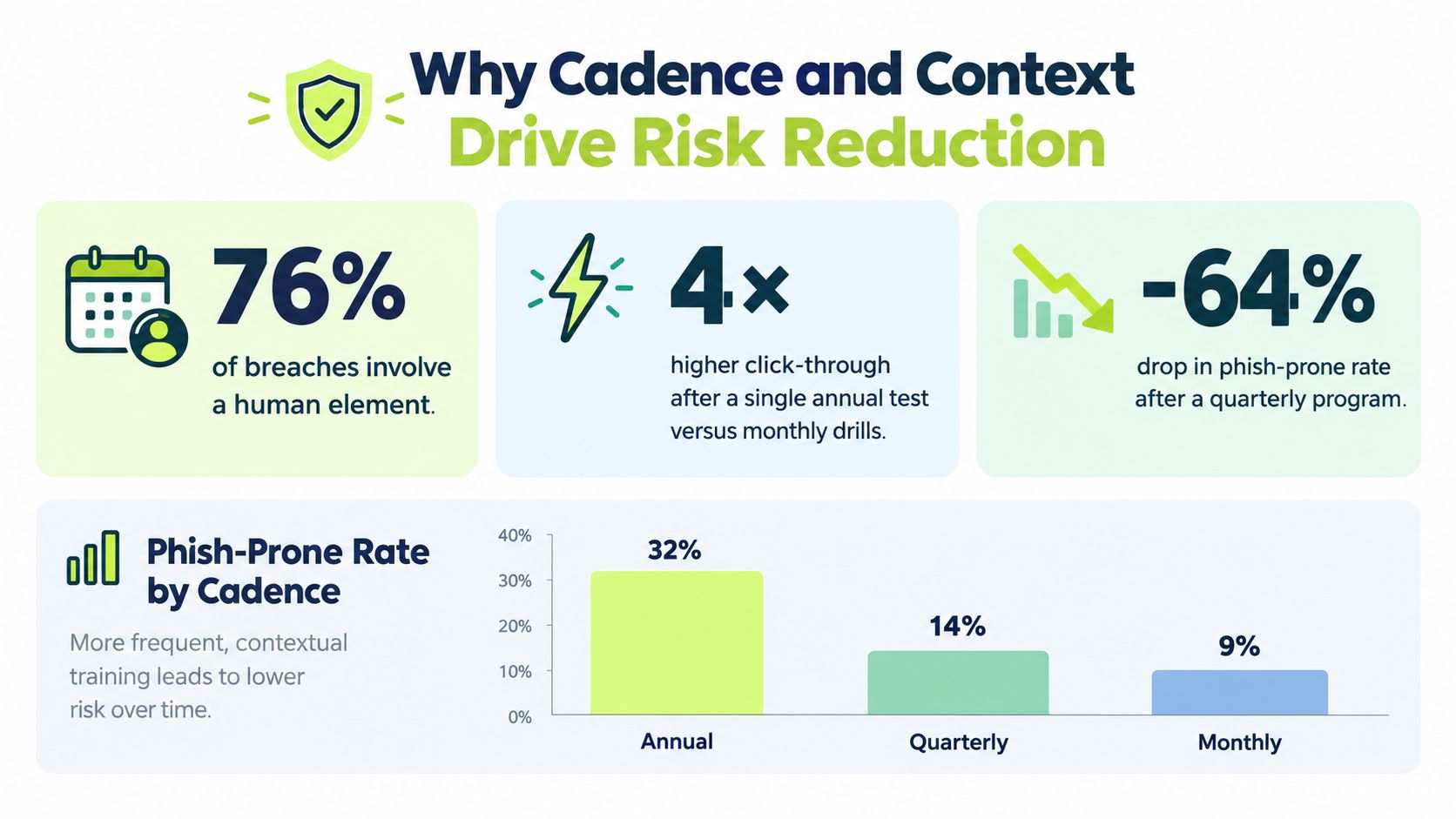
Timing matters for behavior change. Research summarized in the literature reports that point-of-error or context-specific interactive coaching can outperform generic follow-up materials, and one evaluation showed a 19% reduction in phishing failures when the most effective teachable moment was used (Proofpoint summary of phishing training efficacy). The same Proofpoint summary reports weekly phishing tests as 2.74 times more effective at reducing risk than less-than-quarterly testing, which is a clear reason to treat cadence as a design choice, not an admin detail.
If feedback arrives late, the lesson turns into trivia. If it arrives in the same workflow, it becomes memory.
Slack messages, in-email nudges, and short micro-lessons can all work when they are tied to the event itself. The goal is to close the loop before the user mentally moves on.
Why realism and repetition both matter
Realism gives the simulation credibility. Repetition gives it staying power. One exposure can raise awareness for a moment, but behavior changes when people see varied examples over time and get corrected in context. That is the difference between noticing a suspicious email once and building a habit that holds up under pressure.
Why Cadence and Context Drive Risk Reduction
Cadence is the hidden variable in many phishing programs. Test too rarely, and people never build a habit. Test too often, and the exercise starts to feel like background noise. A good program keeps a steady rhythm, while still changing the scenario enough that employees cannot guess the next lure.
The point is memory, not surprise. Repeated simulations keep the lesson fresh, while long gaps let the habit fade. A phishing simulation should work like a training loop inside the workweek, where each round reinforces the same safe response until it becomes automatic.
Timing beats volume
More messages do not always create better behavior. The stronger programs use the right moment. If someone clicks, enters credentials, or reports a lure, the follow-up should arrive right away and in the same channel they already use for work. That keeps the correction tied to the action they just took.
Native workflow integration makes that easier. A Slack-based coaching prompt or a short in-flow lesson feels lighter than a separate portal, so employees are more likely to finish it before they switch tabs, forget, or put it off. The program stays visible without becoming noisy, which matters for distributed teams that already juggle too many tools.
Scenario types should match actual risk
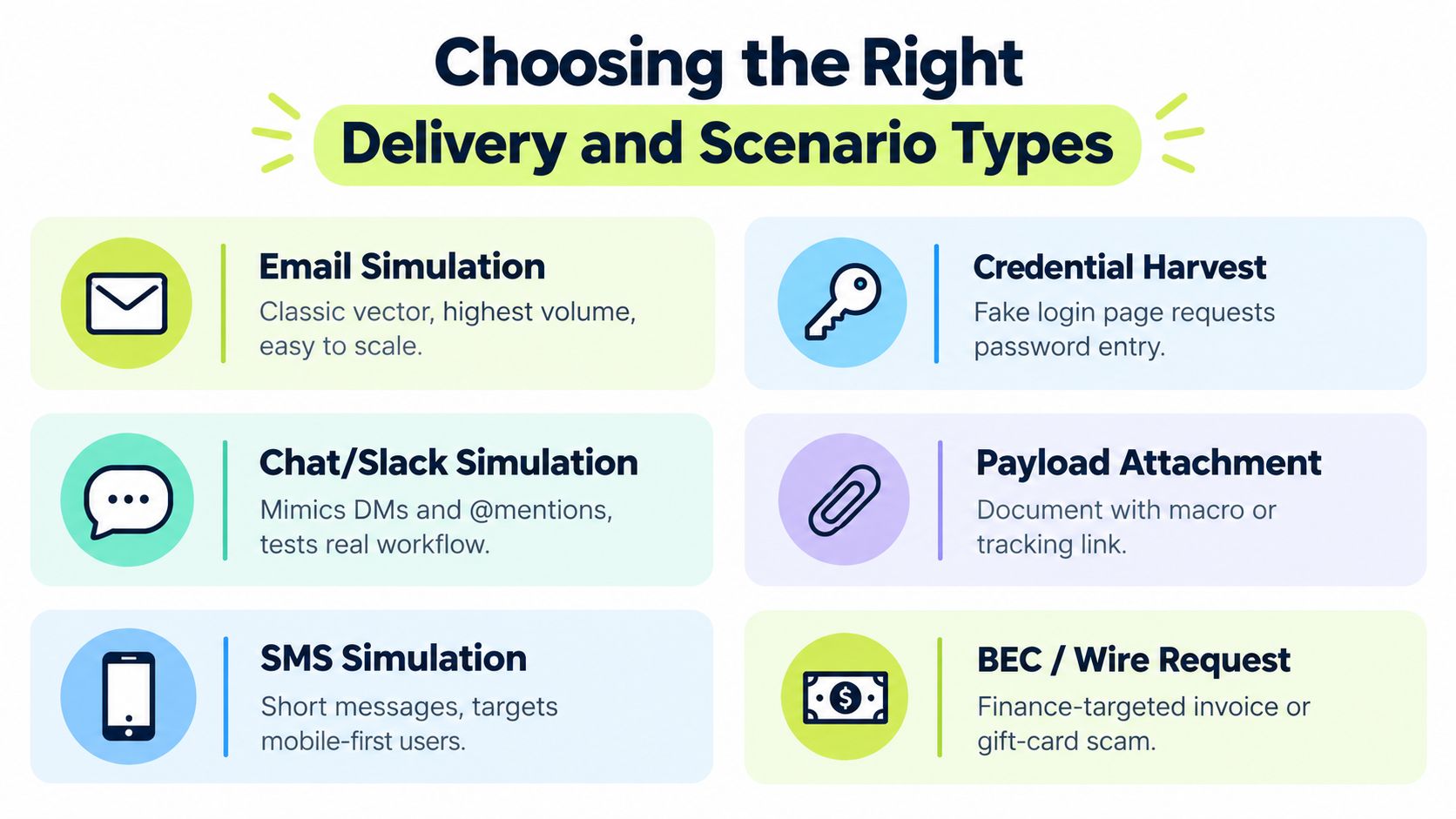
A generic “your mailbox is full” message only tests one habit. Real phishing pressure shows up across email, collaboration tools, SMS, credential harvesters, and business email compromise. Each channel probes a different part of the workflow, so the scenario should match the way people make decisions.
Variety works best when it is deliberate. One round might use a normal-looking invoice update. Another might arrive as a chat-based request. The goal is transfer, not memorization. If employees learn to spot the pattern across tools, they are less likely to rely on one familiar template.
Useful test: if employees can predict the next lure from the last one, the simulation has become too mechanical.
Choosing the Right Delivery and Scenario Types
The delivery channel shapes the lesson. Email is still useful, but email alone misses how people work in a cloud-first company. Chat, SMS, and mobile scenarios test the moments where decisions happen quickly and visual cues are thin.
Modern phishing rarely stays in one place. A lure can begin in email, lead to a login page, then continue in chat or voice. Simulations should reflect that path, while staying believable and tied to real work, not intrusive or manipulative.
Email versus workflow-native delivery
Email simulations are simple to scale and easy for security teams to run. They still matter, especially as a baseline. But an email-only program can create a false sense of coverage because it skips the tools people use all day, such as Slack, Teams, and mobile messaging.
Workflow-native delivery lowers friction. Employees do not need a separate training portal or another password, so drop-off is lower. The lesson also feels like part of the work instead of a disruption. For role-specific examples and tailoring ideas, see role-based training.
Scenario design should fit the audience
A finance team needs invoice fraud and payment requests. IT teams need credential-harvest and reset themes. Executive support, HR, and operations teams often face account alerts, meeting changes, and approval requests. A one-size-fits-all approach blurs those differences and teaches no one well.
The best mix starts with the decisions each group makes every day.
A practical scenario mix looks like this:
- Email lures: Good for baseline exposure and broad coverage.
- Chat or Slack prompts: Useful for testing real workflow behavior in distributed teams.
- SMS simulations: Helpful when staff rely heavily on mobile devices.
- Credential harvest pages: Best for teaching login caution and URL checks.
- Business email compromise scenarios: Useful for finance and admin roles where a click is not the only failure that matters.
The right mix is not about novelty. It is about matching scenarios to the choices your people make, then reinforcing safer behavior in the channels they already use.
Measuring True Phishing Resilience Beyond Clicks
A click rate gives you one clue, not the whole story. Someone may avoid clicking and still ignore a suspicious message. Another employee may click, report it right away, and help security stop a real threat faster than the person who stayed quiet. That is why modern measurement needs more than a single metric.
A phishing simulation should show whether people pause, report, and recover. If the only thing you track is who clicked, the exercise becomes a trap. If you also measure reporting, credential entry, and recovery behavior, it becomes a resilience program. The question shifts from “who got fooled?” to “who helped protect the organization fastest?”
A better metrics framework
| Metric Type | Traditional Approach | Modern Resilience Approach |
|---|---|---|
| Click behavior | Count only who clicked | Track clicks, but read them alongside difficulty and role |
| Reporting behavior | Often ignored | Measure whether people report suspicious messages quickly |
| Credential entry | Sometimes folded into click data | Separate it, because entering credentials is a deeper failure than a click |
| Recovery behavior | Not measured | Track how quickly employees and teams respond after the simulation |
| Learning signal | Completion of a generic module | Evidence that the person changed behavior in the next cycle |
The most useful shift is to treat reporting as the main behavior to watch. If more employees report suspicious messages, the program is changing how the organization responds in real situations. A low click rate can look good on a dashboard and still hide weak reporting habits.
How to read the results
Look for patterns, not just totals. A higher click rate in one group may reflect the kind of work that group does, not poor judgment. A strong reporting rate may show that employees are learning to pause and escalate before harm spreads. Credential submission deserves separate attention because it signals a deeper compromise than a simple click.
Interpretation rule: a “good” simulation result improves reporting and shortens response time, not just the dashboard.
The 2026 industry view on phishing resilience also supports this broader view, saying that clicking, credential submission, and reporting should be measured together, not in isolation (Help Net Security report on phishing resilience). That matches what security teams see in day-to-day operations.
Integrating Simulations with Compliance and Workflows
Phishing simulations are easier to sustain when they fit the systems teams already use. If the program lives in one tool and the evidence lives in another, someone has to assemble the record later. That adds admin work, and admin work is often where awareness programs slow down.
A workflow-native setup avoids that split. It can assign campaigns by team, send reminders automatically, and push evidence into compliance tools without manual export. For distributed organizations, that turns awareness training into part of daily operations rather than a side project.
Why integration matters for audit readiness
Compliance teams need proof. Security teams need behavior change. HR and GRC teams need both without spending their week copying screenshots into spreadsheets. When simulations sync with evidence platforms, the record is easier to defend during audits and easier to maintain between them.
That matters for teams using systems like Vanta and Drata, where evidence quality and freshness are part of the job. A simulation program that updates automatically is easier to keep audit-ready than one that depends on manual follow-up.
Audit readiness depends on evidence, and evidence only exists if employees accept the program. Consent and transparency belong in the design, not as an HR afterthought.
Personalization and consent are part of the design
The strongest simulations are not one-size-fits-all. Research in the area points to mixed results for traditional training, with one 2025 study of 12,000+ employees finding no meaningful improvement from training alone, while another longitudinal study reported unsafe actions falling from 8.5% to 4.2% within six months under continuous simulation plus targeted feedback (arXiv research on phishing simulation design). The same review notes that employee acceptance improved when prior consent was obtained, and that sharing lessons with the whole group helped recognition last for months.
That is a useful warning. A program can be technically accurate and still fail socially if people feel singled out or tricked. Consent, transparency, and group-level learning reduce that risk. For teams comparing workflow-native options, compliance management solutions work best when they reduce both admin burden and employee friction.
Good rule: if the program creates more trust issues than it prevents, the design needs work.
Vigil Security is one option in this space. It delivers Slack-native security awareness training, recurring microlearning, and phishing simulations with role-aware workflows and audit-ready evidence, which fits teams that want training inside the collaboration tool instead of a separate portal.
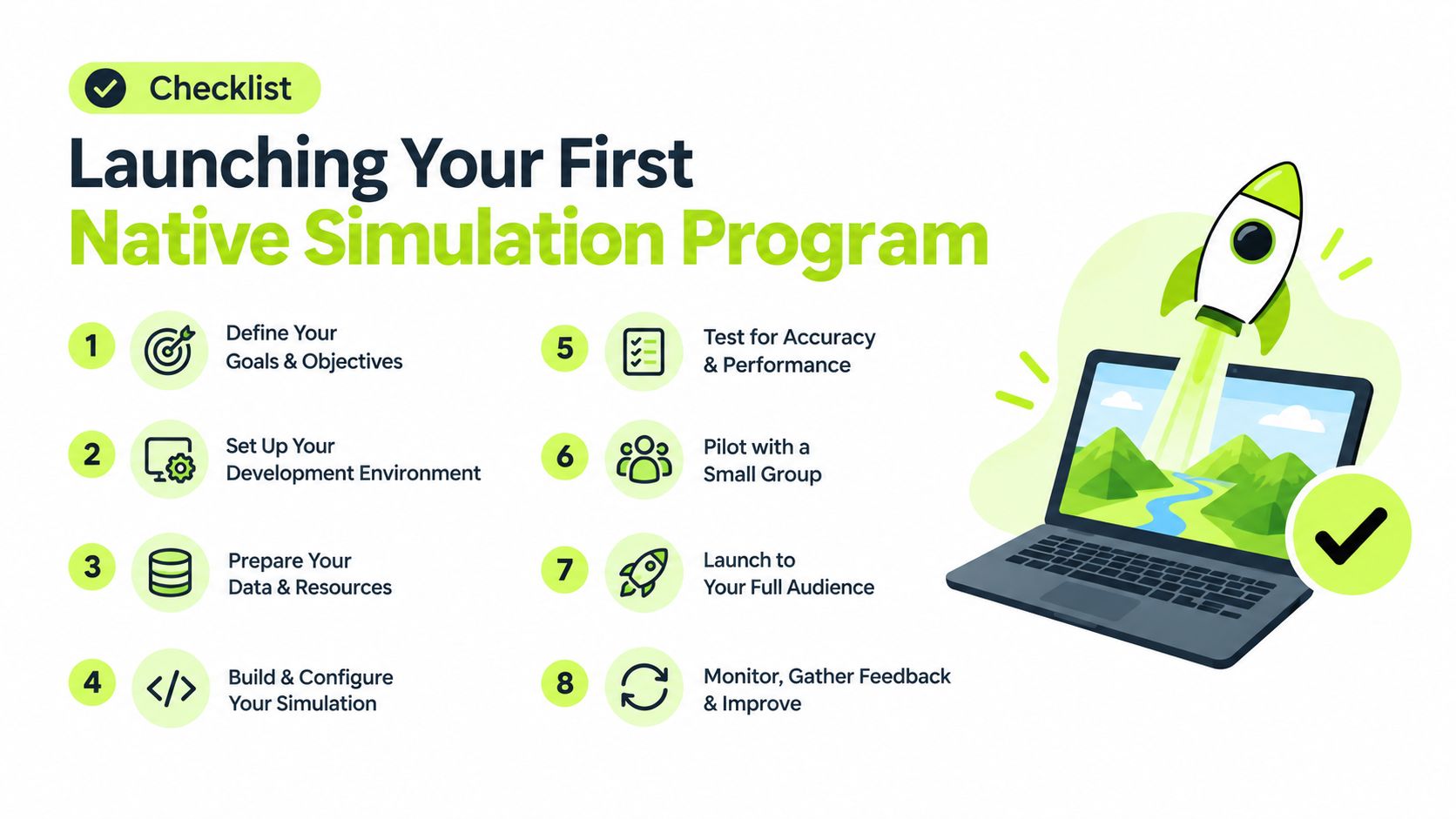
Launching Your First Native Simulation Program
Start small, and make the purpose plain. Tell employees that simulations are part of security awareness, that the goal is practice, and that reporting suspicious messages is the right move even when they are unsure. Clear expectations lower the first-wave anxiety.
Choose one realistic scenario for the pilot group. Use a lure that matches the team's daily work, not a dramatic or personal one. If the team spends time in Slack, deliver the follow-up there. If email is the main channel, keep the first flow simple so people can recognize the pattern without confusion.
A practical launch sequence
- Set expectations early. Send a plain-language notice about periodic simulations and reporting.
- Choose one pilot cohort. Keep the first round small enough to observe clearly.
- Use a believable lure. Make it work-relevant and short.
- Trigger instant coaching. Keep the lesson close to the behavior.
- Track reporting, not just clicks. Use the result to refine the next round.
- Reinforce with microlearning. Short refreshers work better than long remedials.
- Adjust by role. Finance, HR, IT, and executives do not face the same lures.
- Repeat on a steady cadence. Consistency matters more than drama.
A rollout works best when people know what to expect and still learn something new. If the first round feels fair, employees are more likely to engage instead of push back. Launch communication matters as much as the lure.
Reinforcement comes next. Brief pulse quizzes, policy nudges, and role-based reminders help the lesson last beyond the day of the simulation. That turns a one-time test into a habit that shows up in daily reporting and faster response inside the tools people already use.
If you want phishing simulations that fit the way distributed teams work, visit Vigil Security to see how Slack-native lessons, phishing campaigns, and audit-ready evidence can live in the same workflow. It fits security and compliance teams that want behavior change, not another ignored training portal.