You're about to send a customer spreadsheet to a contractor. The request seems routine, the recipient's name looks familiar, and the team needs an answer before the next meeting. But the export includes support notes and account details the contractor doesn't need. The most important privacy decision happens now, before you click Send.
Good privacy and data protection practices make that moment easier to handle correctly. They tell employees what to remove, which sharing method to use, when to ask for help, and what evidence to retain. Policies matter, but their value depends on whether people can apply them during ordinary work.
Privacy and Data Protection Are Different Jobs
Say a support team exports a customer list and emails it to a contractor who should never have seen it. The file contains legitimate business information, and the employee used a company account. Neither fact makes the disclosure appropriate.
The privacy question is whether the organization should have shared that information for that purpose. The data protection question is how its controls allowed an unnecessary export to reach an unauthorized recipient.
Privacy concerns people's rights and reasonable expectations about how organizations collect, use, and share their information. It isn't an absolute right to approve every use. Organizations must identify the applicable rules, explain their activities, and respect the rights those rules provide.
The promise and the safeguards
Think of privacy as the promise made to a customer. Data protection consists of the locks, logs, and procedures that help keep that promise: access restrictions, retention schedules, encryption, safe sharing methods, and incident response.
The contractor scenario makes the distinction tangible.
- Purpose: The contractor needs to investigate a delivery issue, not read unrelated support notes.
- Access: A restricted workspace would provide more control than an unrestricted attachment.
- Accountability: Someone should approve the disclosure and record what was shared.
- Response: If the wrong file leaves the organization, employees need a clear reporting route.
Use the sharing decision below as a discussion prompt for your team.

The stakes include individual complaints, not just technical incidents. According to William Fry's account of the Data Protection Commission's annual report, Ireland's commission received 16,160 new individual cases in 2025, a 45% increase from 2024. Those are individual cases, not a count of confirmed breaches or fines.
Practical rule: An employee shouldn't have to interpret a privacy policy from scratch while preparing an external email.
Start with a self-check: What personal data do we hold? Who can see it? How long do we keep it? Ask the people who operate the systems, not only the people who wrote the policies. If their answers conflict, you've found a concrete governance problem to resolve.
GDPR and CCPA Compared on the Rules That Matter
A marketing analyst prepares a routine export: customer email addresses for a new campaign. Some of those addresses belong to people in Germany, others to people in California. The export takes minutes. The obligations attached to it come from two different legal models, and the analyst needs both translated into procedure before the file leaves the system.
GDPR and CCPA rules side by side
| Rule | GDPR (EU and EEA) | CCPA and CPRA (California) |
|---|---|---|
| Who it covers | Includes organizations outside the EU offering goods or services to people in the EU or monitoring their behavior | A for-profit business handling California residents' information, once it meets the statutory coverage tests |
| Core legal model | A lawful basis for each processing purpose, plus the regulation's processing principles | Notice obligations, opt-outs for sale or sharing, and limits on sensitive information use |
| Individual rights | Access, rectification, erasure, restriction, portability, and objection | Rights to know, delete, correct, opt out of sale or sharing, and limit sensitive information use |
| Response deadline | A fixed window for answering each request, with extra time permitted only in limited cases | A fixed window for answering each request, with a limited extension available |
| Breach notice to regulator | Notification duties to the regulator apply under the GDPR's breach provisions | Remedies sit separately from California's own breach-notification obligations |
| Maximum fines | Penalties scale by infringement category | Penalties apply per violation |
| Cross-border transfers | Safeguards are required for international transfers | Review notice and contractual obligations; don't assume GDPR transfer mechanisms resolve California compliance |
The central distinction is the legal model. GDPR asks a team to name a lawful basis for processing and then work within a set of processing principles. California's framework concentrates on notice and on consumer choices around sale, sharing, and sensitive information. A consent checkbox isn't a universal solution under either framework. And where a side-by-side table stops, the work begins: response clocks, breach duties, and penalty exposure all depend on current statutory text and on the facts of the specific activity.
Use GDPR principles to examine the activity
The GDPR became applicable across the EU on 25 May 2018, is directly applicable in member states, and can reach organizations outside the EU that offer goods or services to people in the EU or monitor their behavior, as described by EUR-Lex's GDPR applicability notice.
Its principles work well as a checklist of questions for a product launch or vendor review:
- Lawfulness, fairness, and transparency: Can you explain why you're processing the information and what people should expect?
- Purpose limitation and minimization: Does each field support the stated task, or did the team collect it because it might become useful?
- Accuracy and storage limitation: Can employees correct inaccurate records, and is there a defensible endpoint for keeping them?
- Integrity, confidentiality, and accountability: Are safeguards working, and can the organization demonstrate that?
Say marketing wants to reuse support conversations to build customer profiles. The fact that the organization already holds those conversations doesn't settle whether the new use is appropriate. The team needs to examine the new purpose, applicable requirements, individual expectations, and available safeguards before starting, and the analyst exporting that list needs the answer in writing rather than a judgment call at the send button.
Resolve overlap before approving the workflow
A business can carry obligations under both frameworks at once. Choosing one law for the whole company because the headquarters or the largest customer group sits in one place leaves the other half of the analyst's export unexamined.
Have counsel assess the people involved, the organization's activities, its role in processing, and the relevant jurisdictional connections. A person's location is an important input, though never the only applicability test.
Before approving a California-facing workflow, verify current revenue and data-volume thresholds, relevant exemptions, whether the business sells or shares personal information, and whether it processes sensitive information. For a European-facing workflow, document the processing basis, the rights-handling process, and any international-transfer safeguards. Employees need the resulting instructions, not a legal analysis they must interpret at the point of sharing.
The payoff shows up in observable behavior. When the analyst pauses before the export, confirms which requests are running against which clock, and records the basis for the transfer, the rules have done their job. That pause, and the record it leaves, is what an audit can verify.
How to Map Which Privacy Laws Apply to Your Data
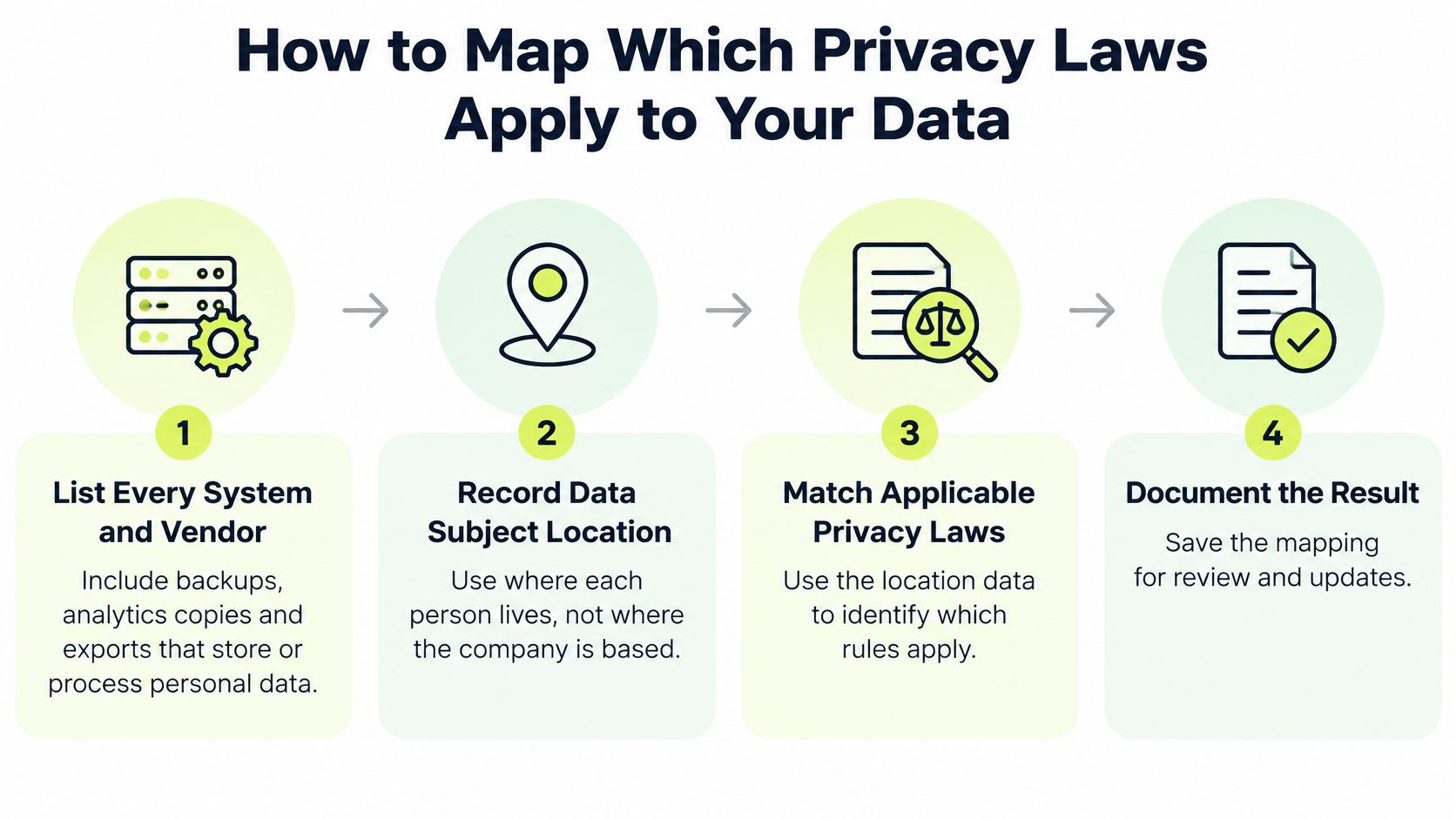
A useful data map follows information through actual systems. A procurement list alone won't reveal the spreadsheet downloaded from Salesforce, the attachment uploaded to Zendesk, or the analytics copy left in cloud storage.
Use this overview to organize the mapping exercise, then document the operational details underneath it.
Build the map from real workflows
List every system and vendor. Include production databases, backups, analytics copies, exports, shared drives, and contractor workspaces. Interview the employees who move information between them.
Record the people and locations involved. Identify customers, employees, applicants, and other affected groups, along with relevant location information. The headquarters trap is assuming the company's address alone determines its obligations.
Describe each purpose and processing condition. Replace vague labels such as business operations with account provisioning, payroll administration, or support troubleshooting. Record the lawful basis, notice requirement, or choice mechanism identified during legal review.
Match the relevant regimes. Have the privacy owner assess national, state, and sector-specific requirements, including HIPAA where relevant. For Canadian operations, CloudOrbis Inc.’s guide to understanding Canadian privacy requirements for SMBs offers a useful starting point for identifying questions to investigate.
Mark international transfers and vendor arrangements. Record storage locations, remote-access locations, subprocessors, and the safeguard used where required. A vendor's billing address doesn't answer where its staff can access data.
Assign an owner and review date. Give someone responsibility for keeping each flow accurate. Revisit it when a vendor, purpose, integration, or data category changes, rather than waiting for an annual review.
Make the map usable at approval time
Apply a consistent classification scheme so reviewers can distinguish routine contact details from credentials, health information, or confidential employee records. A practical introduction to data classification can help teams agree on labels before they build handling rules.
For vendors, retain written answers about storage, processing, access locations, and deletion in the vendor file. Record uncertainty explicitly. For example, we don't currently promise a specific data-residency region at Vigil Security, so your assessment shouldn't treat such a commitment as established.
A blank location field is an unresolved question, not evidence that no international processing occurs.
The finished map should show each flow's data subjects, purpose, applicable requirements, safeguards, owner, and review date. Test its usefulness by asking a support manager to locate the approved route for sharing a troubleshooting extract. If they still need to search old messages, turn the map into a shorter workflow instruction.
Use this video as an additional discussion aid during your team's mapping session.
The Data Lifecycle Controls Every Team Needs
Data lifecycle controls and owners
| Lifecycle stage | Control to apply | Typical owner |
|---|---|---|
| Collection | Collect only fields a stated purpose needs; record the lawful basis or notice given | Product owner |
| Storage | Encrypt at rest; restrict access by role; inventory personal data stores | IT and engineering |
| Use | Enforce purpose limits; pseudonymize analytics datasets | Data owner |
| Sharing | Confirm processor agreements and required transfer safeguards before export | Legal and procurement |
| Retention | Set a retention period for each category and document the reason | Privacy lead |
| Deletion | Delete or appropriately anonymize on schedule; address backups and vendor copies | Engineering and operations |
| Individual requests | Verify identity proportionately, locate records, and meet applicable deadlines | Privacy team |
The weak point is often a handoff, not a missing policy. A product team might document a collection purpose correctly, while an analytics engineer copies the same records into a warehouse without carrying over their retention conditions.
Treat the table as an allocation of responsibilities, not a rigid conveyor belt. Individual requests, for example, can arrive while information is being stored, used, or shared.
Follow an account after closure
Say a customer creates an account and supplies a name, email address, delivery address, and support preferences. The account closes, but an analytics pipeline continues copying the full profile into a reporting table.
Deleting the production record won't resolve that copy. The analytics owner needs to know which fields can remain, for what purpose, and under which retention rule.
Build the correction into the workflow:
- Closure event: Trigger a review of the customer's records when the account closes, while honoring documented legal holds or other justified retention.
- Export transformation: Remove direct identifiers and unnecessary free-text fields before the analytics job writes its output.
- Downstream action: Propagate deletion instructions to relevant stores and vendors.
- Verification: Retain job results and investigate exceptions rather than assuming a successful scheduler run means every record disappeared.
Avoid promising immediate removal from every backup if the architecture can't deliver it. Document backup expiry, restrict access, and establish a restore procedure that reapplies deletion actions before restored information returns to ordinary use.
Keep the rules attached to the data
The inventory, retention schedule, and named owner must agree. If the inventory lists a warehouse but the retention schedule names only the application database, the warehouse can become an unmanaged archive.
Free-text fields deserve particular attention. A support note might contain health information or an identity document reference even when the ticketing system's standard fields look harmless. Export jobs should therefore handle both structured fields and unpredictable text.
For individual requests, establish a search process across systems and a proportionate identity check. Don't collect an unnecessarily sensitive identity document merely because it makes the procedure feel more formal.
Pick a live dataset and trace its collection, storage, use, sharing, retention, deletion, and request handling. Ask each owner to demonstrate their control. Fix an ownerless stage first, because a control without someone responsible for operating it is difficult to maintain or prove.
Encryption, Access and Pseudonymization Controls
Local storage isn't automatically safer. Cisco's 2025 Data Privacy Benchmark Study announcement reports that 90% of surveyed organizations believed local data storage was safer, based on a study covering more than 2,600 privacy and security professionals across 12 countries. That finding describes a belief, not proof of stronger protection.
Location can matter legally and operationally. But a locally hosted database with exposed credentials can still disclose customer information, while geographic proximity doesn't fix excessive permissions.
Protect the content and the keys
Use TLS for network connections and authenticated encryption such as AES-GCM at the application or storage layer where appropriate. Encryption coverage should follow the information, not stop at the main database.
IBM identifies encryption and key management among foundational protections and reports that organizations using encryption reduced the financial impact of a breach by more than USD 200,000, as described in its breach analysis. That doesn't make encryption a guarantee: an attacker who obtains usable keys or an authorized session may still read the records.
Use the diagram to discuss the distinct jobs these controls perform.
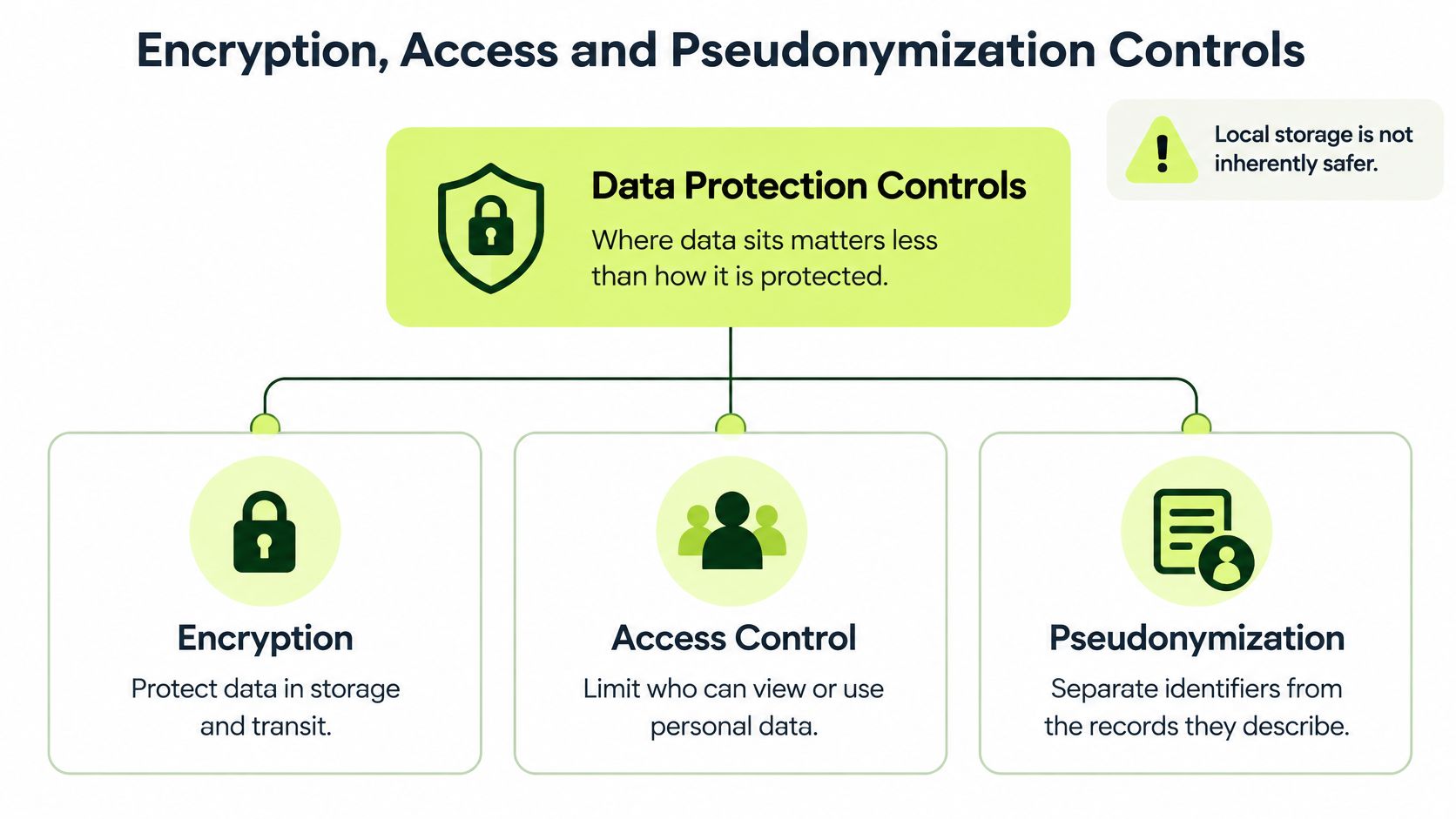
An envelope encryption design protects data-encryption keys with centrally governed key-encryption keys. Restrict decryption operations, rotate and revoke keys through a defined process, log key use, and separate production, backup, and analytics keys. Keeping unrestricted keys alongside encrypted exports defeats the intended separation.
Restrict access and reduce identifiability
Role-based access should reflect the employee's actual task. A support agent might need to view an account's delivery status without downloading the entire customer table. Apply least-privilege access to service accounts and decryption permissions as well as human users.
Pseudonymization replaces identifying details while preserving a controlled route back to the person. Tokenization can support this by substituting tokens and keeping the lookup vault separate from analytics systems.
The NIST Privacy Framework recommends limiting observability, linkability, and identification through measures including local processing, de-identification, and tokenization. The trade-off is practical: reducing linkage can protect individuals but also make fraud investigation or accountability harder.
Test combinations of fields, not just names. A precise location, timestamp, role, and device identifier might reveal an employee even after their name is removed. Don't label a dataset anonymous merely because it uses tokens.
Before approving a release, verify these overlooked destinations:
- Replicas and snapshots: Confirm protection and access settings match their intended use.
- Exports and queues: Check temporary files and messages, including failure paths.
- Logs and observability tools: Remove sensitive payloads and prevent keys from appearing in diagnostic output.
Role-Aware Training for Everyday Data Decisions
Role-based privacy training focus
| Role | Highest-risk everyday task | Lesson focus | Evidence to keep |
|---|---|---|---|
| Customer support | Pasting full customer records into tickets or AI tools | Minimize fields and redact before sharing | Completion record and quiz score |
| Engineering | Logging personal data or exposing storage buckets | Safe logging, scoped access, and configuration checks | Training record linked to code-review policy |
| HR and People Operations | Emailing salary or health data to the wrong recipient | Verify recipients and classify documents | Policy acknowledgement and certificate |
| Sales and marketing | Exporting contacts to unapproved tools | Approved tools and applicable outreach permissions | Quiz result and policy attestation |
| Managers and executives | Approving vendor sharing without review | Vendor due diligence and escalation | Signed acknowledgement and decision log |
| Contractors | Using shared folders outside offboarding controls | Access rules and return or deletion | Access agreement and offboarding record |
Training needs to target these decisions, not just test whether employees recognize legal vocabulary. Verizon's 2025 Data Breach Investigations Report found human involvement in approximately 60% of breaches and third-party involvement doubling from 15% to 30%.
Those findings aren't a reason to blame employees. They're a reason to give people usable workflows, including contractors and the managers who authorize their access.
Teach the safer version of the task
Say a support agent wants an AI assistant to draft a response. They paste the complete customer record because finding the relevant details takes longer.
A useful lesson shows the replacement behavior: remove names, account identifiers, addresses, and unrelated notes; use the approved tool; then review the draft before sending it. If the task requires sensitive context, the agent needs an escalation route and an acceptable alternative.
Cisco's 2025 Data Privacy Benchmark Study found that nearly half of respondents reported entering personal employee information or non-public information into generative-AI tools. Approval policies alone therefore don't establish safe behavior.
Before submitting a prompt: Confirm the tool, minimize the input, check retention and processing conditions, and plan human review of the output.
An approved tool isn't permission to upload every record. Teach employees to recognize unsafe prompts, avoid unnecessary attachments, and report accidental disclosure without hiding the mistake.
Measure decisions, not attendance alone
Use short monthly refreshers, deeper lessons at onboarding and role changes, and targeted coaching after incidents. Build scenarios from the work employees perform, using synthetic examples rather than real customer records.
A focused personally identifiable information training program should test whether employees can identify unnecessary fields and select a safe sharing route.
Keep completion and comprehension records, but also sample operational outcomes. Review whether export approvals include minimization checks, whether code reviews catch sensitive logging, and whether contractors lose access when assignments end. Use consistent review criteria so a change in reporting effort doesn't get mistaken for a change in behavior.
Pick Your First Three Controls and Prove Them
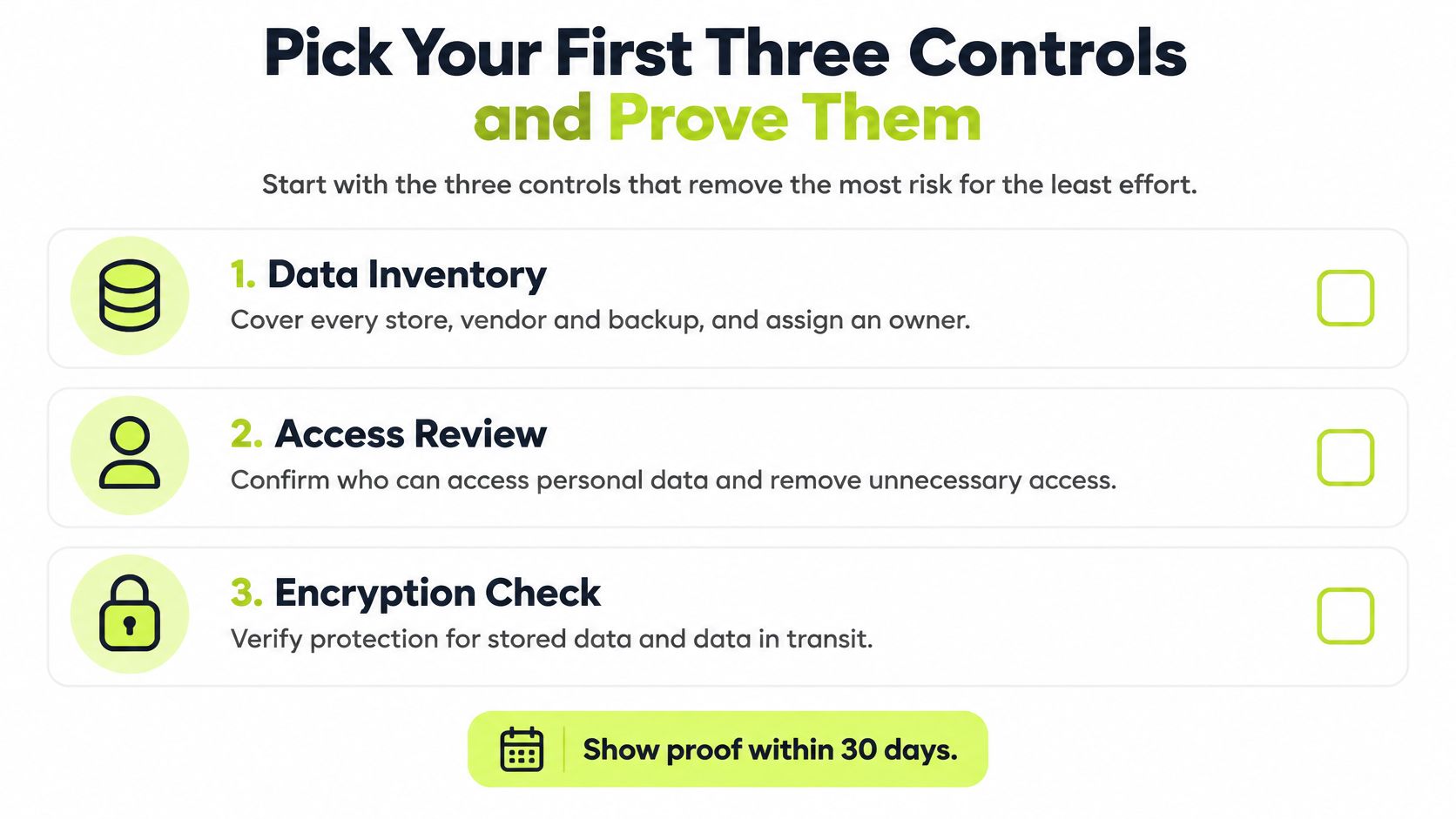
Start with a complete inventory, a retention schedule with working deletion triggers, and role-based training for your riskiest tasks. These are manageable starting points, not a claim that every organization has the same risk priorities.
Use the inventory to identify urgent technical checks, including unnecessary access and missing encryption. The visual below highlights those immediate checks alongside the inventory.
Build evidence while the work happens
Give each control an identifier and attach records as employees create them. Keep the data map with owners and review dates, signed policy acknowledgements, training completion and comprehension results, access-review logs, deletion-job results, and incident-response records.
Distinguish design evidence from operating evidence. A retention policy shows what should happen. A deletion-job result, including resolved exceptions, shows whether someone operated the control.
At Vigil Security, our lessons can be attached to editable framework controls, with mapping across SOC 2, ISO 27001, HIPAA, PCI DSS, GDPR, and more. The important governance choice is to connect each lesson to the behavior the control requires, rather than treating course completion as proof of the entire control.
Use a 30-day implementation checklist
- Week one: Inventory stores, vendors, backups, and routine exports. Name an owner for every flow and investigate unresolved access paths.
- Week two: Set justified retention periods, configure deletion triggers, and test an export job for unnecessary fields and downstream copies.
- Week three: Deliver lessons for the highest-risk roles. Include a practical AI-redaction exercise and immediate feedback on incorrect decisions.
- Week four: Export an evidence pack, review missing or overdue items, and assign each correction an owner and due date.
Export completion and overdue status monthly. Pair those records with a small, consistent sample of real workflow checks, such as whether external shares have approval and whether deletion exceptions were resolved.
Don't aim to produce the largest evidence folder. Aim to answer a concrete question: Can an employee make the safer decision before sharing information, and can the organization demonstrate that the supporting controls worked? Choose a live workflow this week and test it from request to final disclosure.
Vigil Security delivers short, interactive training inside Slack, with no separate portal or password, so employees can practice privacy decisions where they already work. Visit Vigil Security to explore role-aware lessons and evidence workflows that help connect everyday data handling to your compliance controls.