You're probably staring at a tab you shouldn't have opened, trying to remember whether you typed anything, clicked anything else, or just closed it too late. That's a normal reaction. Treat it like an incident, not a personal failure, and move fast. Phishing is still the most frequently reported cybercrime in the United States in 2024, which is why this happens to ordinary people in busy inboxes and Slack threads, not just to careless ones (FBI IC3 report). If you need a calm reference while you work through it, En Gb from Purple Shield is a useful read on how teams frame security responses without turning them into panic.
You Clicked a Phishing Link and It Is Fixable
A phishing click does not automatically mean your account or device is compromised. Loading a page and stopping creates a different response from entering a password, approving an MFA prompt, or opening a downloaded file. Identify which action occurred before choosing your next step.
In Slack, report the incident plainly: “I opened a suspicious link at [time]. I did or did not enter information, approve a prompt, or download a file.” Skip apologies. Security teams need the facts quickly, not a polished explanation.
Practical rule: treat every click as an incident first. Then narrow the response to viewed, submitted, authenticated, or downloaded.
The FBI IC3 report lists phishing or spoofing as the most frequently reported cybercrime in 2024, with 193,407 complaints, more than twice the complaints involving extortion and roughly three times those involving personal-data breaches. The figure does not mean your click caused a breach. It shows why prompt reporting and containment are the right default.
If you need a calm reference for handling the conversation, Purple Shield's guide to calm security incident response offers a useful framing. Report first, preserve what you remember, and let the response match what you did after the page opened.
Stop the Damage in the First Five Minutes
Freeze the interaction
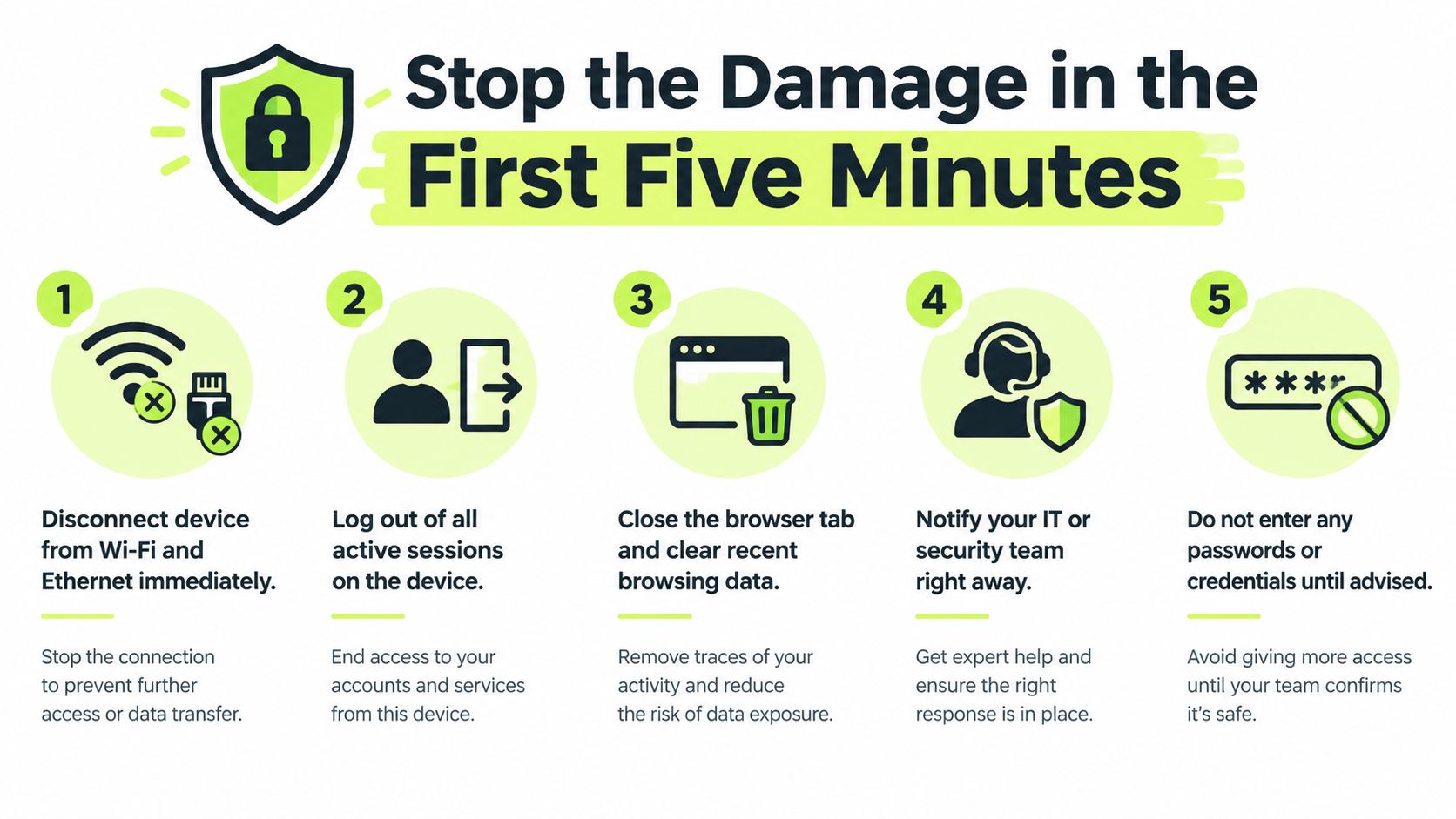
The moment you realize the page is suspicious, stop interacting with it. Do not enter a password, approve an MFA prompt, click “verify,” call a displayed number, or reopen the page to test it. On a work device, use your normal incident-reporting route. Use a trusted device for any later account sign-in.
A download or executed file changes the response. Disconnect the device from Wi-Fi and Ethernet if you suspect a file ran or a browser exploit executed. If you can do so safely, preserve the open tab, the original message, and the time before leaving the page. Do not delete evidence or keep experimenting on the device.
Capture the basics without going back
Record the sender, subject, time, device, and action taken. Keep the note factual and brief: loaded, submitted, authenticated, or downloaded. That distinction lets responders choose the right containment steps instead of treating every click as a full account takeover.
Do not reopen the link to “see what happened.” A second visit gives the page another chance to collect information.
For any real account, use a saved bookmark or type the address yourself on a separate, clean device. The FTC phishing guidance advises changing compromised passwords promptly and disconnecting infected devices from the network. Apply those actions to the branch that fits what happened, rather than trying to solve the entire incident at once.
In Slack, report the event in the channel or DM used for security incidents: “I clicked a suspected phishing link and stopped.” Add whether you submitted credentials, approved MFA, or downloaded anything. That gives the response team a usable starting point without an apology or long explanation.
What Happened After Your Click Changes What to Do
Use the exposure level, not your anxiety, to choose the next move
A lot of advice treats every click like the same event. It isn't. The right response depends on whether the page just loaded, whether you typed data, whether you approved MFA, or whether a file ran.
| What happened | Risk level | Do next |
|---|---|---|
| The page loaded, nothing was entered | Lower, but still reportable | Close it, save the message details, report it, and check whether anything downloaded automatically |
| You entered a username or password | High | Treat the credential as exposed, use a clean device, and reset it on the real site immediately |
| You completed MFA or signed in through the fake page | Very high | Reset the password, revoke sessions, and assume session theft may have occurred |
| You downloaded or opened a file, or granted browser permissions | Very high | Escalate as a possible malware or persistence issue and involve IT/security right away |
The “nothing entered” branch is still not harmless. The page can learn that your address is live, can collect browser and device details, and can help the attacker refine follow-up lures. But it usually does not mean the attacker already owns your account. That's why a click alone is different from credential submission.
Know which branch you're in
If you typed personal or payment data, the response shifts toward fraud protection and identity monitoring. If you entered a password, assume the secret is exposed even if the page looked broken or gave an error. If you approved MFA or signed in, don't comfort yourself with “but I had two-factor on.” Session theft can still preserve access, which is why revocation matters later.
The same logic applies on mobile. A page view on a phone is one thing, but installing a profile, granting device permissions, or submitting credentials is another. Don't flatten those into one bucket.
A practical habit from security-aware teams is to sort the event into clicked, submitted, downloaded, or authenticated and route each one differently. That keeps people from underreacting to a real compromise or overreacting to a harmless page view.
Lock Down Accounts Sessions and Devices
Start from a clean device and work outward
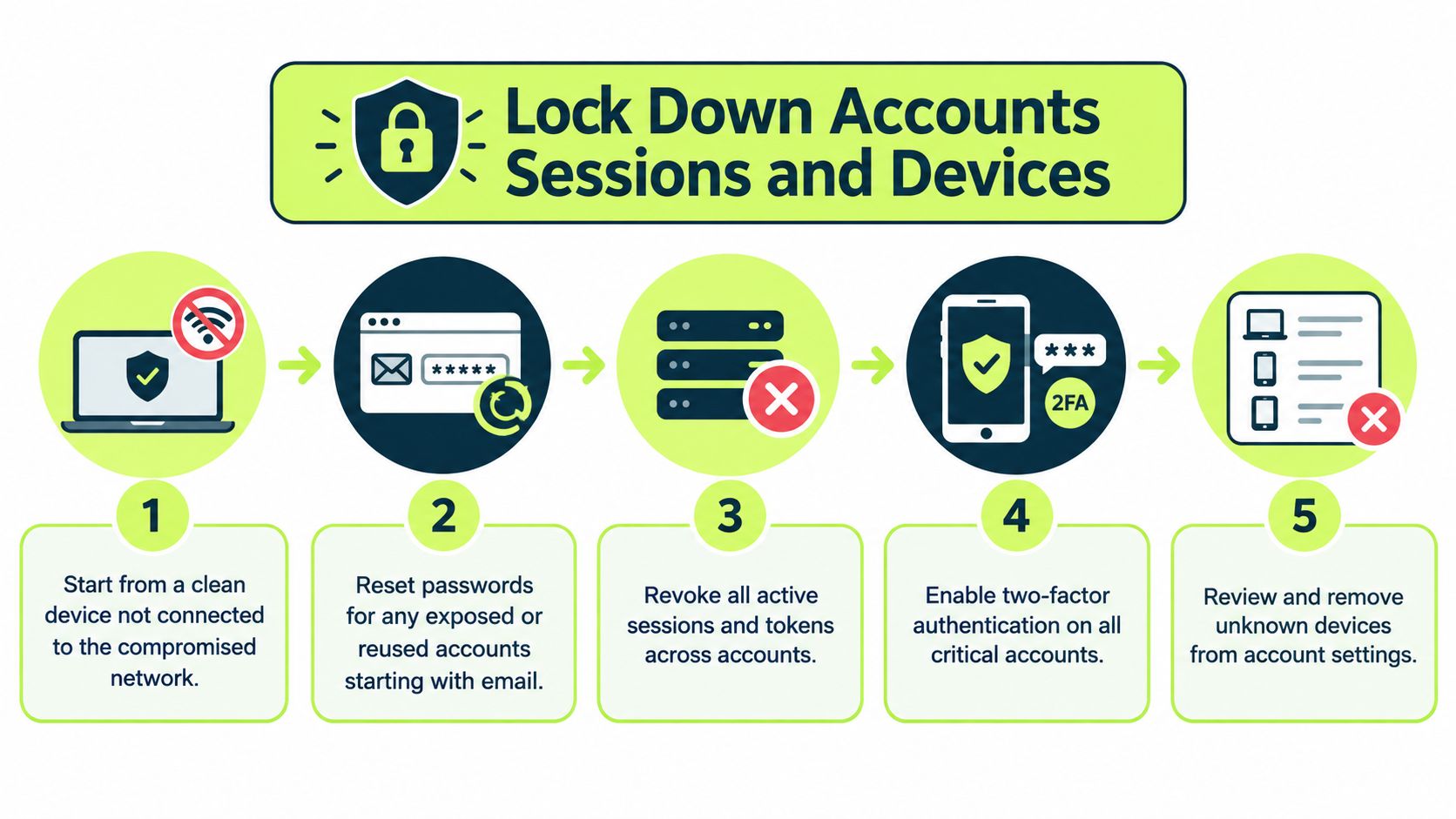
Use a trusted device that didn't touch the phishing page. Start with the account that matters most, usually email, because email can reset everything else. Change the exposed password, then change any other account that reused it.
Do not reset the password through the phishing page itself. That sounds obvious, but people do it when they're stressed. Also don't stop at the password. Revoke active sessions and tokens, because an attacker can stay in through a live session even after the password changes.
Microsoft's email threat reporting shows why this matters, credential phishing remained the dominant payload category in its reported Q2 2026 email threat environment, representing 94–96% of payload-based attacks each month. That figure is a reminder to treat identity cleanup as the main job, not an optional extra (Microsoft Digital Defense Report).
Check the persistence points people forget
Review MFA methods, recovery contacts, and registered devices. Remove anything you don't recognize. Look at sign-in activity, mailbox rules, forwarding, and OAuth app consents. If a suspicious app got access, changing the password won't necessarily remove it.
Clean-up order matters: password, sessions, MFA, mailbox rules, app consents, then device review.
If there's any chance a file ran or a command executed, tell IT to isolate the endpoint for review. Don't just “scan and hope.” Malicious code can leave behind browser extensions, scheduled tasks, or hidden access that a quick scan won't fully clear.
For a practical checklist on layered account hardening, it's worth comparing the steps against this 3-factor security guide and then mapping the items to your own accounts. If you want a broader workspace-security readout to share internally, browse workspace security articles can help frame the cleanup conversation for non-specialists.
How to Report Phishing in Slack Email and IT
Report it where the work happens
If Slack is your approved reporting route, use it first. Keep the alert short: say what you clicked, whether you entered information, and whether anything downloaded or opened. Do not repost the live phishing link for coworkers. That can expose more people and create extra cleanup.
For email, use your organization's report-phishing button. If there is no button, send the original message to security with its headers intact. The headers and metadata can help responders identify other recipients and block related messages. A complete original message is more useful than a polished summary.
Give IT the exact time, device type, and browser or app involved. State whether you approved an MFA prompt, entered a password, downloaded a file, opened anything, or granted a permission. If the message impersonated a company or vendor, contact that organization through a verified support channel, never through the suspicious thread. CISA recommends reporting suspicious messages, avoiding further links or attachments, and using contact details obtained independently (CISA phishing guidance).
Make the handoff easy to act on
Use a message like this:
I clicked a suspected phishing link at 10:14, entered nothing, and will not reopen it. I'm using a clean device now. I can provide the sender, subject, and original message.
That gives the responder a starting point for searching and containment. If your account sent messages or another person may have clicked, tell security immediately. Let the incident team decide who needs notification and whether partners or customers are affected. Keep the escalation path documented rather than trying to coordinate it yourself.
Report based on what happened after the click. A click with no submission needs a clear timeline. A submitted password or approved MFA prompt needs an urgent account response. A downloaded or opened file needs IT review of the device. Put that distinction in the first Slack message so the responder can prioritize correctly.
Vigil Security provides Slack-based training and reporting tools that can route suspicious-message reports into the team's normal workflow. After the incident is contained, share this guide to spotting scam email patterns with colleagues. It gives them a practical way to question urgent messages before they click.
Stay Safe After the Scare With Smarter Habits
Build habits that work under pressure
Bookmark your bank, email, and SSO portals. Open those bookmarks instead of following links in unexpected messages. Verify support requests through a separate channel before acting. If a message creates urgency, fear, secrecy, or the promise of a reward, check the sender through the actual service rather than the contact details it provides.
Apply the same discipline to money and identity. Monitor financial and account activity after an incident because stolen information may be used later. Silence does not confirm that an account is safe.
For a view of the broader threat situation these practices help address, review these secure data destruction tips from Beyond Surplus.
Teams retain these checks when practice is short and regular. Use Slack microlearning, quick phishing simulations, and reminders after near-misses. Each exercise should reinforce the action people need under pressure. Managers and team leads can use these social engineering attack tips as a follow-up resource.
Make reporting easier than hiding
People report faster when the process is simple and nonjudgmental. Set one obvious Slack channel, one reporting button, and one clear response from security. Treat an accidental click as a signal for investigation, not a reason to shame the person who reported it.
Training should reflect the behavior that failed. Show colleagues how to inspect mismatched links, question urgent demands, and reject requests to bypass the normal workflow. Repeat those checks until they become routine.
Bottom line: reduce repeat risk with clear reporting, simple verification, and practiced cleanup steps.
If your team needs Slack-based microlearning, phishing simulations, and audit-ready training records, review Vigil Security. Its tools support reporting and short security lessons within the normal workday.
If you clicked a link today, report the details, secure affected accounts from a clean device, and ask your security team what to do next. Use the incident to strengthen the habit that would have stopped the next lure.