Spam is unsolicited bulk messaging aimed at selling or persuading, while phishing is a deceptive attack built to steal credentials, money, or access. In 2025, spam made up 44.99% of global email traffic, while phishing campaigns included 3.8 million tracked attacks, showing why the two categories overlap but demand different levels of caution.
You may already be making this distinction several times a day without naming it. One message offers a discount on something you once browsed. Another claims your bank detected suspicious activity and asks you to verify your account immediately. Both arrive in the same inbox, but they're not asking for the same kind of action, and treating them alike can create unnecessary risk.
A useful habit starts with three questions: What does the sender want me to do? What does the sender want me to give up? How can I verify the request without using the message itself?
A Tuesday Morning Inbox Story
Maya opens her laptop on a Tuesday morning and sees the familiar inbox count waiting for her. Near the top is a marketing email from a sneaker brand she visited last week. The subject promises 40% off selected styles, and the message includes bright product photos, a discount code, and a button leading to the company's online store.
She deletes it without much thought. It's unwanted, but she recognizes the pattern. The brand is trying to sell her something, not convince her to surrender a password.
A second message feels different. The sender name looks like her bank. The subject says, “Unusual login attempt detected.” Inside, the message warns that her account may be restricted unless she verifies her identity immediately. Maya's first instinct is to click the button, because ignoring a possible banking problem feels more dangerous than opening the email.
Then she notices the pressure. The message wants her to act quickly, through a link supplied by the sender, while she's worried about losing access. She closes the message instead and opens her bank's app directly.

The sneaker promotion is probably spam. The bank alert may be phishing. The important difference isn't that one looks polished and the other looks suspicious. It's that the first tries to influence a purchase, while the second tries to push Maya toward a fake verification process where she could expose credentials, payment data, or account access.
The safe responses are also different. She can ignore, filter, or report the promotion as spam. She should report the bank message as suspected phishing, avoid its links and attachments, and verify the account through an official channel.
What Spam and Phishing Actually Mean
Spam is an unsolicited bulk message, usually sent to promote a product, service, website, or idea. A spam sender wants broad reach. The message may be irrelevant, repetitive, or annoying, but it generally doesn't need to impersonate someone you trust or capture your login details.
Phishing is a deceptive social-engineering attack. The sender pretends to be a bank, colleague, supplier, cloud service, or other trusted source and tries to make you take a harmful action. That action might include entering a password, approving a payment, downloading a file, or handing over sensitive information.
A simple way to explain the difference is:
Spam tries to sell or persuade. Phishing tries to deceive and steal.
Spam is often a productivity and filtering problem. It fills the inbox, consumes attention, and may promote questionable offers. Phishing is a security incident because the message is designed to cause harm through impersonation and manipulation. The Encyclopaedia Britannica overview of spam describes spam as unsolicited bulk email and traces a commonly cited early mass-marketing email to 1978, while the term phishing appeared later, in the 1990s.
The history helps explain the confusion. Phishing grew out of the same broad email environment that made mass unsolicited messaging possible. Both can arrive without permission, both can contain links, and both can ask you to act. Modern attackers also deliberately make phishing resemble ordinary advertising, which weakens the old assumption that spam is merely annoying and phishing is always visibly alarming.
The deciding question is therefore not, “Does this look like junk?” Ask instead, “Is this message trying to make me buy something, or is it trying to make me surrender something?” A sales email may want a click for revenue. A phishing email wants the click to lead to stolen credentials, money, data, or access.
Spam and Phishing Side by Side
| Dimension | Spam | Phishing |
|---|---|---|
| Intent | Promotion, advertising, or persuasion | Deception and theft |
| Primary goal | Generate attention, visits, or purchases | Capture credentials, payment data, or access |
| Typical volume | Broad, unsolicited distribution | May be broad, targeted, or highly tailored |
| Sender behavior | Often uses promotional branding and sales language | Impersonates a trusted person, service, or organization |
| Risk level | Usually nuisance, with possible indirect risk | High, because the message seeks a harmful action |
| Example message | “Save on selected shoes this week” | “Your account is locked. Verify your password now” |
The table shows why intent matters more than appearance. A professional design doesn't make a message safe, and poor grammar doesn't automatically make it phishing. Spam optimizes for reach. Phishing optimizes for one successful reaction, whether that's a login, a payment approval, or an attachment opening.
Volume can still provide a useful clue. The 2025 Kaspersky spam and phishing report recorded spam as 44.99% of global email traffic and reported 554,002,207 attempts to follow fraudulent links blocked by Kaspersky systems in a single year. The same report noted that about 96% of phishing attacks are delivered by email, which helps explain why phishing often travels through the same crowded channel as spam.
A message can also be both. If an unsolicited promotional email contains a fake login page, it functions as spam by distribution and phishing by intent. That overlap matters because a strict either-or label can encourage careless handling.
Look past the category label. Identify the action the sender wants and the information that action could expose.
A harmless-looking discount email may ask only for a purchase. A malicious “reward” email may ask you to scan a code and sign in. The visual format can be nearly identical, but the second message belongs in a security workflow.
Warning Signs You Can Spot in Seconds
You don't need advanced technical knowledge to perform a quick inbox check. Start with the sender, read the request, and inspect the destination before you interact.
Check the sender
Display names are easy to copy. The full address is more useful.
- Look for lookalike domains:
support@paypa1.comuses a number in place of a letter. A real address may use a legitimate company domain or a clearly recognizable marketing subdomain such asdeals@brand.example. - Read the part after the @ symbol: An address that claims to represent your bank but ends in an unrelated domain deserves caution.
- Treat unusual variations carefully: Extra words, unexpected country domains, or a free mailbox address can signal impersonation, although a familiar-looking address alone doesn't prove safety.
Read the pressure
Marketing spam usually says, “Buy this,” “See the offer,” or “Claim a discount.” Phishing says, “Act now or something bad will happen.”
A fake invoice might say, “Payment overdue. Open the attached document immediately.” A legitimate shipping confirmation is more likely to provide an order reference and delivery information without demanding an unexpected password reset. A message that combines authority, urgency, and a sensitive request deserves a slower response.
- Notice threats: Account closure, legal action, or failed payment warnings can push you past normal verification.
- Question generic greetings: “Dear customer” isn't proof of fraud, but it provides little evidence that the sender knows you.
- Compare the branding: Mismatched logos, odd formatting, and an unusual tone can reveal a copied template.
Inspect the link or attachment
Hover over a link without clicking it. If the visible text says “Open your bank account” but the destination points somewhere unrelated, stop. Be especially cautious with unexpected password-reset links, invoice attachments, shared-document invitations, and QR codes that move the verification step onto a phone.
If a message trips two or more checks, treat it as suspected phishing and report it instead of deleting it immediately. For more examples of suspicious wording and sender behavior, use this scam email recognition guide.
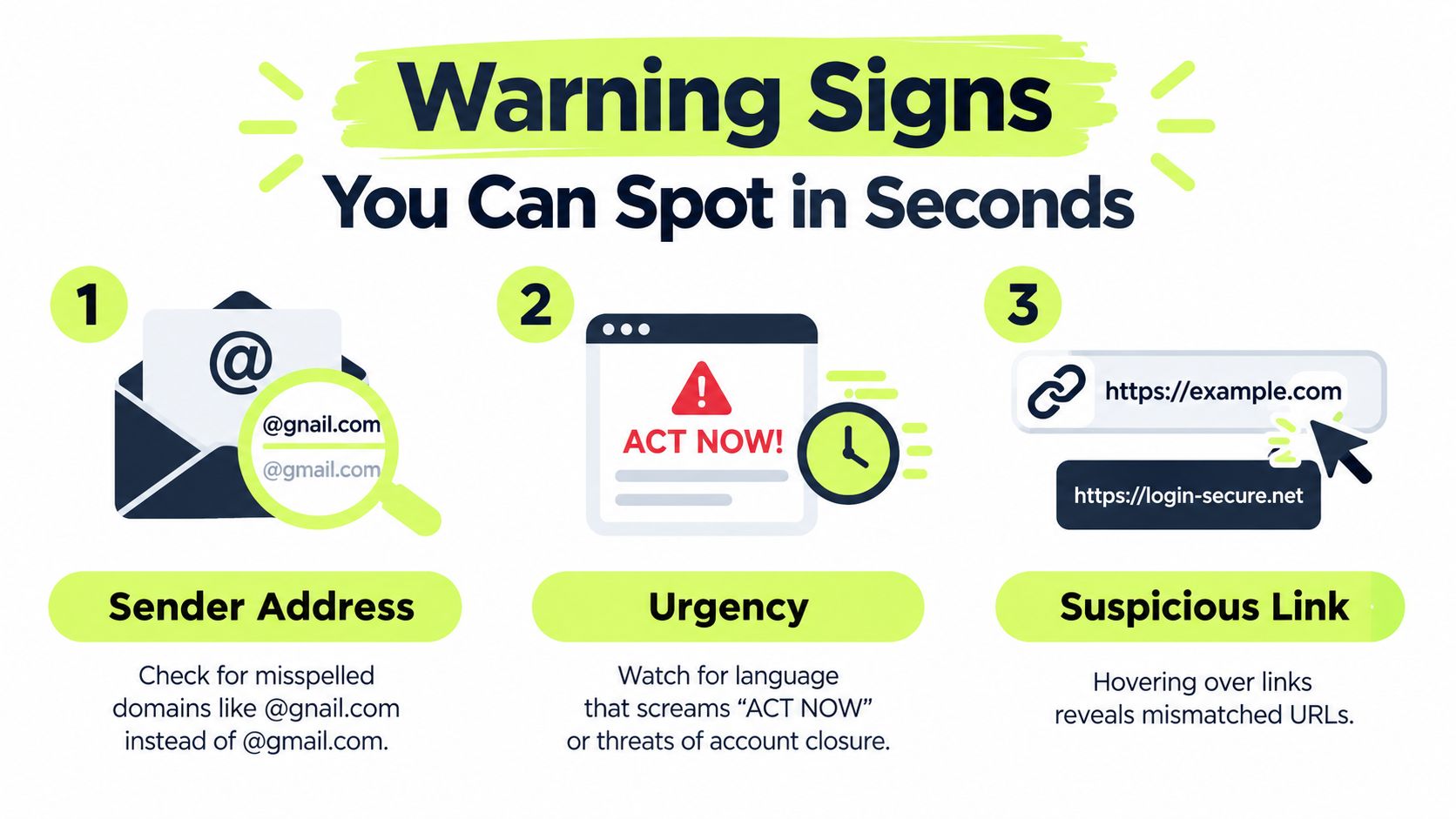
The most reliable test combines signals. Spam may contain a sales link, but phishing uses the link to create a false sign-in, collect information, or trigger a harmful action. When the message asks for credentials, money, or access, classify it by its risk rather than its promotional appearance.
This short video demonstrates practical phishing cues and reporting behavior:
Why the Line Between Spam and Phishing Is Blurring
The old mental model was tidy. Spam was a broad stream of unwanted promotions, while phishing was a smaller set of obvious fake alerts. That model no longer captures how attackers use email.
The Barracuda analysis of malicious and unwanted email reports that 1 in 3 email messages are malicious or unwanted spam and that 48% of malicious email activity is phishing. It also found that compromised accounts account for 33% of spam delivery, while free email services account for 32%. Those figures illustrate the operational problem: spam-like volume can provide the cover, while phishing supplies the theft mechanism.
Consider a loyalty-reward message. It may use a familiar retailer's logo, mention points that are about to expire, and invite you to scan a QR code. The email can look like ordinary marketing, but the QR code may open an attacker-controlled sign-in page. The sender isn't trying to sell you sneakers or remind you about rewards. The sender wants your credentials.
Other blended tactics include compromised legitimate senders, open redirects, CAPTCHA-gated pages, and AI-assisted copy that removes the spelling mistakes people once relied on. A message can also use a QR code to move the suspicious step outside the email security controls that inspect ordinary links. The result is a lure that behaves like spam at the inbox level and phishing at the moment of interaction.
Microsoft reported about 8.3 billion email-based phishing threats in Q1 2026 and 7.6 billion in Q2 2026, including emerging QR-code and CAPTCHA-gated variants in its email threat landscape analysis. The point isn't that every promotional message is dangerous. It's that appearance and delivery volume no longer tell you enough.
Treat unsolicited mail as untrusted until you verify what it wants. A familiar logo, polished grammar, or real-looking sender address can support a deception. Your response should depend on the requested action and the verification path, not on whether the message resembles an advertisement.
How to Respond to Each Type Safely
Start with the action the message requests. An unsolicited discount email asking you to “confirm delivery” deserves more caution than ordinary advertising because its purpose may be hidden behind a familiar format.
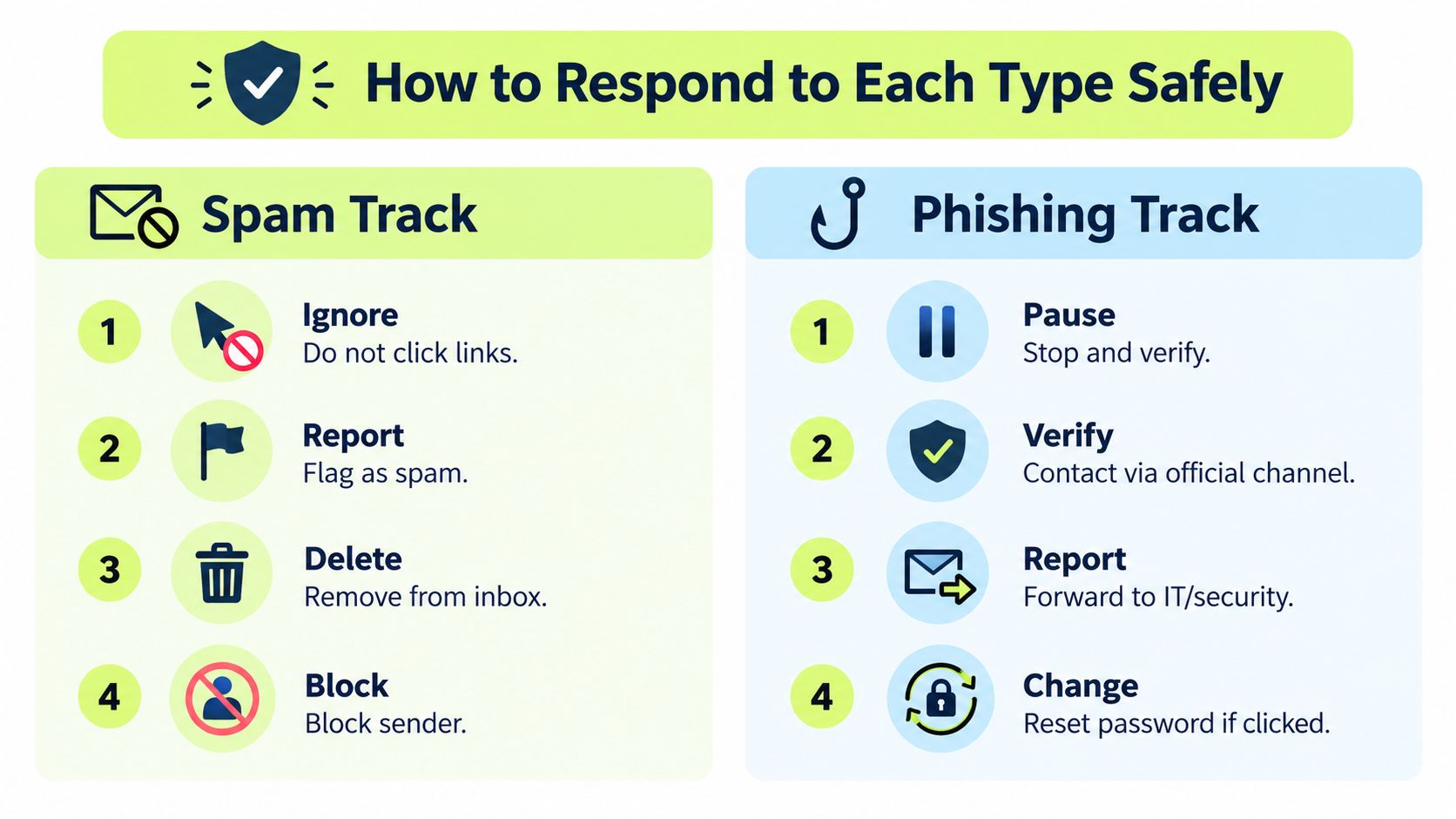
For ordinary spam, follow a light-touch routine:
- Do not click or reply. A reply can confirm that your address is active.
- Unsubscribe only when the sender is clearly legitimate. If you feel uncertain, visit the company's known website instead of using the email link.
- Block the sender if the messages continue.
- Report it through your mailbox provider's spam control so similar mail can be filtered.
This limits unwanted marketing without giving the sender more information. It also avoids links that only appear promotional but lead somewhere unsafe.
Suspected phishing needs a stricter response:
- Pause. Do not click a link, scan a code, open an attachment, or reply.
- Verify independently. Open the official app or type the known website address yourself. For a colleague's request, contact that person through a separate channel.
- Report the message with your organization's Phish Report button or security process.
- Delete it from the inbox and trash after reporting, according to your company's retention rules.
- Escalate any interaction. If you clicked, entered information, opened a file, or approved a request, contact IT or security immediately and follow the incident process.
A curiosity click is still an interaction. Tell security what happened, even if you closed the page immediately.
Spam commonly creates nuisance and more unwanted mail. A phishing message can lead to account takeover or unauthorized access, and a promotional-looking email can combine both risks. If you are unsure, forward the message as an attachment so the security team can preserve useful headers and inspect the original content.
Use this social-engineering protection guidance to reinforce the same pause, verify, and report behavior across email and other communication channels.
Turning Awareness Into a Team Habit
People remember a response pattern better when they practice it in the same place they work. A short message in Slack or Teams can show one suspicious subject line, ask what the employee would do, and provide immediate feedback. The exercise doesn't need to become a long classroom session.
A security manager might share a fake bank alert one week, then a QR-code loyalty lure another week. The team discusses whether each message is ordinary junk, credential theft, or a hybrid. That conversation builds a common vocabulary for escalation, especially when employees disagree about whether a polished message “looks real.”
Build a repeatable loop
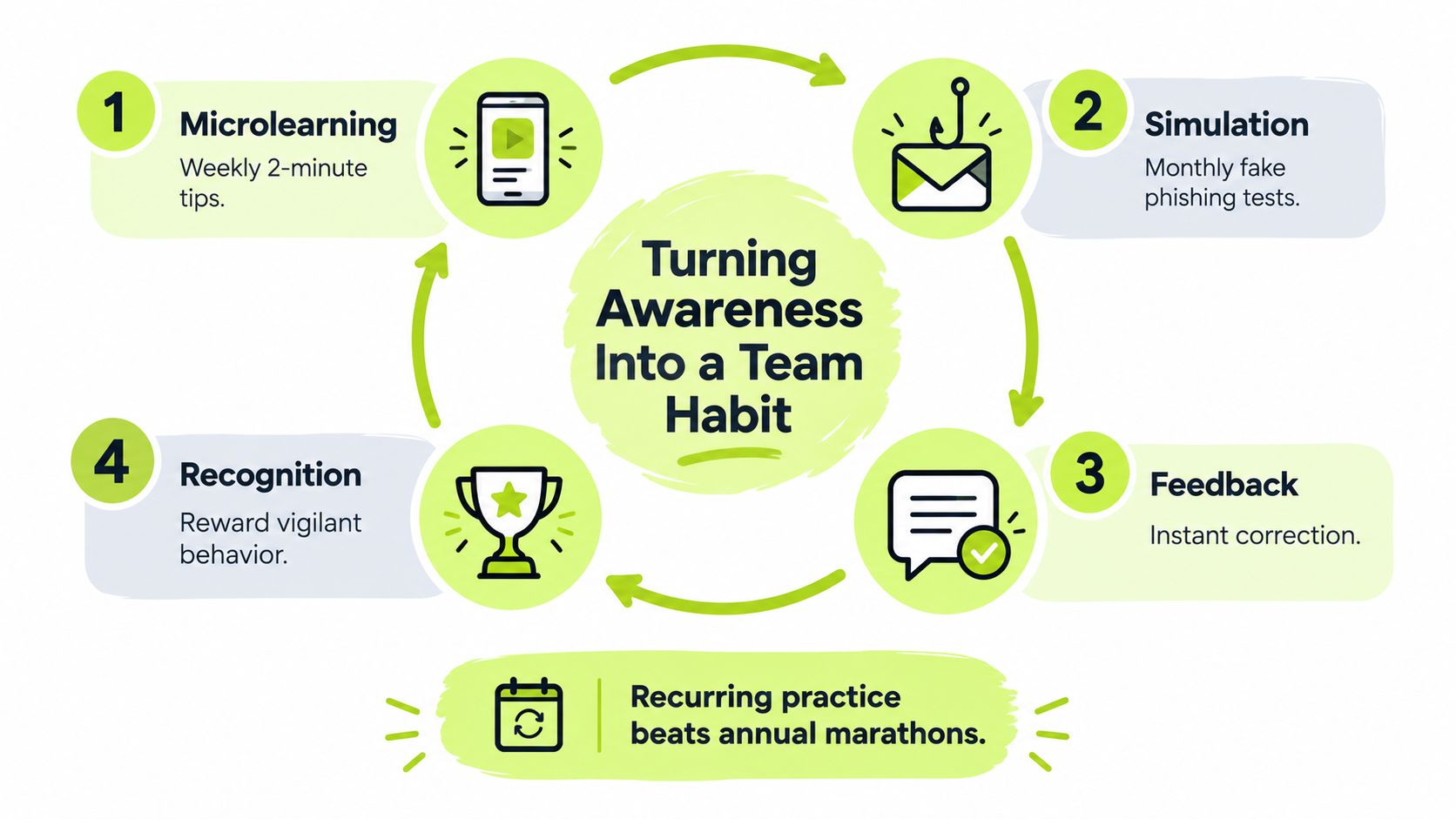
A practical habit loop has four parts:
- Microlearning: Present one focused cue, such as checking the domain behind a display name.
- Simulation: Use realistic examples that ask employees to pause before clicking.
- Feedback: Explain immediately why a response was safe or risky.
- Recognition: Reinforce careful reporting rather than embarrassing people who made a mistake.
Every report should reach one defined channel. The security team can review the message, label it, notify affected recipients, and use the result to choose the next lesson. That creates a feedback loop between inbox activity and training rather than leaving reports isolated in individual mailboxes.
A recurring program also gives managers visibility into completion, comprehension, and reporting behavior. The aim isn't to turn employees into investigators. It's to make the safe action obvious: stop, verify through a separate route, report, and escalate if interaction occurred.
For teams that want training inside their existing workflow, Vigil Security delivers Slack-native microlearning, phishing simulations, and automated awareness workflows. Its model reinforces short lessons and feedback without requiring employees to leave Slack for a separate training portal.
The One Rule to Remember
Use this two-second decision rule:
Spam pushes you toward a purchase or a click for someone else's gain. Phishing pulls you toward a fake surface so you surrender something for the attacker's gain.
That distinction remains useful even when one message fits both categories. A discount email may be ordinary spam if it leads to a known retailer and asks for a purchase. A “reward” email becomes suspected phishing when it leads to a fake sign-in, asks for a password, or uses urgency to bypass independent verification.
Before acting, ask two questions:
- What does this message want me to do?
- What does it want me to give up?
A request to browse an offer is not automatically safe, but it differs from a demand to enter credentials after an unexpected account warning. A request to review a document differs from a request to enable macros or approve a payment. The answer tells you whether to filter a nuisance or activate the security response.
Keep the response proportional but cautious. Don't click or reply to spam. Use unsubscribe only for clearly legitimate senders, then block and report. For suspected phishing, stop interaction, verify through an independent channel, report it, delete it after reporting, and notify IT or security if you clicked or disclosed anything.
Organizations can turn that rule into routine by maintaining one reporting channel, sending a monthly awareness reminder, and running periodic simulations that reflect current lures such as bank alerts, fake invoices, and QR-code prompts. The goal is an email-aware team that recognizes not only obvious phishing, but also credential theft hiding inside ordinary-looking junk.
Vigil Security provides Slack-native security awareness training, phishing simulations, reporting workflows, and short recurring lessons that help teams practice the difference between spam and phishing in context. Visit Vigil Security to explore a practical way to build consistent reporting and verification habits.