Total reported cybercrime losses passed $20 billion in 2025, according to the FBI Internet Crime Complaint Center 2025 Internet Crime Report, which also recorded 191,561 phishing and spoofing complaints that year. That number reframes phishing and social engineering. This isn't mainly a hunt for typos in email. It's a daily test of whether a person, under pressure and on any channel, pauses, verifies on a channel they chose, and reports fast enough for someone else to act.
The 2026 Scale of Phishing Losses
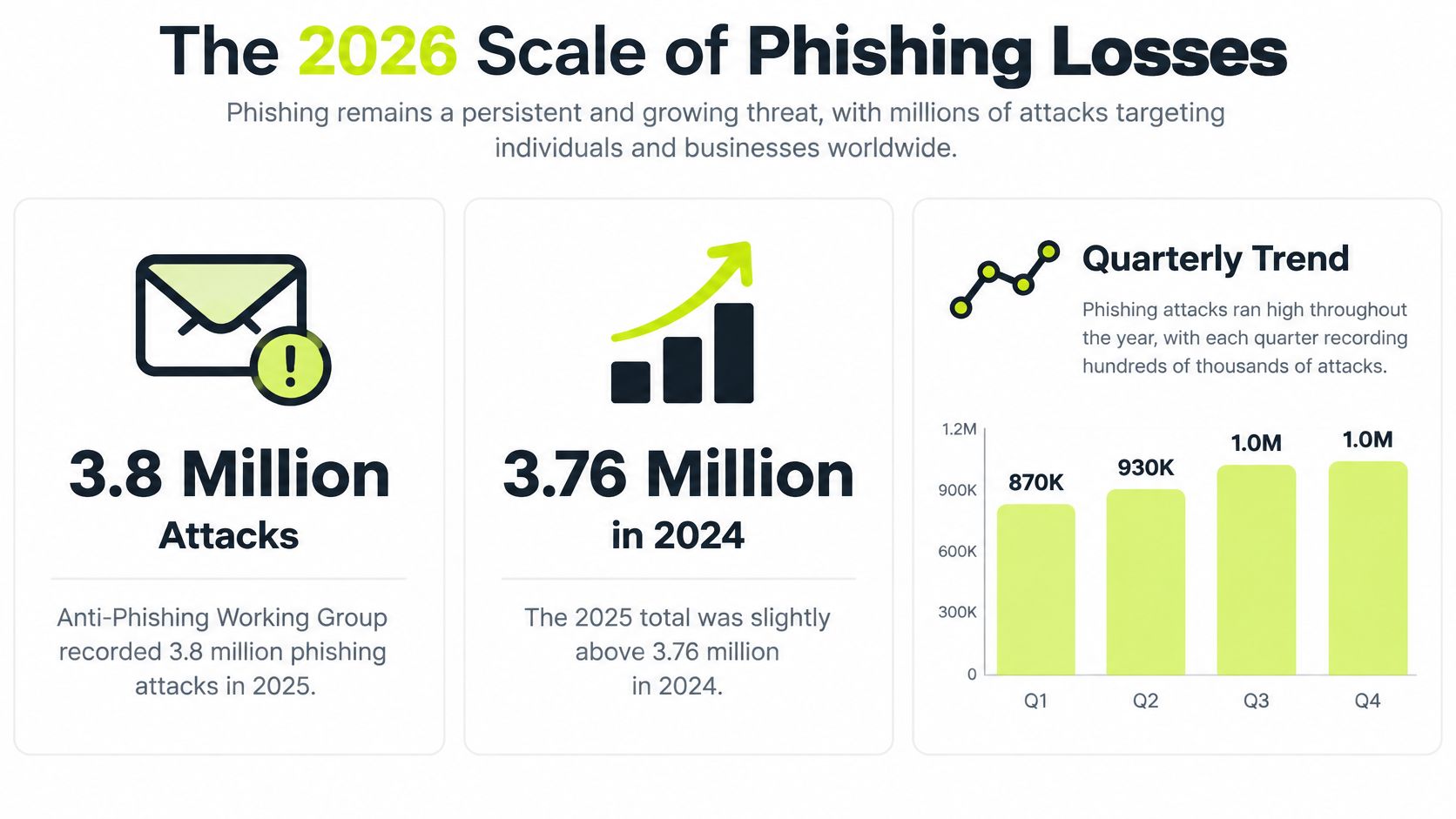
The scoreboard starts with volume. The Anti-Phishing Working Group trends report for Q4 2025 recorded 3.8 million phishing attacks during 2025, slightly above the 3.76 million observed in 2024. The first quarter alone reached 1,003,924 attacks, the highest quarterly total reported since late 2023, and later quarters stayed high even as they fluctuated.
Read that total correctly. APWG aggregates reports from member companies, research partners, and public submissions worldwide. Treat it as a measured minimum. A dip between quarters tells you reported volume moved, and attackers may have shifted channels, brands, or timing.
From Attack Counts to Dollars
Complaint data adds the financial picture, and it needs the same caution. Many complaints report no dollar loss at all, so an average calculated only among people who lost money looks severe while hiding how many cases ended at zero. Complaint counts also depend on whether victims know where to report and choose to do it, which makes them a lower bound on harm.
| Signal | Figure | Period | How to read it |
|---|---|---|---|
| APWG phishing attacks | 3.8 million | 2025 | Just above 3.76 million in 2024; observed reports, a measured minimum |
| APWG first quarter | 1,003,924 attacks | Q1 2025 | Highest quarterly total since late 2023 |
| APWG later quarters | 1,130,393; 892,494; 853,244 | Q2-Q4 2025 | Volume stayed high but fluctuated |
| IC3 complaints and losses | Complaints and reported losses rose | 2024 | Losses increased from the prior year |
| Complaints with a dollar loss | A minority of complaints | 2024 | Averages among losers hide the many zero-loss cases |
| Phishing and spoofing complaints | A leading complaint category | 2025 | Recent years remained high |
| All reported cybercrime losses | Record reported total | 2025 | Complaint-based lower bound, not global prevalence |
| Adults 60 and older | Largest complaint group | 2024 | Harm concentrated in that age group |
| Payment and banking share | 30.9 percent of attacks | Q1 2025 | APWG counts online payment and banking together |
Two patterns matter for a training plan. Financially oriented impersonation is central, and SaaS, webmail, and social media brands give attackers familiar costumes. Harm also concentrates in a minority of cases where a real payment, credential, or account change goes through. That concentration is why recovery planning matters alongside prevention, including understanding what identity fraud coverage includes before an incident forces rushed decisions.
Judge any awareness effort by a simple test. Does it build a detect-and-report habit across email, chat, text, voice, and QR codes, or does it only rehearse spotting a suspicious email once a year? A stronger proof is a 90-day plan on three high-risk processes: payment approvals, credential resets, and vendor bank-detail changes. Measure whether people pause, verify on a channel they chose, and report fast enough for someone else to act.
How Social Engineering Turns Trust into Access
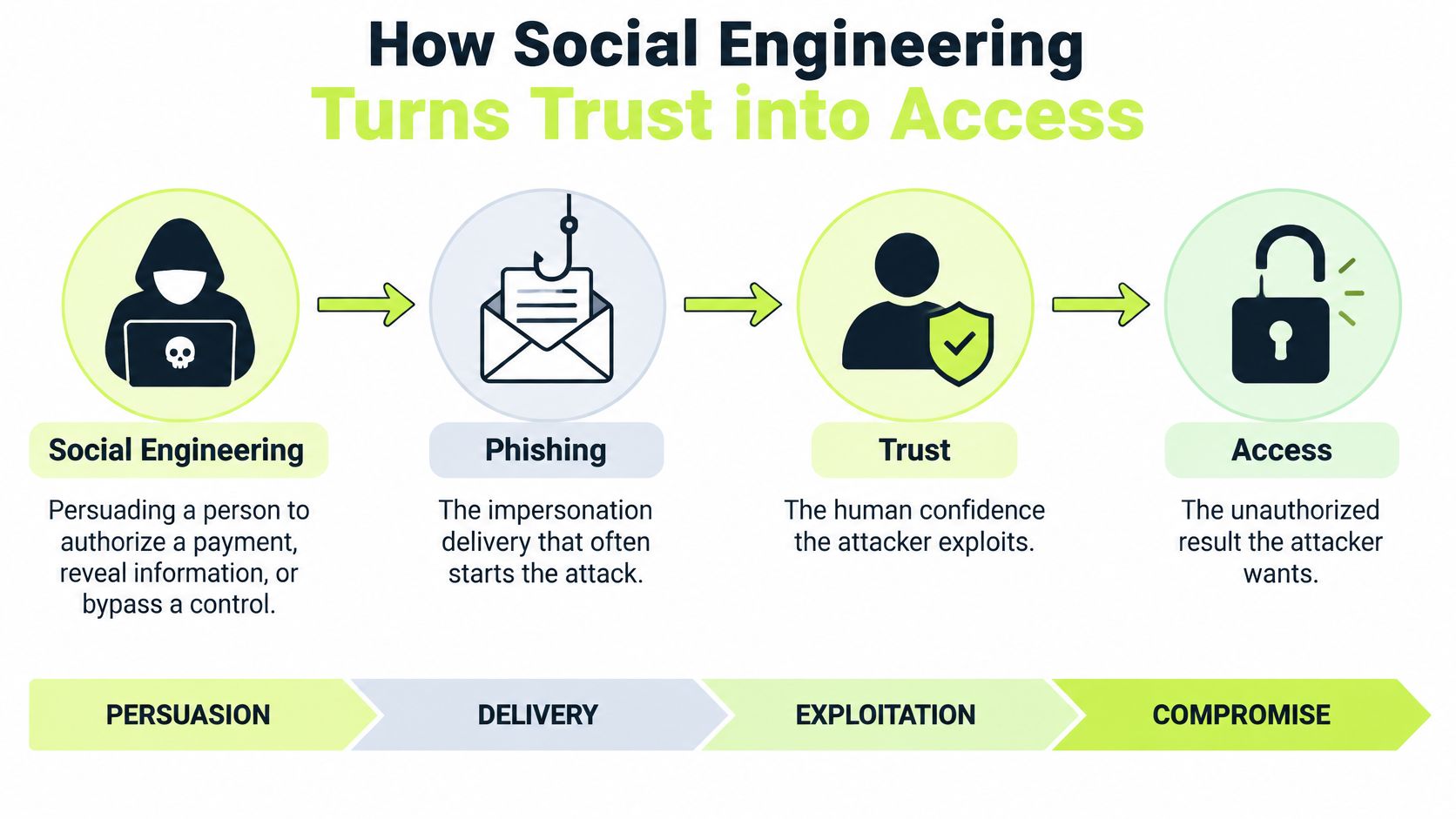
Social engineering means persuading a person to authorize a payment, reveal information, or bypass a control. Phishing is the impersonation delivery that often starts it, a message, page, call, or code dressed as someone trusted. Think of a sound lock on a door. The lock can work perfectly and an attacker still gets in if the owner hands over the key.
The chain runs in a predictable order, and naming each link helps you interrupt it. First comes attention, drawn by a trusted brand, coworker, vendor, or familiar thread. Second comes pressure, through urgency, authority, scarcity, or a request that feels routine. Third is the action, a click, scan, approval, payment, one-time code, or exception to procedure. Last is abuse, where the attacker uses a real account, session, or payment rail, so no software bug is required.
Business email compromise shows the model clearly. The attacker doesn't need to break encryption if a convincing request, sent at the right moment to the right person, causes a transfer or a credential disclosure through normal tools.
A convincing request can make a legitimate process do the attacker's work.
That human route carries real economic weight. The FBI 2024 Internet Crime Complaint Center report collected 859,532 complaints and documented $16.6 billion in reported losses, a 33% increase over 2023, with phishing and spoofing among the three cybercrime categories generating the most complaints. Only 256,256 complaints reported an actual financial loss, yet the average reported loss among those cases was $19,372, and people aged 60 and older submitted the largest number of complaints and suffered nearly $5 billion in losses in 2024.
It's worth watching how that persuasion unfolds in a spoken example before you try to spot it in your own inbox.
The outdated picture, a badly spelled email with a strange attachment, no longer protects anyone. Polished writing, cloned voices, and correct branding have removed those old tells, and filtering alone can't help once a person approves a real transfer or pastes a real code into a real form. The durable habit is different. Pause the action, and verify it on a channel the requester didn't choose.
Attack Vectors and the Move That Stops Each One
Start with the scan, not a story. Find the row that matches the request in front of you, then run that row's move before you approve anything consequential.
| Vector | Typical channel | What they want | Verification move |
|---|---|---|---|
| Credential phishing | Email, SaaS, or webmail login | Password, token, or session | Open a known address yourself; use phishing-resistant MFA |
| Business email compromise | Email as an executive, finance contact, or vendor | Wire, invoice, or bank-detail change | Confirm out of band on a number already on file |
| QR-code phishing | Email image, poster, package, or slide | A phone visit to a fake site | Treat the code as a link and preview the destination |
| Smishing | SMS or messaging app | A tap, a code, or a reply | Ignore numbers and links inside the message |
| Vishing and voice clone | Phone call | Urgent approval, code, or exception | Hang up and call back on a known number |
| AI-polished or deepfake impersonation | Email, chat, or video | Trust from tone, face, or branding | Ignore polish; verify the request, not the style |
| Pretexting and authority pressure | Any work channel | A skipped procedure | Pause high-impact actions until a second person confirms |
| Social or brand impersonation | Social media or a lookalike SaaS page | Account access or a trusted download | Reach the brand through its official app or a saved contact |
Reading the Table Row by Row
Credential phishing wants what proves you're you. Don't travel from the message to the login page. Type or open the known address yourself, and rely on authentication the fake page can't replay.
Business email compromise wants money moved through normal finance steps. The thread, invoice, and signature can all look right. Your callback number must come from a vendor record or directory you already trust, never from the message asking for the change.
QR-code phishing moves the click onto a phone, often a personal one outside the corporate browser. Treat every code as a link you can't see yet. Preview the destination, and if it asks for work credentials, stop and open the service the normal way instead.
Smishing and vishing shrink your time to think. A text wants a tap or a code, a call wants an answer while someone waits on the line. Ending the contact isn't rude. It's the control, because you restart on a number you chose.
When the Surface Looks Perfect
AI-polished and deepfake impersonation defeat style-based detection on purpose. Correct grammar, a familiar face, and a confident voice are production qualities, not identity proof. Evaluate what's being asked and who benefits if you rush.
Pretexting attacks procedure directly. Someone with apparent authority asks you to skip a step just this once. For payments, access grants, and account changes, a second person's confirmation isn't bureaucracy. It's what keeps one persuaded person from becoming a single point of failure.
Social and brand impersonation exploit the logos you see daily, and SaaS, webmail, and social platforms are frequent targets for exactly that reason. A correct logo proves an image was copied well, nothing more. Vendor and partner requests belong in this same table, because an outside sender asking for access or payment deserves the same check as an internal one.
Cross-Channel Attacks That Look Legitimate
Friday afternoon, finance gets a reply inside a real vendor thread. The invoice amount matches recent work, the tone matches earlier messages, and the sender asks to update the bank account before the payment cutoff. The history looks genuine because the mailbox is real: it was compromised, or the thread was copied closely. Nothing in the spelling saves the person reading it.

Now move the lure off the laptop. A QR code sits on a delivered package, a lobby poster about a benefits update, or the last slide of a meeting deck. An employee scans it with a personal phone, lands on a login page wearing the company brand, and types credentials on a device your filters never see.
That phone scan is a mainstream tactic now. Analysts at APWG found criminals used QR codes to target 1,642 brands in Q2 2025, according to the APWG trends report for Q2 2025. The code works because it does three jobs at once: it hides the destination, it moves the victim to a different device, and it arrives in a physical setting where scanning feels like the intended next step.
A Voice You Recognize, a Chat That Sounds Right
Scene three is a ringing phone during a supposed security incident. The caller sounds like the employee's manager, a voice that can be cloned from public audio like a conference talk or an earnings call. The request is small and urgent: read back a one-time code so the team can get back into a system. Refusing feels unhelpful in the moment, and that discomfort is exactly what the caller is renting.
Scene four never leaves chat. A message with the right avatar, perfect tone, and a plausible project name asks an engineer to approve access for a partner who is blocked on a launch. There is no attachment to scan and no misspelled domain to catch. The ask itself is the payload. If you want to see how text-message lures differ from email ones, this comparison of smishing and phishing lays it out, though the defense converges on the same move either way.
Four scenes, one habit. Whether the lure arrives by thread, code, call, or chat, the person under pressure does the same thing: pause, verify on a contact method they already trust, and report what they saw. That report reflex is the skill worth measuring, because it is the one that transfers across every channel an attacker tries next.
Channel-independent rule: Use a contact method you already know, confirm payment or credential changes out of band, and treat a QR code as a link with the address hidden.
Grammar, spelling, and branding no longer decide these cases. The practical question is how you verify when the channel, voice, writing, and logo all look authentic, and the answer cannot rest on any of those surface signals. AI makes the bait polished. It does not make the request safer.
Controls That Break the Attack Chain
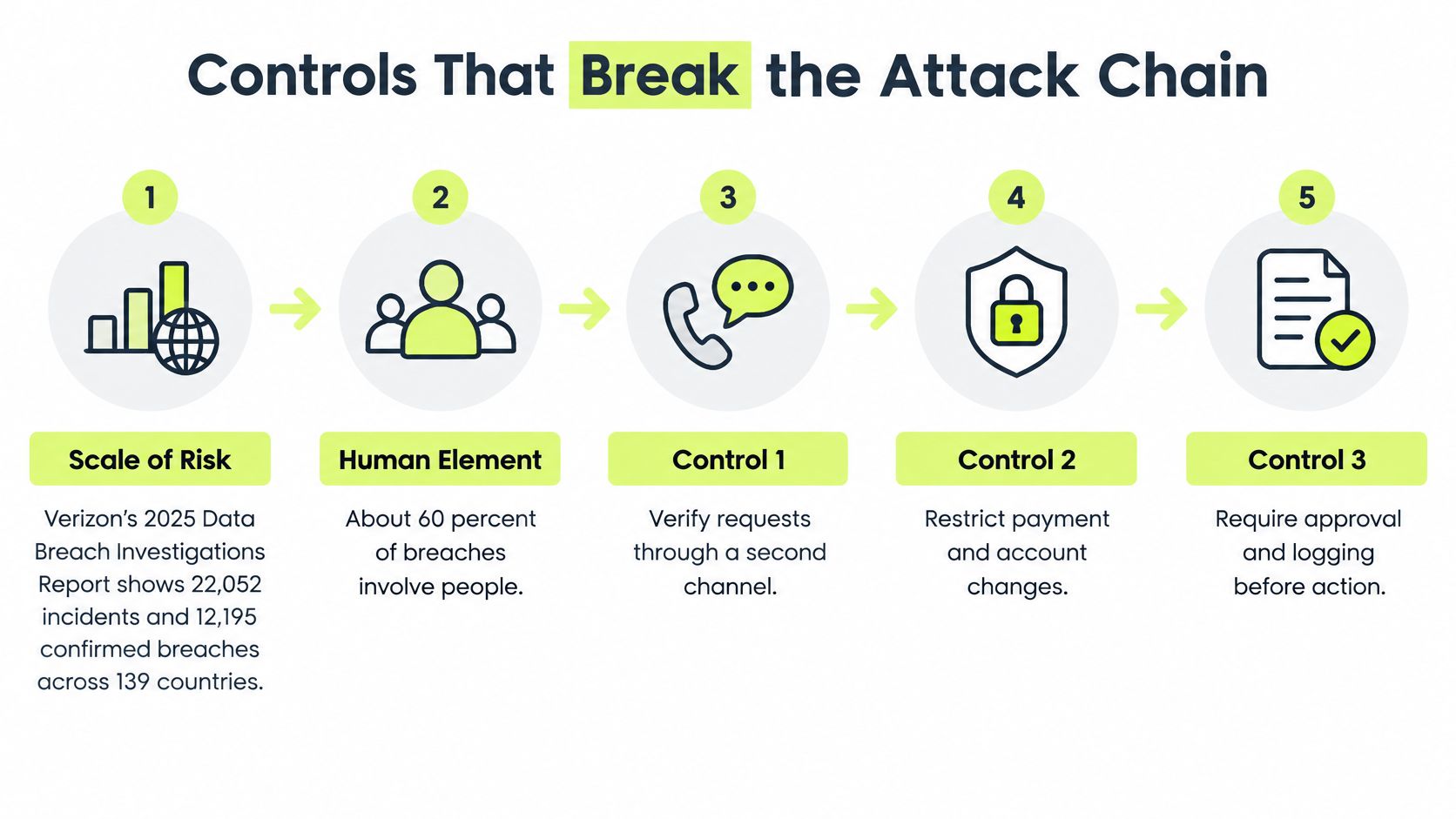
Treat a successful lure as an identity and access event, not a training footnote. Verizon's 2025 Data Breach Investigations Report analyzed 22,052 real-world security incidents, including 12,195 confirmed breaches across 139 countries, and found the human element remained involved in approximately 60% of breaches. Social engineering, system intrusion, and miscellaneous errors together represented about 80% of breaches, and third-party involvement doubled from 15% to 30%, so your checks have to cover vendors as well as employees.
Five Interrupts, in Order
- Detect what you can at delivery: Filter email and messaging for malicious domains and impersonation, and accept that some lures will still arrive. Filtering reduces exposure, it doesn't finish the job. Practical guidance on stopping spoofed email from reaching your team belongs at this first link in the chain.
- Make stolen passwords worth less: Use phishing-resistant multifactor authentication, meaning hardware security keys and passkeys bound to the domain, not SMS or one-time codes a person can be talked into reading aloud. Make it the default for email, SaaS, and privileged accounts. It pairs naturally with disciplined credential storage, and managing company passwords securely covers that supporting habit in practical terms.
- Confirm consequential changes out of band: Payments, bank-detail changes, and privilege changes get verified through a contact already on file, on a channel the requester didn't supply. No exceptions for seniority, because seniority is what gets impersonated.
- Give uncertainty one obvious exit: Every employee needs a single, low-friction way to report a suspicious message, with clear answers on what to report and how fast. State plainly that a false alarm is acceptable, or people will delete things your team needed to see.
- Watch what happens after contact: After a report or a click, monitor for anomalous authentication, revoke the session if needed, and reset credentials fast. A report that nobody acts on teaches people that reporting doesn't matter.
Measure the Interrupts, Not Attendance
Course completion tells you a video played. It tells you nothing about whether step four or five works. Track reporting latency, repeat-failure rates, credential-submission attempts, and remediation by role or business process. Those numbers show you which link in the chain is weak for finance, for executives' assistants, or for new hires, and they tell you where the next exercise should aim.
Technical controls and human checks cover different links in the same chain. Filters can't approve a callback, and a careful employee can't revoke a stolen session alone. Drop either side and you leave a gap exactly where the attacker planned to walk through.
Simulations and Coaching That Raise Reporting
Here's the uncomfortable comparison. A large-scale empirical assessment reported in the Phish Scale study found only 8.3% of phishing emails were reported at baseline, and traditional training increased reporting only modestly, to 9.1%. Interactive training did substantially better, with employees reporting phishing attempts 37% more often than the baseline group and 25% more often than the traditional-training group.
An annual module barely moving reporting shouldn't surprise anyone. Clicking and reporting are different behaviors. Not clicking is passive and private. Reporting is active, slightly social, and starts your response, yet most programs measure the first and assume the second. If you're weighing the evidence on whether phishing simulations actually work, the reporting rate is the number to interrogate, not the click rate alone.
Design Rules That Follow from Those Numbers
- Measure reporting as its own outcome: Track report rate, speed, and accuracy separately from clicks, by role and by channel. A team that clicks rarely but never reports still leaves you blind to the one message that landed.
- Tell people what to report when they're unsure: Uncertainty is the trigger, not certainty. Set the expected speed in plain terms, such as reporting before you finish the task that raised the doubt, so nobody waits for a quieter moment that never comes.
- Reward reports, including false alarms: Thank people publicly and never punish a wrong call. One embarrassed employee who stays silent next time costs more than a hundred harmless reports, because the next message might be genuine.
- Give feedback immediately: After a simulation or a real report, tell the person what it was and what gave it away, right away. Separate safe uncertainty, which you want more of, from a repeated credential submission, which needs coaching and possibly tighter controls.
- Practice where messages arrive: Short recurring scenarios should cover Slack, SMS, QR codes, and voice, not only the corporate inbox. Distributed teams meet suspicious requests everywhere they work, so training confined to email rehearse only part of the job.
In-Slack coaching shows what this looks like day to day. Instead of a portal opened once a year, a person gets a few minutes of questions and corrective feedback inside the same conversation where requests already land, plus brief weekly refreshers that keep the reporting habit warm. The lesson ends, the feedback sticks, and the next real lure meets someone who practiced last week, not last October.
Build a Human Defense You Can Measure
Choose a program you can score, not another annual slideshow. Start with three processes where one persuaded person can do real damage: payment and vendor bank changes, password or MFA resets, and privilege or access approvals. For each one, write the out-of-band check and the report path in a single sentence an employee can remember at 4:45 on a Friday.
Within 30 days, run a realistic simulation against those three processes, and include at least one non-email lure such as a chat message or a QR code. Then track three measures for 90 days: report rate, time to report, and repeat failures by role. Review them with the same seriousness you'd give blocked malware, because they're your evidence that the human layer is working.
Pair the practice with phishing-resistant MFA and callback rules so a single miss doesn't become a transfer or a takeover. For Slack-first, distributed teams, Vigil Security can run this practice inside the chat tool where requests already arrive, using short interactive lessons, phishing campaigns with instant coaching, and weekly refreshers. Employees can use /vigil learn to start the next assigned lesson, /vigil progress to view personal progress, and /vigil report to flag a suspicious message.
Vigil is an employee training and compliance platform, not antivirus, endpoint protection, remote access, or an IT helpdesk.
That boundary keeps expectations honest. You still need your filters, your authentication, and your incident response. What changes is that your people become a measured detection layer instead of an unmeasured hope. Pick your three processes this week, write the one-sentence check for each, and schedule the first simulation. The 90-day numbers will tell you the truth.
Turn phishing and social engineering training into a reporting habit your team keeps with Vigil Security, where short interactive lessons, realistic phishing campaigns with instant Slack coaching, and weekly refreshers run inside the chat tool your distributed team already uses. Pick your three highest-risk processes, run your first simulation within 30 days, track report rate and time to report for 90 days, and walk into your next audit with evidence to show for it.