93% of employees do not complete training, according to a 2025 global study on ethics and compliance program maturity.pdf). The same study found that 94% of surveyed organizations run training regularly, yet only 40% say employees are highly prepared to identify, avoid, and report threats. A green completion bar and a prepared workforce are not the same result.
That gap is why a buying committee should judge compliance training software on behavior change and audit-ready evidence, not on seat price alone. Authoring, integrations, administrator hours, and exit terms determine the true annual cost. Score every vendor on one sheet before the first demo, then ask what an auditor can export and what a simulation can prove.
Evaluation Criteria to Score Every Platform
Use this scorecard before demos so every vendor answers the same questions. A red flag in any row is enough to drop the vendor, even if the demo looks polished.
| Criterion | What to Verify | Red Flag |
|---|---|---|
| Delivery model | Where learners finish training: inside Slack or Teams, an LMS portal, or email | Separate logins that learners skip |
| Integrations | Identity provider, HRIS, Slack or Teams, Vanta, Drata | Manual CSV uploads as the only route |
| Audit evidence | Timestamped completions, pass records, exportable certificates | Screenshots offered as evidence |
| Assessment standards | Published pass threshold, retake rules, version control of question banks | Pass rate with no published threshold |
| Engagement features | Microlearning cadence, pulse quizzes, phishing simulations | One annual module and nothing between cycles |
| Automation | Assignment by role, channel, or team, plus reminders and overdue alerts | Admins assigning each user by hand |
| Reporting | Assigned, started, completed, passed, and overdue views with CSV export | Completion rate as the only metric |
| Pricing clarity | Per-seat rate, minimum, billing term, and add-on fees | Quote-only pricing with no seat definition |
Weight the criteria to the risk you actually carry
These eight criteria are not equal. The 2025 Verizon Data Breach Investigations Report analyzed 22,052 security incidents, including 12,195 confirmed breaches. Human involvement appeared in approximately 60% of breaches. Credential abuse was the leading initial access vector at 22%, ahead of vulnerability exploitation at 20%. Third-party involvement doubled from 15% to 30%.
A platform that trains employees and ignores contractors, vendors, and shared credentials leaves that third-party share untouched. Credential hygiene and a clear way to report a suspicious message belong on the scorecard for that reason.
Practical rule: Give delivery and GRC sync the heaviest weight when people already live in chat and evidence has to land in Vanta or Drata. Give assessment standards and record retention the heaviest weight when an examiner will ask for the question bank and the pass rule.
A 40-person startup chasing SOC 2 should weight Slack or Teams delivery and a Vanta or Drata sync more heavily than a giant catalog. A regulated bank should weight published pass thresholds, long retention, and long-form course tracking more heavily than chat-native convenience.
Score each vendor 1 to 5 on every criterion, multiply by the weight you assigned, and keep the sheet. That file is documentation of the selection process, not a scratch pad you throw away after the demo.
Audit Evidence Auditors Accept and How to Get It
Attendance answers only the first question an examiner asks. NIST's guidance on building a cybersecurity and privacy learning program frames evaluation as a lifecycle: implementation, effectiveness, efficiency, and longitudinal outcomes. A completion certificate speaks to implementation. It does not show whether people changed how they work.
NIST treats longitudinal behavior as a real measure, including the share of participants who changed a workplace behavior, such as correctly reporting a phishing message. Useful software metrics in that model include training reach, assessment performance, phishing-test response, reports of suspected phishing, timely software updates, multifactor-authentication adoption, and adherence to password policies.
The pack an auditor or executive will request
Build the export before the audit week, not during it.
- Policy acknowledgments: Name, policy version, and a timestamp, not a shared inbox screenshot.
- Completion and pass records: Tied to a published threshold, such as 80%, with retake rules written down.
- Phishing-report rates: Reports separated from clicks and from credential submissions.
- Repeat-error rates by role: The same mistake showing up again in finance or in admin accounts.
- Manager observations: A short note when a control failed in real work, not only in a quiz.
The same safety logic shows up outside cyber. Practical safety insights from TP Training treat workplace safety training as something you judge by whether people follow the procedure, not by whether they sat through the session.
Five statuses, not one percentage
Configure the dashboard so it separates assigned, started, completed, passed, and overdue. A single completion percentage hides the overdue tail, and that tail is what auditors sample. Retain timestamped exports and certificate records. Compare behavior metrics with a pre-training baseline and with later periods so you can show change rather than attendance.
Completion and a stated intent to report are leading indicators. Fewer incidents are lagging, and they are hard to attribute to training alone. Claim correlation. Do not claim that the course caused the drop.
Check whether records sync into Vanta or Drata control mapping, or whether someone still exports a CSV and maps controls by hand. The mapping standard you are chasing, including how training evidence sits next to other controls, is laid out in this guide to security compliance standards.

Ask every finalist three questions in writing. What export formats do you support, and can we pull them without a support ticket? How long do you retain timestamps, scores, and certificates? Is each record versioned to the policy version that was live on that date?
Microlearning and Phishing Simulation Benchmarks That Matter
Click rate is a weak success metric. A click shows exposure. It says nothing about whether the person reported the message, and reporting is the behavior you want more of.
A large global dataset reported by KnowBe4 put the average phish-prone percentage at 33.2% before training, 20.1% after 90 days, and 4.2% after one year of continuous training and simulated phishing, a drop the release reports at 79% after that first year. Treat it as a measurement frame worth copying for your own program.
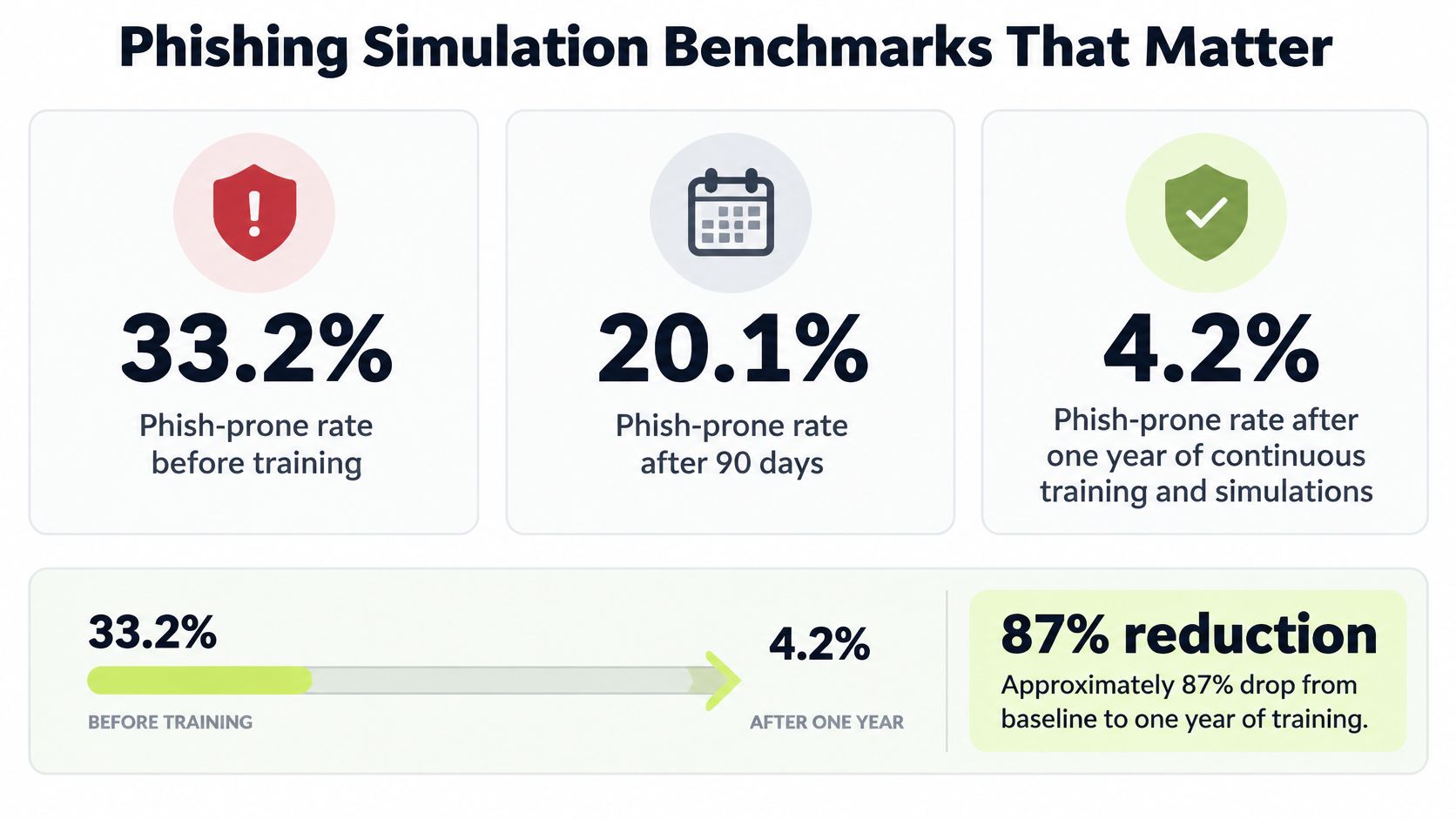
| Stage | Average phish-prone percentage | Change from baseline |
|---|---|---|
| Before training | 33.2% | Baseline |
| After 90 days | 20.1% | About 39% lower |
| After one year of continuous training and simulations | 4.2% | Study reports a 79% drop |
What the software has to preserve
Run a controlled baseline simulation before any training touches the cohort. Repeat at about 90 days, then track susceptibility quarterly or annually by department, role, geography, and risk tier. The platform should keep campaign-level denominators so a percentage always resolves to a count of delivered messages, split clicks, credential submissions, and reports, and attach corrective coaching to the individual event so the fix lands where the failure happened.
Reporting rate is the stronger signal. A falling click rate with a flat report rate means people got quieter, not safer.
Compare a cohort on recurring microlearning and simulations with a cohort that only sees an annual module. That comparison tells you whether frequency, timing, and role relevance drive the change, or whether enrollment alone does. When you design the drill itself, these phishing simulation best practices cover how to keep the exercise fair and measurable.
Cadence beats length. Weekly refreshers of 30 to 60 seconds, plus lessons around four minutes, create repeated exposure without a portal login. Pulse quizzes after a policy change check that the new rule landed. Set a target reduction against your own baseline, and put a 90-day review date on the calendar before you sign.
Pricing Models and the Real Annual Cost
The fast check is price per seat times seats times twelve. Vigil Security lists $2 per seat per month, billed annually with a defined minimum, so 200 seats put the license line at $4,800 a year before that floor applies. The committee number should be the license plus the minimum, setup work, administrator time, and any provider usage. This 200-seat example prices only the license line; the other rows depend on your identity stack, evidence stack, and how much custom content you need.
| Cost Line | What Drives It | Example at 200 Seats |
|---|---|---|
| License | Active users billed per seat | $4,800 a year at $2 per seat per month |
| Minimum commitment | Vendor-set dollar floor | No public value in the list price; request the floor amount in the quote |
| Content authoring | Custom policy and role-specific lessons | One-time internal authoring sprint, plus any vendor fee named in the order form |
| Integration setup | Vanta, Drata, and identity provider connections | Usually one-time admin hours; add any vendor setup fee if quoted |
| Administrator time | Assignments, exceptions, audit requests | Planning estimate of about 2 to 4 hours a week |
| AI personalization (BYOK) | Your own OpenAI or Anthropic usage | Billed by the provider on your key, based on tokens used |
| Phishing simulations | Campaign volume and recipient count | Quote must state whether campaigns are included or sold as an add-on |
Where the quiet costs sit
Custom lessons for policies that exist only inside your company are content work, even when no vendor fee appears. Connecting Vanta, Drata, and your identity provider is usually internal time, sometimes plus a vendor fee. If you run bring-your-own-key personalization, OpenAI or Anthropic bills your key. That usage is yours to forecast, separate from the training invoice.
Administrator time is the line small teams underprice. For a 200-seat program, plan on about two to four hours a week for assignments, exceptions, and audit pulls. Treat that range as a planning estimate and push it to the low end with role-based assignment, scheduled reminders, and evidence sync instead of manual exports.
The expensive outcome is paying a low seat price and still assembling proof by hand at audit time. Before you sign, lock four contract points. Do seats count active users or every account in the directory? How are mid-term additions billed? What happens to price at renewal? On exit, can you export timestamps, scores, and certificates without a paid extension? Put the answers in the order form, not in a sales call.
How to Roll Out Compliance Training Inside Slack
In NAVEX's 2025 risk and compliance benchmarking, only 43% of knowledgeable respondents rated their organization very good or excellent at offering shorter, targeted training, even though 76% reported strong tailoring for high-risk and control employees. Roughly half said they use training results to measure policy-management effectiveness. A Slack rollout should close both gaps: lessons sized to the role, and records an auditor can work from.
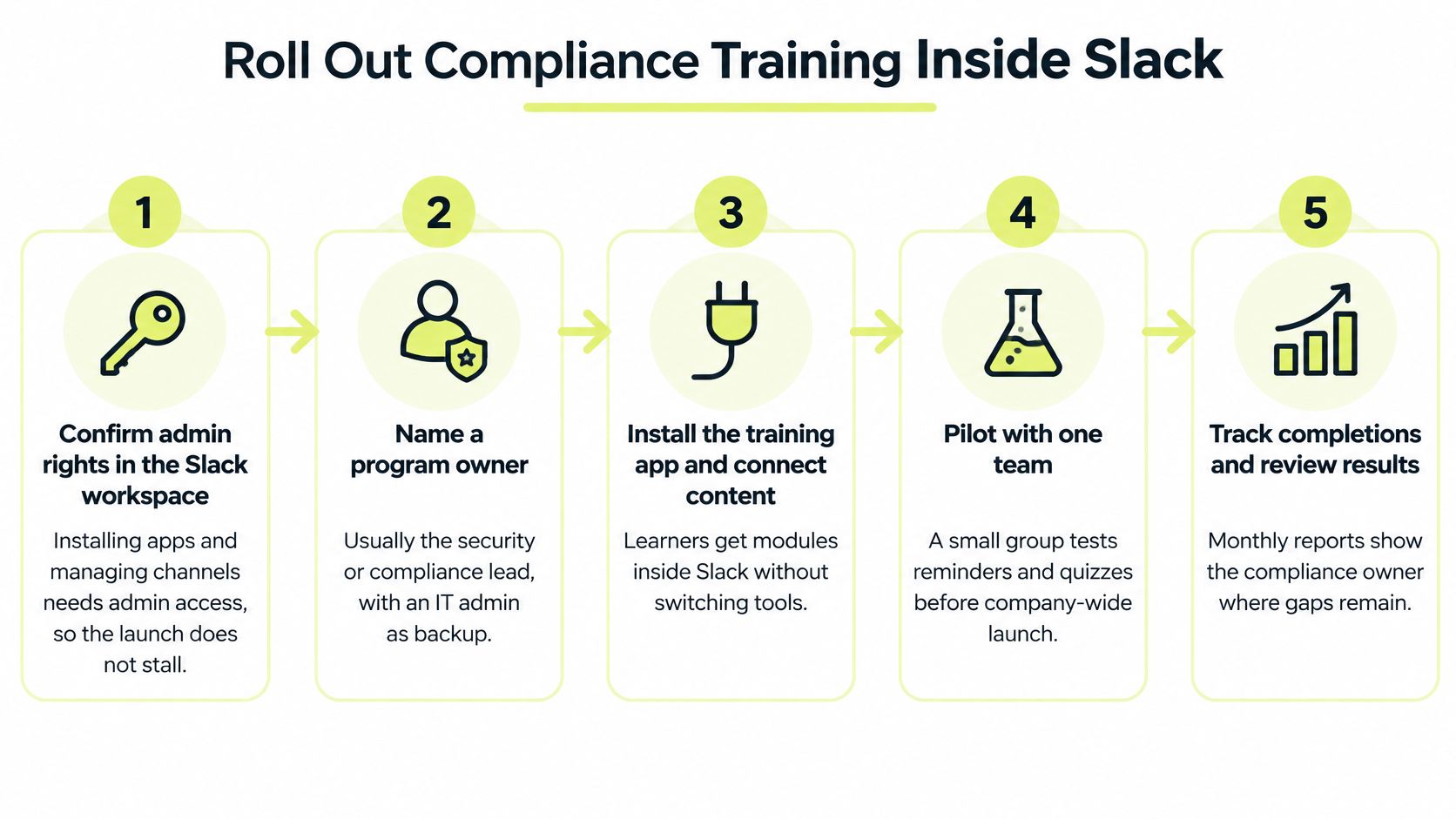
The install takes minutes. Role mapping is what fails audits later.
- Confirm admin rights and name an owner. App installs and channel management need a workspace admin. Name the security or compliance lead as program owner, with an IT admin as backup, so questions do not die in a shared channel.
- Install the app and connect identity or HRIS. Installation is quick, but role mapping takes longer, and it is worth the time because assignments should follow job role instead of a hand-built list. Hand-built lists go stale the first time someone changes teams.
- Build role-based paths. Engineering, finance, customer support, and managers each need a path, with a stated pass mark such as 80% and a separate high-risk path for administrators. How to split those paths is covered in this guide to role-based security awareness training.
- Connect Vanta or Drata. Completions and certificates should land on the control they support. Manual mapping after launch recreates the spreadsheet you were trying to leave.
- Set the cadence. Weekly microlearning, a pulse quiz after each policy change, and a quarterly phishing simulation. Annual-only delivery leaves long gaps where habits fade, so recurring touchpoints between cycles matter.
- Pilot 20 to 30 people in one channel for two weeks. Watch reminders, overdue alerts, and whether questions reach a named escalation channel. Sustaining organisational change with Ekipa is a useful companion here: a tool install does not stick unless owners, feedback, and reinforcement are designed on purpose.
- Launch, then review at 90 days against your baseline. Compare overdue volume and quiz scores against the 80% pass mark with what the pilot produced. Versioned records should show which policy version applied to which role on each date, because that pairing is what separates audit-ready evidence from a completion dashboard.
Failures the pilot should catch
Test these before the workspace-wide send.
- Wrong channel: Reminders landing where the team does not read them.
- Bad role map: Administrators sent down the engineering path.
- Early alerts: Overdue notices firing before the due date.
- Thin certificates: Completions missing the policy version.
- No escalation: Employee questions with nobody reachable.
During the same two weeks, test AI-related lessons, multilingual delivery, and accessibility with two or three people from the pilot group. Emerging risks such as generative-AI data leakage, deepfakes, shadow AI, and role-specific privacy duties belong in short lessons for the people who face them, delivered on the same recurring cadence as the rest of the program.
Match Your Delivery Model and Make the Call
Cloud delivery no longer separates vendors. Compliance training is now usually hosted, online, and delivered through a browser or chat client, so the decisive choice is where lessons appear, which behavior changes you can evidence, and how much work sits outside the seat price.
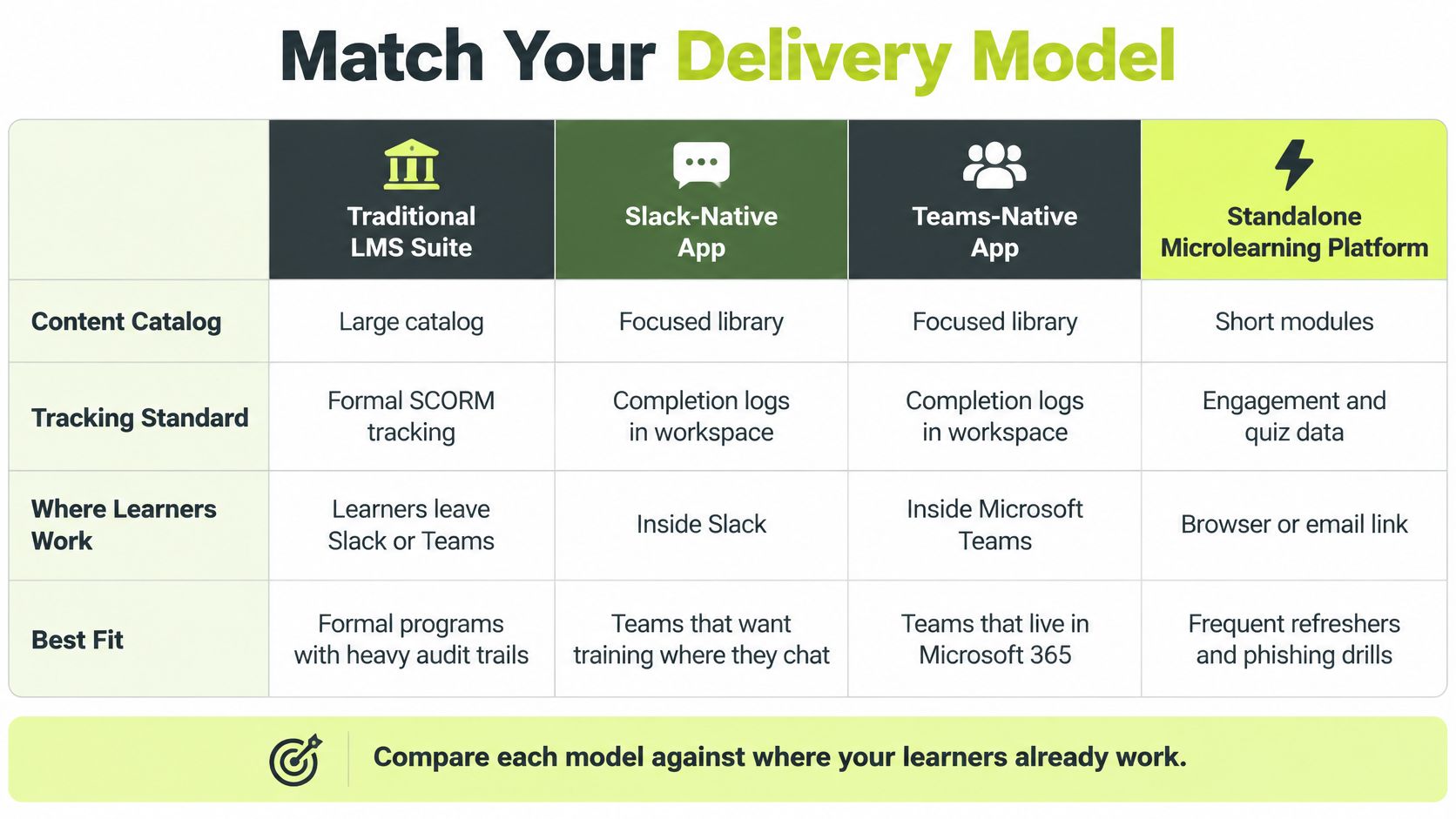
The four models differ less by hosting and more by the behavior loop and the evidence path.
| Delivery Model | Strongest For | Main Trade-Off | Best Fit |
|---|---|---|---|
| Traditional LMS suite | Large course catalogs and formal SCORM tracking | Learners leave chat tools; heavier admin setup | Regulated firms with long, formal courses |
| Security-awareness platform | Phishing simulations and recurring refreshers | Often a separate portal login | Security teams running a dedicated awareness program |
| Slack-native platform | Short lessons, quizzes, and reminders in DMs and App Home | Limited to Slack workspaces; not for Teams-only firms | Slack-first, distributed teams |
| GRC-bundled training | Training tied to Vanta or Drata controls and evidence | Content depth may trail specialist tools | Small GRC teams wanting one dashboard |
Four situations, four verdicts
Slack-first and already on Vanta or Drata. Choose a Slack-native platform. Lessons, App Home progress, and a slash command keep people out of a second login, and completions can sync to the control map. Ask to see certificates, overdue status, CSV export, and the exact fields pushed to Vanta or Drata before you count that as audit-ready. A Teams-only firm should not force this model.
Teams-first, regulated, and heavy on formal courses. Choose an LMS suite with a Teams integration. You are paying for SCORM history, long retention, and a catalog an examiner already recognizes. The trade-off is setup time and the extra click out of chat. If the courses need custom video, create training videos with Wideo and drop the finished modules into that LMS rather than rebuilding them inside chat.
Small GRC team, almost no admin time. Start with training bundled in Vanta or Drata. Evidence stays in one dashboard. Add a simulation tool only if phishing is a material risk for you. Thin content is acceptable until the risk says otherwise, but confirm how records leave the bundle if you later move to a specialist tool.
Mature security team with a real awareness program. A dedicated security-awareness platform earns its cost when simulations, coaching, and quarterly reporting are the job. Accept the portal login if the behavior data is better than what chat-native tools give you. Make the committee compare reported phish rate, repeat-clicker coaching, completion by role, and time-to-remediation, not a prettier dashboard.
Choose by where people already work, by which behavior changes you can show, and by what the auditor will accept. Feature count is a weak tie-breaker.
Shortlist three vendors on the weighted scorecard. Run the two-week pilot from the rollout sequence, then price the whole operating model: seat count, defined minimum, billing term, admin effort, second-portal drag, simulation add-ons, and export terms. Before anyone signs, get the minimum, the seat definition, and the exit export terms in writing.
Vigil Security delivers short security and compliance lessons, pulse checks, and phishing coaching inside Slack, and it syncs completion evidence to Vanta and Drata so a buying committee can show more than a completion rate. If that matches how your team already works, review the workflows and the audit exports at Vigil Security before you lock the shortlist.